
Total Reflexology 3D

Total Reflexology 3D

Education

| GraphicViZion

Play on PC with BlueStacks or from our cloud

  • Overview
  • How to Download

Page Modified On: October 23, 2025

Run Total Reflexology 3D on PC or Mac

Multitask effortlessly on your PC or Mac as you try out Total Reflexology 3D, a Education app by GraphicViZion on BlueStacks.

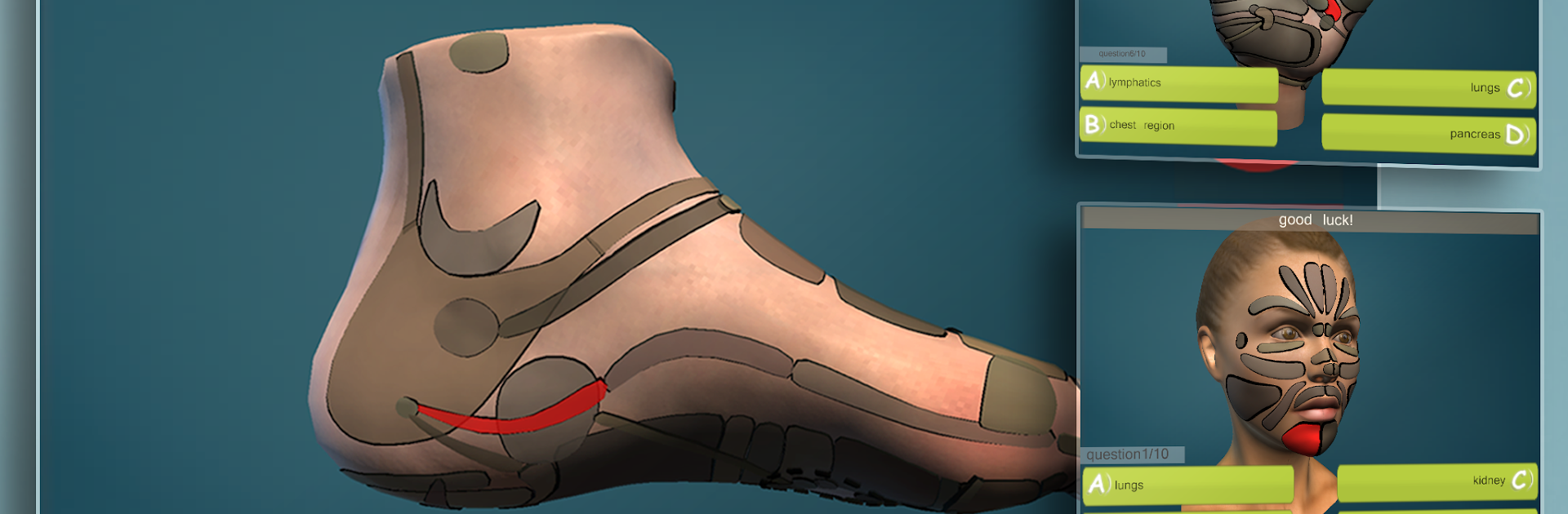
Total Reflexology 3D feels like a hands-on atlas for reflex zones. It covers feet, hands, ears, and face, and the whole thing runs in full 3D that can be spun around, zoomed, and poked at to see what is what. On a PC with BlueStacks, the mouse wheel and bigger screen make it easy to glide around the model and read labels without squinting. There are also clean 2D illustrations when a flat chart is just quicker to read, so it does not lock anyone into only one view.

What stands out is how direct it is. Type a symptom or pick a body system, and it highlights the matching zones so users can see where to work. Tap a zone to get details. There are quick quizzes too, so it turns studying into a small challenge rather than just scrolling through charts. It is not trying to replace a full textbook, and it says so, but it fills that gap when someone needs a visual reference fast. Students or anyone who learns better by seeing and moving things around will probably get alot from it. The 3D model helps make the relationships between zones and anatomy click in a way that flipping pages rarely does. Content has been checked with a proper training center, which gives it a trustworthy feel without being all formal. No fluff, just a solid, interactive guide that is more fun to explore on a desktop where the controls feel natural.

Eager to take your app experience to the next level? Start right away by downloading BlueStacks on your PC or Mac.


How to Download and Run Total Reflexology 3D on PC or Mac

  • Download and install BlueStacks on your PC or Mac

  • Complete Google sign-in to access the Play Store, or do it later

  • Look for Total Reflexology 3D in the search bar at the top right corner

  • Click to install Total Reflexology 3D from the search results

  • Complete Google sign-in (if you skipped step 2) to install Total Reflexology 3D

  • Click the Total Reflexology 3D icon on the home screen to start playing

video
Watch Video

Minimum System Requirements

With BlueStacks 5, you can get started on a PC that fulfills the following requirements.

  • Operating System

    Microsoft Windows 7 or above, macOS 11 (Big Sur) or above

  • Processor

    Intel, AMD or Apple Silicon Processor

  • RAM

    at least 4GB

  • HDD

    10GB Free Disk Space

Note:

* You must be an Administrator on your PC. Up to date graphics drivers from Microsoft or the chipset vendor.

Total Reflexology 3D - FAQs

  • How to Run Total Reflexology 3D on Windows PC & Mac?

    Run Total Reflexology 3D on your PC or Mac by following these simple steps.

    • Click on ‘Download Total Reflexology 3D on PC’ to download BlueStacks
    • Install it and log-in to Google Play Store
    • Launch and run the app.
  • Why is BlueStacks the fastest and safest platform to play games on PC?

    BlueStacks respects your privacy and is always safe and secure to use. It does not carry any malware, spyware, or any sort of additional software that could harm your PC.

    It is engineered to optimize speed and performance for a seamless gaming experience.

  • What are Total Reflexology 3D PC requirements?

    Minimum requirement to run Total Reflexology 3D on your PC

    • OS: Microsoft Windows 7 and above:
    • Processor: Intel or AMD Processor:
    • RAM: Your PC must have at least 2GB of RAM. (Note that having 2GB or more disk space is not a substitute for RAM):
    • HDD: 5GB Free Disk Space.
    • You must be an Administrator on your PC.



