120 Tình Huống Mô Phỏng GPLX

120 Tình Huống Mô Phỏng GPLX

Educational

| iClick Software

Play on PC with BlueStacks or from our cloud

  • Overview
  • Game Features
  • How to Play

Page Modified On: December 26, 2025

Play 120 Tình Huống Mô Phỏng GPLX on PC or Mac

120 Tình Huống Mô Phỏng GPLX brings the Educational genre to life, and throws up exciting challenges for gamers. Developed by iClick Software, this Android game is best experienced on BlueStacks, the World’s #1 app player for PC and Mac users.

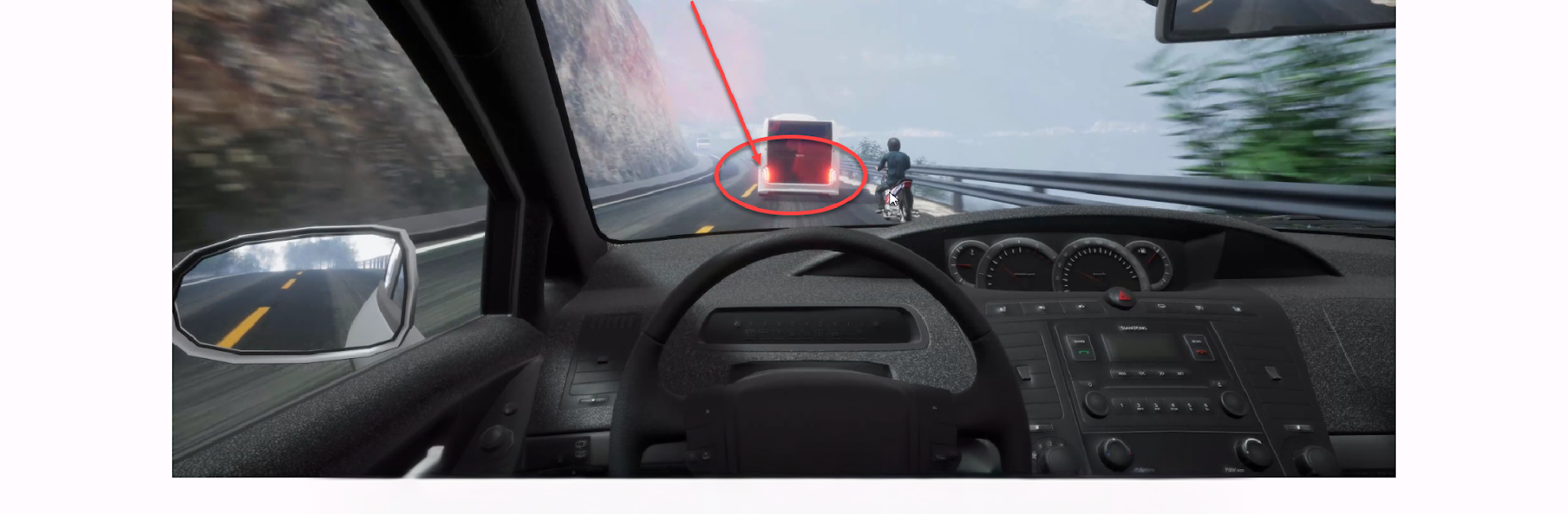
120 Tình Huống Mô Phỏng GPLX is basically the Vietnamese hazard perception part of the driving test turned into a practice app, and it treats those 120 traffic situations like short, tense mini challenges. A clip plays, something risky is about to happen, and the player needs to pick the right moment or the right situation. It is modeled after the official testing software, so the layout is simple, clean, and straight to the point. There is a study vibe here, but it still feels gamey because of the timer, the score, and that little rush when the guess lands just right. Running it on PC with BlueStacks helps a lot since the bigger screen makes it easier to spot a scooter slipping in from the blind side or a pedestrian stepping off the curb, and clicking with a mouse feels more precise than tapping a small phone screen.

The app splits nicely between practice and mock exam. Practice mode lets players replay a clip, check the solution, and learn why that exact second counts. The mock exam strings scenarios together and pushes focus, so it feels close to how the real test hits. It covers a lot of everyday stuff too, like right of way at messy intersections, lane changes, rain or night visibility, and those surprise U-turns. The explanations are straightforward and help turn guesswork into patterns, and after a few runs it becomes less about luck and more about reading the road like a driver should. Key mapping on BlueStacks can make quick responses easier, although tapping works fine if someone just wants to run a few clips and move on.

Ready to top the leaderboard? We bet you do. Let precise controls and sharp visuals optimized on BlueStacks lead you to victory.


Game Features

Enhancements

  • Macros
  • Multi Instance
  • Multi Instance Sync
  • Script
  • Enhancements
Macros

Macros

Automate the predictable in 120 Tình Huống Mô Phỏng GPLX and transform your gameplay with Macros. Get access to inventive Macros in the BlueStacks Macro Community
Multi Instance

Multi Instance

Play 120 Tình Huống Mô Phỏng GPLX on one window. And chat with your friend on the other. Press CTRL + Shift + 8 to open the Multi-Instance Manager. And start creating fresh instances or clone an existing one.
Multi Instance Sync

Multi Instance Sync

Play 120 Tình Huống Mô Phỏng GPLX with the power of Multi-Instance Sync. Replicate what you are doing on the main instance on all other instances. Level up faster, play more.
Script

Script

Script your way to gaming glory in 120 Tình Huống Mô Phỏng GPLX with BlueStacks Script. Write and run a set of commands to automate repeated tasks. Trigger the command by assigning it to any key.
Read More

How to Download and Play 120 Tình Huống Mô Phỏng GPLX on PC or Mac

  • Download and install BlueStacks on your PC or Mac

  • Complete Google sign-in to access the Play Store, or do it later

  • Look for 120 Tình Huống Mô Phỏng GPLX in the search bar at the top right corner

  • Click to install 120 Tình Huống Mô Phỏng GPLX from the search results

  • Complete Google sign-in (if you skipped step 2) to install 120 Tình Huống Mô Phỏng GPLX

  • Click the 120 Tình Huống Mô Phỏng GPLX icon on the home screen to start playing

video
Watch Video

Minimum System Requirements

With BlueStacks 5, you can get started on a PC that fulfills the following requirements.

  • Operating System

    Microsoft Windows 7 or above, macOS 11 (Big Sur) or above

  • Processor

    Intel, AMD or Apple Silicon Processor

  • RAM

    at least 4GB

  • HDD

    10GB Free Disk Space

Note:

* You must be an Administrator on your PC. Up to date graphics drivers from Microsoft or the chipset vendor.

120 Tình Huống Mô Phỏng GPLX - FAQs

  • How to play 120 Tình Huống Mô Phỏng GPLX on Windows PC & Mac?

    Play 120 Tình Huống Mô Phỏng GPLX on your PC or Mac by following these simple steps.

    • Click on 'Play 120 Tình Huống Mô Phỏng GPLX on PC’ to download BlueStacks
    • Install it and log-in to Google Play Store
    • Launch and play the game.
  • Why is BlueStacks the fastest and safest platform to play games on PC?

    BlueStacks respects your privacy and is always safe and secure to use. It does not carry any malware, spyware, or any sort of additional software that could harm your PC.

    It is engineered to optimize speed and performance for a seamless gaming experience.

  • What are 120 Tình Huống Mô Phỏng GPLX PC requirements?

    Minimum requirement to run 120 Tình Huống Mô Phỏng GPLX on your PC

    • OS: Microsoft Windows 7 or above MacOS 11 (Big Sur) or above
    • Processor: Intel, AMD or Apple Silicon Processor
    • RAM: Your PC must have at least 4GB of RAM. (Note that having 4GB or more disk space is not a substitute for RAM)
    • HDD: 10GB Free Disk Space.
    • You must be an Administrator on your PC.