Cocobi World 2 -Kids Game Play

Cocobi World 2 -Kids Game Play

Educational

| KIGLE

Play on PC with BlueStacks or from our cloud

  • Overview
  • Game Features
  • How to Play

Page Modified On: September 14, 2026

Play Cocobi World 2 -Kids Game Play on PC or Mac

Bring your A-game to Cocobi World 2 -Kids Game Play, the Educational game sensation from KIGLE. Give your gameplay the much-needed boost with precise game controls, high FPS graphics, and top-tier features on your PC or Mac with BlueStacks.

About the Game

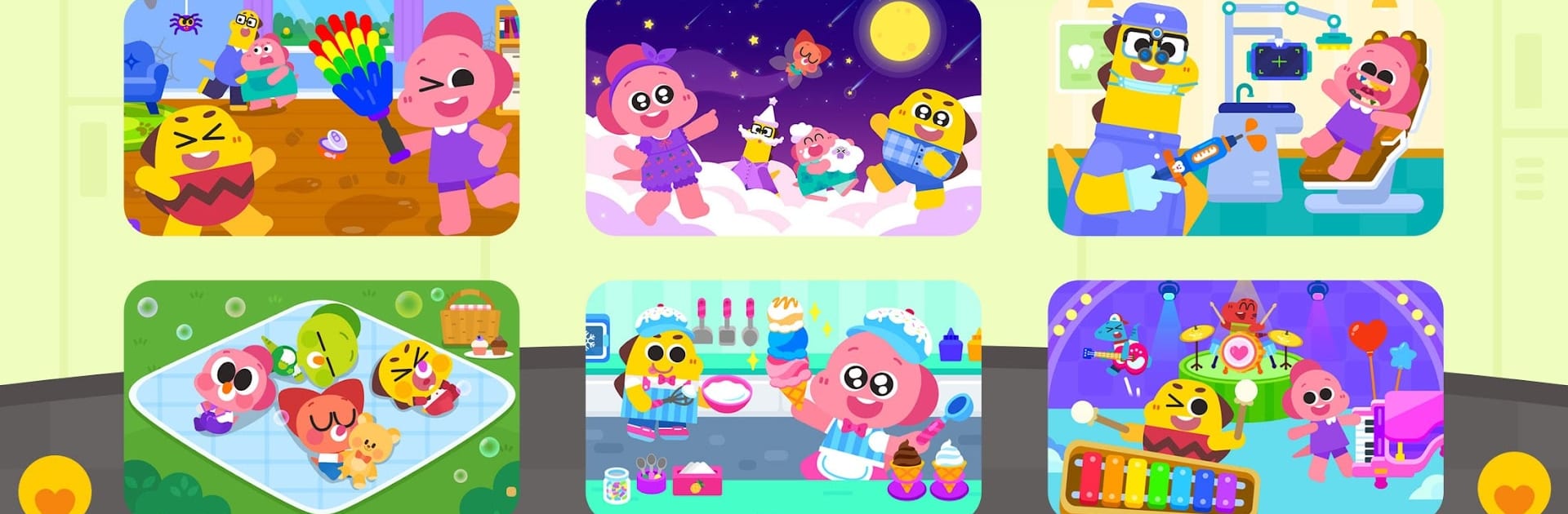
Cocobi World 2 -Kids Game Play is an Educational playground packed with bite-size adventures starring the dino duo, Coco and Lobi. Kids can jump between cheerful role-plays—like caring for babies, tidying a messy house, or running an ice cream truck—and pick up real-life habits along the way. Prefer a bigger screen? It runs smoothly on PC with BlueStacks, too.

Game Features

  • Friendly Role-Play Jobs: Try on fun roles—dentist, ice cream maker, babysitter, and cleanup helper—each with simple steps and feel-good goals.
  • House Cleanup Fun: Sort clutter, sweep up crumbs, and restore shine with Coco while turning chores into quick, satisfying wins.
  • Gentle Bedtime Routine: Slow the pace with calm nighttime activities that make “getting sleepy” feel cozy and familiar.
  • Baby Care Moments: Feed, bathe, and soothe adorable babies to practice empathy, patience, and responsibility.
  • Dentist Time, Made Friendly: Brush, polish, and treat teeth using kid-safe tools that show how smiles stay healthy.
  • Ice Cream Truck Crafting: Mix flavors, stack toppings, and serve cool treats to keep customers happy on a hot day.
  • Make Music Your Way: Tap into instruments, play with rhythms, and build cheerful tunes in a low-pressure music room.
  • Meet Coco and Lobi: Explore a playful dinosaur universe guided by two lovable pals who cheer kids on at every step.
  • All-in-One Hub: Six Cocobi experiences live under one roof, so it’s easy to switch activities without hopping between apps.
  • Easy for Shared Play: Simple controls and short activities make it great for quick sessions, side-by-side play, or family guidance.

Ready to top the leaderboard? We bet you do. Let precise controls and sharp visuals optimized on BlueStacks lead you to victory.


Game Features

Enhancements

  • Macros
  • Multi Instance
  • Multi Instance Sync
  • Script
  • Enhancements
Macros

Macros

Automate the predictable in Cocobi World 2 -Kids Game Play and transform your gameplay with Macros. Get access to inventive Macros in the BlueStacks Macro Community
Multi Instance

Multi Instance

Play Cocobi World 2 -Kids Game Play on one window. And chat with your friend on the other. Press CTRL + Shift + 8 to open the Multi-Instance Manager. And start creating fresh instances or clone an existing one.
Multi Instance Sync

Multi Instance Sync

Play Cocobi World 2 -Kids Game Play with the power of Multi-Instance Sync. Replicate what you are doing on the main instance on all other instances. Level up faster, play more.
Script

Script

Script your way to gaming glory in Cocobi World 2 -Kids Game Play with BlueStacks Script. Write and run a set of commands to automate repeated tasks. Trigger the command by assigning it to any key.
Read More

How to Download and Play Cocobi World 2 -Kids Game Play on PC or Mac

  • Download and install BlueStacks on your PC or Mac

  • Complete Google sign-in to access the Play Store, or do it later

  • Look for Cocobi World 2 -Kids Game Play in the search bar at the top right corner

  • Click to install Cocobi World 2 -Kids Game Play from the search results

  • Complete Google sign-in (if you skipped step 2) to install Cocobi World 2 -Kids Game Play

  • Click the Cocobi World 2 -Kids Game Play icon on the home screen to start playing

video
Watch Video

Minimum System Requirements

With BlueStacks 5, you can get started on a PC that fulfills the following requirements.

  • Operating System

    Microsoft Windows 7 or above, macOS 11 (Big Sur) or above

  • Processor

    Intel, AMD or Apple Silicon Processor

  • RAM

    at least 4GB

  • HDD

    10GB Free Disk Space

Note:

* You must be an Administrator on your PC. Up to date graphics drivers from Microsoft or the chipset vendor.

Cocobi World 2 -Kids Game Play - FAQs

  • How to play Cocobi World 2 -Kids Game Play on Windows PC & Mac?

    Play Cocobi World 2 -Kids Game Play on your PC or Mac by following these simple steps.

    • Click on 'Play Cocobi World 2 -Kids Game Play on PC’ to download BlueStacks
    • Install it and log-in to Google Play Store
    • Launch and play the game.
  • Why is BlueStacks the fastest and safest platform to play games on PC?

    BlueStacks respects your privacy and is always safe and secure to use. It does not carry any malware, spyware, or any sort of additional software that could harm your PC.

    It is engineered to optimize speed and performance for a seamless gaming experience.

  • What are Cocobi World 2 -Kids Game Play PC requirements?

    Minimum requirement to run Cocobi World 2 -Kids Game Play on your PC

    • OS: Microsoft Windows 7 or above MacOS 11 (Big Sur) or above
    • Processor: Intel, AMD or Apple Silicon Processor
    • RAM: Your PC must have at least 4GB of RAM. (Note that having 4GB or more disk space is not a substitute for RAM)
    • HDD: 10GB Free Disk Space.
    • You must be an Administrator on your PC.