Cute Drawing : Anime Color Fan

Cute Drawing : Anime Color Fan

Educational

| JoyCraze

Play on PC with BlueStacks or from our cloud

  • Overview
  • Game Features
  • How to Play

Page Modified On: January 06, 2026

Play Cute Drawing : Anime Color Fan on PC or Mac

Explore a whole new adventure with Cute Drawing : Anime Color Fan, a Educational game created by JoyCraze. Experience great gameplay with BlueStacks, the most popular gaming platform to play Android games on your PC or Mac.

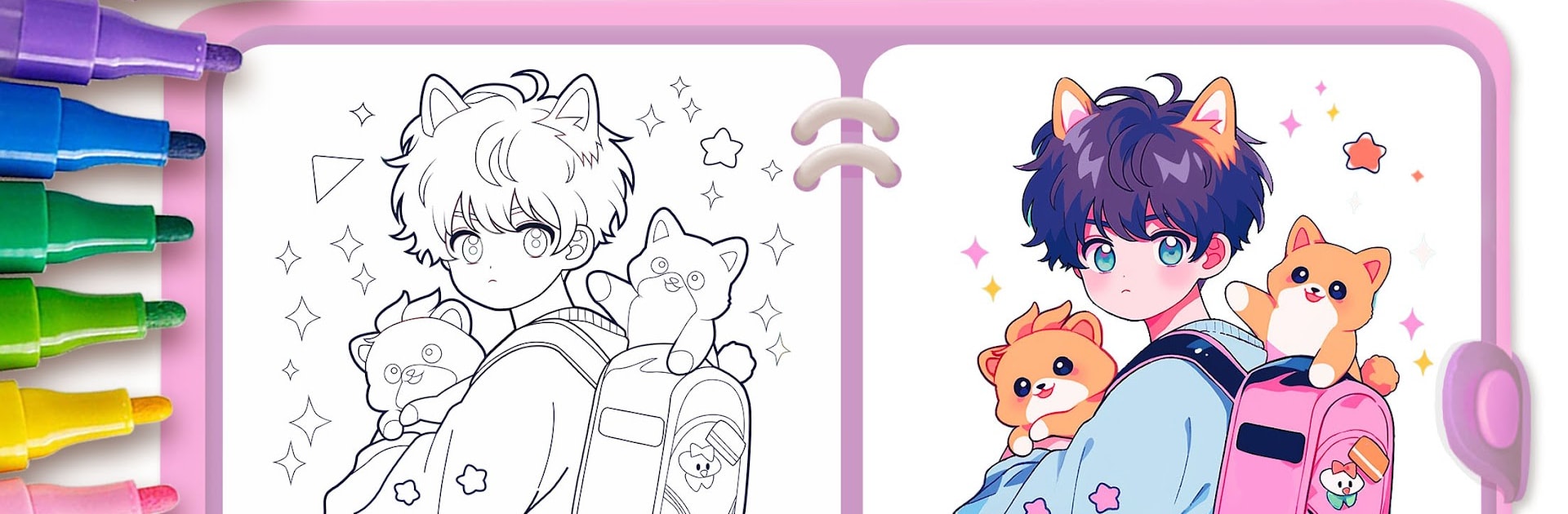
Cute Drawing: Anime Color Fan is a chill coloring and doodling game with a big anime vibe. It is mainly aimed at kids, but it works as a relaxing art app for anyone who likes cute characters. On PC with BlueStacks it feels like flipping through a fat digital coloring book, and the bigger screen makes staying inside lines way easier. There are loads of pages to pick from, mostly manga and chibi style stuff. Think tiny Q version avatars, animals, flower fairies, a bunch of ancient style outfits with an oriental touch, and some goth sweethearts that lean a bit Halloween. Some pages are super simple and others have more tiny details, so it scales well for different ages.

What stands out is the toolbox. There are tons of color sets, including gradients and glitter, plus patterned stickers, so filling a page does not feel samey. The layering feature adds a soft 3D look that makes flat colors pop without much effort. Undo and Clear All keep mistakes from turning into meltdowns. It supports multiple canvases so someone can color the same picture a few different ways and save every version. Finished art saves cleanly, and sharing with friends is easy later. New images roll in often, and there are step by step bits that gently nudge beginners toward drawing anime on their own. No timers, no pressure, just a calm creative loop that lets kids explore color and line at their pace. With a mouse on BlueStacks, coloring feels precise, zoom is smooth, and the lines stay sharp, which helps the final pictures look way better than expected.

Start your journey now. Download the game on BlueStacks, invite your friends, and march on a new adventure.


Game Features

Enhancements

  • Macros
  • Multi Instance
  • Multi Instance Sync
  • Script
  • Enhancements
Macros

Macros

Automate the predictable in Cute Drawing : Anime Color Fan and transform your gameplay with Macros. Get access to inventive Macros in the BlueStacks Macro Community
Multi Instance

Multi Instance

Play Cute Drawing : Anime Color Fan on one window. And chat with your friend on the other. Press CTRL + Shift + 8 to open the Multi-Instance Manager. And start creating fresh instances or clone an existing one.
Multi Instance Sync

Multi Instance Sync

Play Cute Drawing : Anime Color Fan with the power of Multi-Instance Sync. Replicate what you are doing on the main instance on all other instances. Level up faster, play more.
Script

Script

Script your way to gaming glory in Cute Drawing : Anime Color Fan with BlueStacks Script. Write and run a set of commands to automate repeated tasks. Trigger the command by assigning it to any key.
Read More

How to Download and Play Cute Drawing : Anime Color Fan on PC or Mac

  • Download and install BlueStacks on your PC or Mac

  • Complete Google sign-in to access the Play Store, or do it later

  • Look for Cute Drawing : Anime Color Fan in the search bar at the top right corner

  • Click to install Cute Drawing : Anime Color Fan from the search results

  • Complete Google sign-in (if you skipped step 2) to install Cute Drawing : Anime Color Fan

  • Click the Cute Drawing : Anime Color Fan icon on the home screen to start playing

video
Watch Video

Minimum System Requirements

With BlueStacks 5, you can get started on a PC that fulfills the following requirements.

  • Operating System

    Microsoft Windows 7 or above, macOS 11 (Big Sur) or above

  • Processor

    Intel, AMD or Apple Silicon Processor

  • RAM

    at least 4GB

  • HDD

    10GB Free Disk Space

Note:

* You must be an Administrator on your PC. Up to date graphics drivers from Microsoft or the chipset vendor.

Cute Drawing : Anime Color Fan - FAQs

  • How to play Cute Drawing : Anime Color Fan on Windows PC & Mac?

    Play Cute Drawing : Anime Color Fan on your PC or Mac by following these simple steps.

    • Click on 'Play Cute Drawing : Anime Color Fan on PC’ to download BlueStacks
    • Install it and log-in to Google Play Store
    • Launch and play the game.
  • Why is BlueStacks the fastest and safest platform to play games on PC?

    BlueStacks respects your privacy and is always safe and secure to use. It does not carry any malware, spyware, or any sort of additional software that could harm your PC.

    It is engineered to optimize speed and performance for a seamless gaming experience.

  • What are Cute Drawing : Anime Color Fan PC requirements?

    Minimum requirement to run Cute Drawing : Anime Color Fan on your PC

    • OS: Microsoft Windows 7 or above MacOS 11 (Big Sur) or above
    • Processor: Intel, AMD or Apple Silicon Processor
    • RAM: Your PC must have at least 4GB of RAM. (Note that having 4GB or more disk space is not a substitute for RAM)
    • HDD: 10GB Free Disk Space.
    • You must be an Administrator on your PC.