Monkey Preschool Animals

Monkey Preschool Animals

Educational

| THUP Games

Play on PC with BlueStacks or from our cloud

  • Overview
  • Game Features
  • How to Play

Page Modified On: October 23, 2025

Play Monkey Preschool Animals on PC or Mac

Monkey Preschool Animals brings the Educational genre to life, and throws up exciting challenges for gamers. Developed by THUP Games, this Android game is best experienced on BlueStacks, the World’s #1 app player for PC and Mac users.

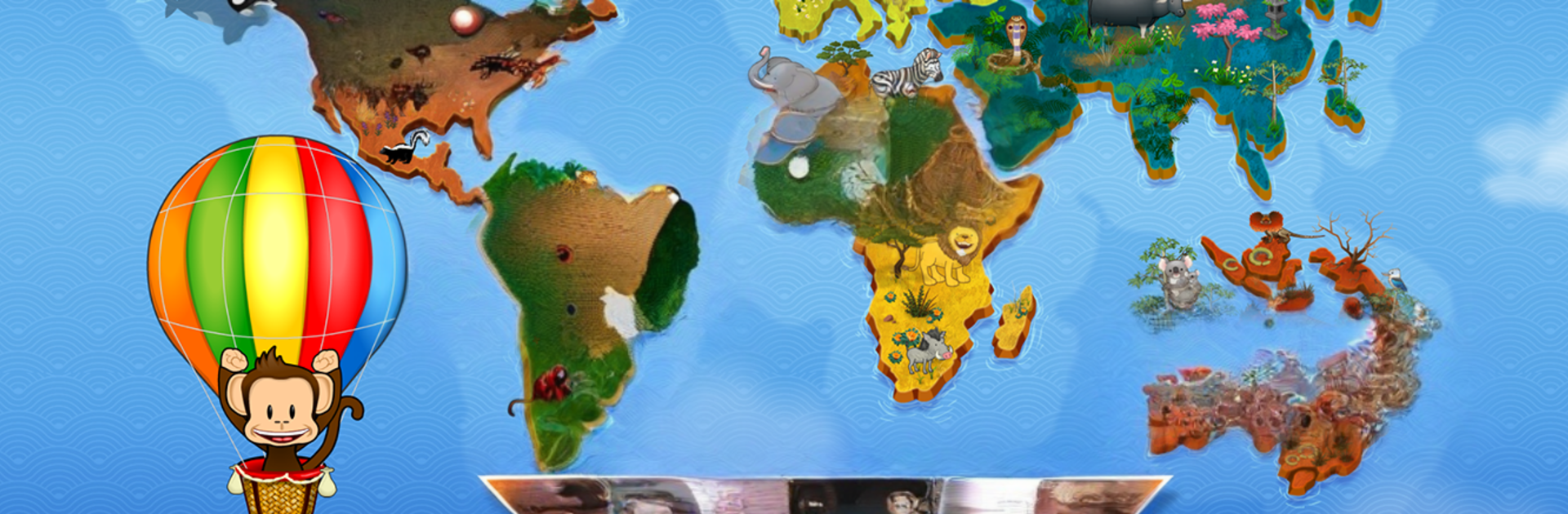
Monkey Preschool Animals is a gentle, cartoony world tour with a monkey guide in a hot air balloon, and the whole thing is built for very young players. They hop between places like the Arctic, savanna, rainforest, and the Australian outback, tapping animals to hear their real noises, answer simple questions, and trigger goofy little animations. One minute it asks for a reptile, the next it plays a sound and wants to know which creature made it. The mood is playful, not stressful, and the tasks are quick so a kid does not get stuck or bored. There are a lot of critters here, including fun picks like the kookaburra, tasmanian devil, and a hungry orca that actually gets fed. Even the roaring polar bear shows up and it is more funny than scary.

What stands out is the variety and how clear everything looks and sounds. The badge book is an easy reward system, like collecting stickers for doing little challenges. No ads, no menus that need reading, just big buttons and a friendly voice nudging them along. On BlueStacks, the larger screen makes the animals easier to spot and the mouse clicks are perfect for small hands that do not love touch controls. It feels more like a curiosity sandbox than a test, which suits preschool brains. If someone wants high scores or heavy puzzles, this is not it. If they want a low-pressure animal tour with tons of sounds and animations, it hits the mark.

Get ready for a buttery smooth, high-performance gaming action only on BlueStacks.

Game Features

Enhancements

  • Macros
  • Multi Instance
  • Multi Instance Sync
  • Script
  • Enhancements
Macros

Macros

Automate the predictable in Monkey Preschool Animals and transform your gameplay with Macros. Get access to inventive Macros in the BlueStacks Macro Community
Multi Instance

Multi Instance

Play Monkey Preschool Animals on one window. And chat with your friend on the other. Press CTRL + Shift + 8 to open the Multi-Instance Manager. And start creating fresh instances or clone an existing one.
Multi Instance Sync

Multi Instance Sync

Play Monkey Preschool Animals with the power of Multi-Instance Sync. Replicate what you are doing on the main instance on all other instances. Level up faster, play more.
Script

Script

Script your way to gaming glory in Monkey Preschool Animals with BlueStacks Script. Write and run a set of commands to automate repeated tasks. Trigger the command by assigning it to any key.
Read More

How to Download and Play Monkey Preschool Animals on PC or Mac

  • Download and install BlueStacks on your PC or Mac

  • Complete Google sign-in to access the Play Store, or do it later

  • Look for Monkey Preschool Animals in the search bar at the top right corner

  • Click to install Monkey Preschool Animals from the search results

  • Complete Google sign-in (if you skipped step 2) to install Monkey Preschool Animals

  • Click the Monkey Preschool Animals icon on the home screen to start playing

video
Watch Video

Minimum System Requirements

With BlueStacks 5, you can get started on a PC that fulfills the following requirements.

  • Operating System

    Microsoft Windows 7 or above, macOS 11 (Big Sur) or above

  • Processor

    Intel, AMD or Apple Silicon Processor

  • RAM

    at least 4GB

  • HDD

    10GB Free Disk Space

Note:

* You must be an Administrator on your PC. Up to date graphics drivers from Microsoft or the chipset vendor.

Monkey Preschool Animals - FAQs

  • How to play Monkey Preschool Animals on Windows PC & Mac?

    Play Monkey Preschool Animals on your PC or Mac by following these simple steps.

    • Click on 'Play Monkey Preschool Animals on PC’ to download BlueStacks
    • Install it and log-in to Google Play Store
    • Launch and play the game.
  • Why is BlueStacks the fastest and safest platform to play games on PC?

    BlueStacks respects your privacy and is always safe and secure to use. It does not carry any malware, spyware, or any sort of additional software that could harm your PC.

    It is engineered to optimize speed and performance for a seamless gaming experience.

  • What are Monkey Preschool Animals PC requirements?

    Minimum requirement to run Monkey Preschool Animals on your PC

    • OS: Microsoft Windows 7 or above MacOS 11 (Big Sur) or above
    • Processor: Intel, AMD or Apple Silicon Processor
    • RAM: Your PC must have at least 4GB of RAM. (Note that having 4GB or more disk space is not a substitute for RAM)
    • HDD: 10GB Free Disk Space.
    • You must be an Administrator on your PC.