Princess Mermaid Phone

Princess Mermaid Phone

Educational

| HappyTap

Play on PC with BlueStacks or from our cloud

  • Overview
  • Game Features
  • How to Play

Page Modified On: November 20, 2025

Play Princess Mermaid Phone on PC or Mac

Step into the World of Princess Mermaid Phone, a thrilling Educational game from the house of HappyTap. Play this Android game on BlueStacks App Player and experience immersive gaming on PC or Mac.

Princess Mermaid Phone feels like a bright pretend phone stuffed with little underwater apps. Tap an icon, hop into a tiny activity, back out, try another. There is a cheerful mermaid front and center, plus chatty buddies like Billy the Crab and Oscar the Octopus, so the whole thing comes off like a playful toy rather than a serious game. On PC with BlueStacks, the bigger screen makes all the small buttons easier to hit and the mouse clicks suit the quick mini games really well.

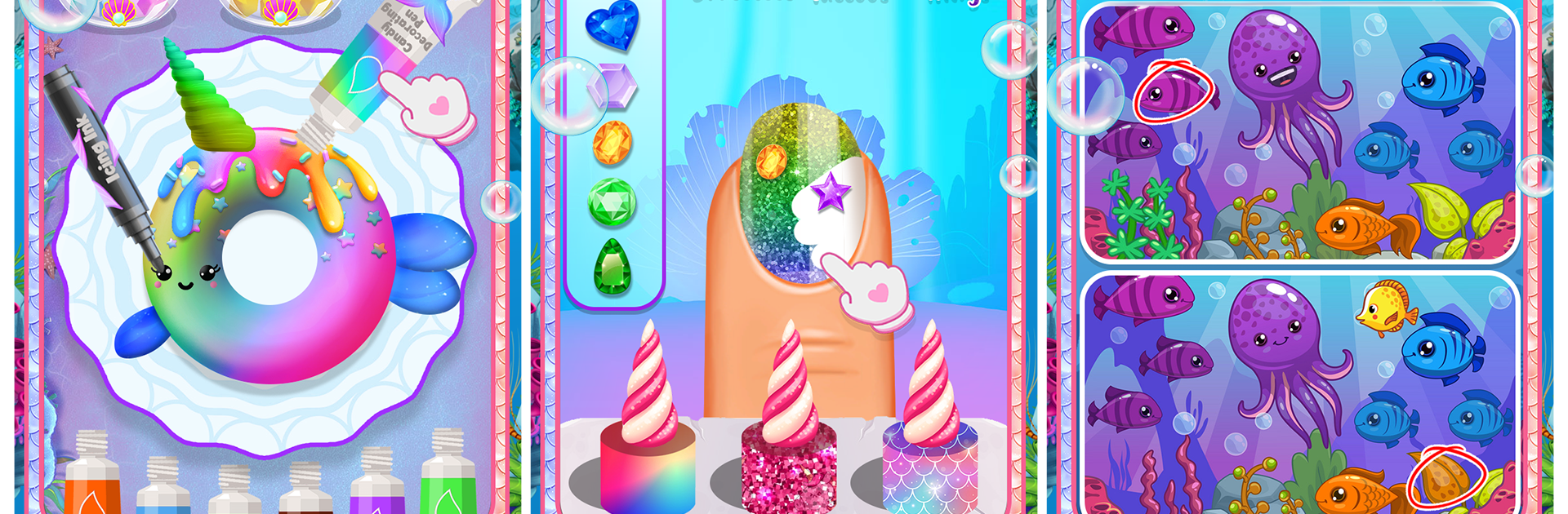
Most of the time is spent in short, low pressure tasks. There is a salon where players wash, dry, comb, color, and add accessories to the mermaid’s hair. There is a spa and makeup corner for a full makeover. A pet doctor section lets players patch up little sea critters. Creative bits pop up everywhere, from coloring pages filled with cakes, castles, ice cream, mermaids, and that cute unicornfish, to baking and decorating sea themed cupcakes and Narwhal donuts. For breaks, there are relaxing ocean jigsaws, spot the difference, and simple underwater puzzles. When something more active is wanted, there is a sailing scene that fires cannonballs at sea monsters, a run where fruit bombs need dodging to face a crocodile pirate, and even a classic pinball table. The art is very colorful, the animations are chunky and friendly, and the pacing is gentle enough that younger players or anyone who wants a calm, toy-like game can swap between activities and hunt for stars without stress.

Start your journey now. Download the game on BlueStacks, invite your friends, and march on a new adventure.


Game Features

Enhancements

  • Macros
  • Multi Instance
  • Multi Instance Sync
  • Script
  • Enhancements
Macros

Macros

Automate the predictable in Princess Mermaid Phone and transform your gameplay with Macros. Get access to inventive Macros in the BlueStacks Macro Community
Multi Instance

Multi Instance

Play Princess Mermaid Phone on one window. And chat with your friend on the other. Press CTRL + Shift + 8 to open the Multi-Instance Manager. And start creating fresh instances or clone an existing one.
Multi Instance Sync

Multi Instance Sync

Play Princess Mermaid Phone with the power of Multi-Instance Sync. Replicate what you are doing on the main instance on all other instances. Level up faster, play more.
Script

Script

Script your way to gaming glory in Princess Mermaid Phone with BlueStacks Script. Write and run a set of commands to automate repeated tasks. Trigger the command by assigning it to any key.
Read More

How to Download and Play Princess Mermaid Phone on PC or Mac

  • Download and install BlueStacks on your PC or Mac

  • Complete Google sign-in to access the Play Store, or do it later

  • Look for Princess Mermaid Phone in the search bar at the top right corner

  • Click to install Princess Mermaid Phone from the search results

  • Complete Google sign-in (if you skipped step 2) to install Princess Mermaid Phone

  • Click the Princess Mermaid Phone icon on the home screen to start playing

video
Watch Video

Minimum System Requirements

With BlueStacks 5, you can get started on a PC that fulfills the following requirements.

  • Operating System

    Microsoft Windows 7 or above, macOS 11 (Big Sur) or above

  • Processor

    Intel, AMD or Apple Silicon Processor

  • RAM

    at least 4GB

  • HDD

    10GB Free Disk Space

Note:

* You must be an Administrator on your PC. Up to date graphics drivers from Microsoft or the chipset vendor.

Princess Mermaid Phone - FAQs

  • How to play Princess Mermaid Phone on Windows PC & Mac?

    Play Princess Mermaid Phone on your PC or Mac by following these simple steps.

    • Click on 'Play Princess Mermaid Phone on PC’ to download BlueStacks
    • Install it and log-in to Google Play Store
    • Launch and play the game.
  • Why is BlueStacks the fastest and safest platform to play games on PC?

    BlueStacks respects your privacy and is always safe and secure to use. It does not carry any malware, spyware, or any sort of additional software that could harm your PC.

    It is engineered to optimize speed and performance for a seamless gaming experience.

  • What are Princess Mermaid Phone PC requirements?

    Minimum requirement to run Princess Mermaid Phone on your PC

    • OS: Microsoft Windows 7 or above MacOS 11 (Big Sur) or above
    • Processor: Intel, AMD or Apple Silicon Processor
    • RAM: Your PC must have at least 4GB of RAM. (Note that having 4GB or more disk space is not a substitute for RAM)
    • HDD: 10GB Free Disk Space.
    • You must be an Administrator on your PC.