Super Kids Games Pack

Super Kids Games Pack

Educational

| Ratata-dev

Play on PC with BlueStacks or from our cloud

  • Overview
  • Game Features
  • How to Play

Page Modified On: January 14, 2026

Play Super Kids Games Pack on PC or Mac

Super Kids Games Pack brings the Educational genre to life, and throws up exciting challenges for gamers. Developed by Ratata-dev, this Android game is best experienced on BlueStacks, the World’s #1 app player for PC and Mac users.

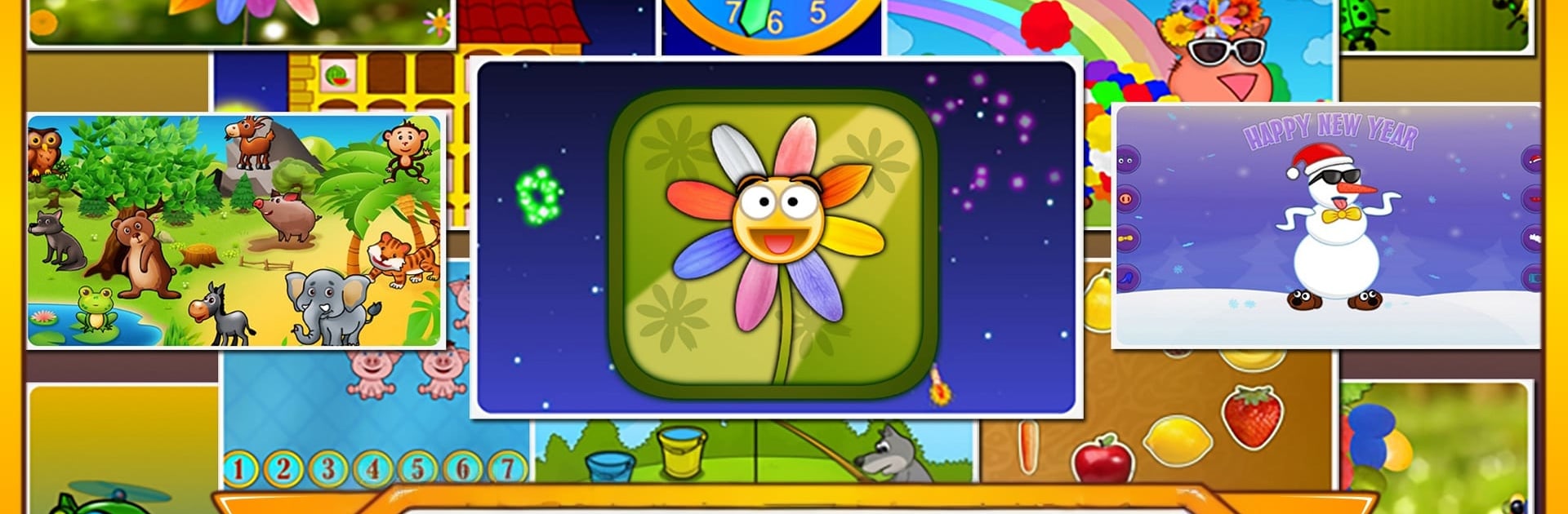
Super Kids Games Pack is a bundle of tiny, colorful mini games made for younger kids who like to tap everything on the screen. It leans hard into simple touch play and big friendly icons, so there is no maze of menus or fiddly settings. The themes jump around in a nice way. One minute it is popping bubbles and matching animals, then it turns into little fishing games, plant care, puzzles, and shape or color sorting. There are music bits that teach notes and help with ear training, plus quick reaction tasks that build coordination and memory without feeling stressful. The visuals are bright and cartoony, with soft nature sounds and chill music in the background. It feels more like a toy box than a single game, with small themed rooms to explore and pick a new activity.

On PC with BlueStacks, the larger screen makes it easier to spot colors and shapes, and mouse clicks work like taps, so no learning curve there. It suits short play sessions and co-play moments, where an adult can set little goals like find all the red petals or count the fish, then let the kid take over. Navigation is straightforward enough that children can move around on their own after a bit. It aims at boys and girls equally, mostly early learners but older kids can still poke at the puzzles. Nothing flashy or complicated, just a lot of gentle activities that quietly teach counting, colors, shapes, basic music and a few logic skills while keeping things relaxed. The pack keeps growing over time, so there is usually something new to try.

Start your journey now. Download the game on BlueStacks, invite your friends, and march on a new adventure.


Game Features

Enhancements

  • Macros
  • Multi Instance
  • Multi Instance Sync
  • Script
  • Enhancements
Macros

Macros

Automate the predictable in Super Kids Games Pack and transform your gameplay with Macros. Get access to inventive Macros in the BlueStacks Macro Community
Multi Instance

Multi Instance

Play Super Kids Games Pack on one window. And chat with your friend on the other. Press CTRL + Shift + 8 to open the Multi-Instance Manager. And start creating fresh instances or clone an existing one.
Multi Instance Sync

Multi Instance Sync

Play Super Kids Games Pack with the power of Multi-Instance Sync. Replicate what you are doing on the main instance on all other instances. Level up faster, play more.
Script

Script

Script your way to gaming glory in Super Kids Games Pack with BlueStacks Script. Write and run a set of commands to automate repeated tasks. Trigger the command by assigning it to any key.
Read More

How to Download and Play Super Kids Games Pack on PC or Mac

  • Download and install BlueStacks on your PC or Mac

  • Complete Google sign-in to access the Play Store, or do it later

  • Look for Super Kids Games Pack in the search bar at the top right corner

  • Click to install Super Kids Games Pack from the search results

  • Complete Google sign-in (if you skipped step 2) to install Super Kids Games Pack

  • Click the Super Kids Games Pack icon on the home screen to start playing

video
Watch Video

Minimum System Requirements

With BlueStacks 5, you can get started on a PC that fulfills the following requirements.

  • Operating System

    Microsoft Windows 7 or above, macOS 11 (Big Sur) or above

  • Processor

    Intel, AMD or Apple Silicon Processor

  • RAM

    at least 4GB

  • HDD

    10GB Free Disk Space

Note:

* You must be an Administrator on your PC. Up to date graphics drivers from Microsoft or the chipset vendor.

Super Kids Games Pack - FAQs

  • How to play Super Kids Games Pack on Windows PC & Mac?

    Play Super Kids Games Pack on your PC or Mac by following these simple steps.

    • Click on 'Play Super Kids Games Pack on PC’ to download BlueStacks
    • Install it and log-in to Google Play Store
    • Launch and play the game.
  • Why is BlueStacks the fastest and safest platform to play games on PC?

    BlueStacks respects your privacy and is always safe and secure to use. It does not carry any malware, spyware, or any sort of additional software that could harm your PC.

    It is engineered to optimize speed and performance for a seamless gaming experience.

  • What are Super Kids Games Pack PC requirements?

    Minimum requirement to run Super Kids Games Pack on your PC

    • OS: Microsoft Windows 7 or above MacOS 11 (Big Sur) or above
    • Processor: Intel, AMD or Apple Silicon Processor
    • RAM: Your PC must have at least 4GB of RAM. (Note that having 4GB or more disk space is not a substitute for RAM)
    • HDD: 10GB Free Disk Space.
    • You must be an Administrator on your PC.