
TV Today - TV Programm

TV Today - TV Programm

Entertainment

| TV Spielfilm Verlag GmbH

Play on PC with BlueStacks or from our cloud

  • Overview
  • How to Download

Page Modified On: September 12, 2025

Run TV Today - TV Programm on PC or Mac

Why limit yourself to your small screen on the phone? Run TV Today – TV Programm, an app by TV Spielfilm Verlag GmbH, best experienced on your PC or Mac with BlueStacks, the world’s #1 Android emulator.

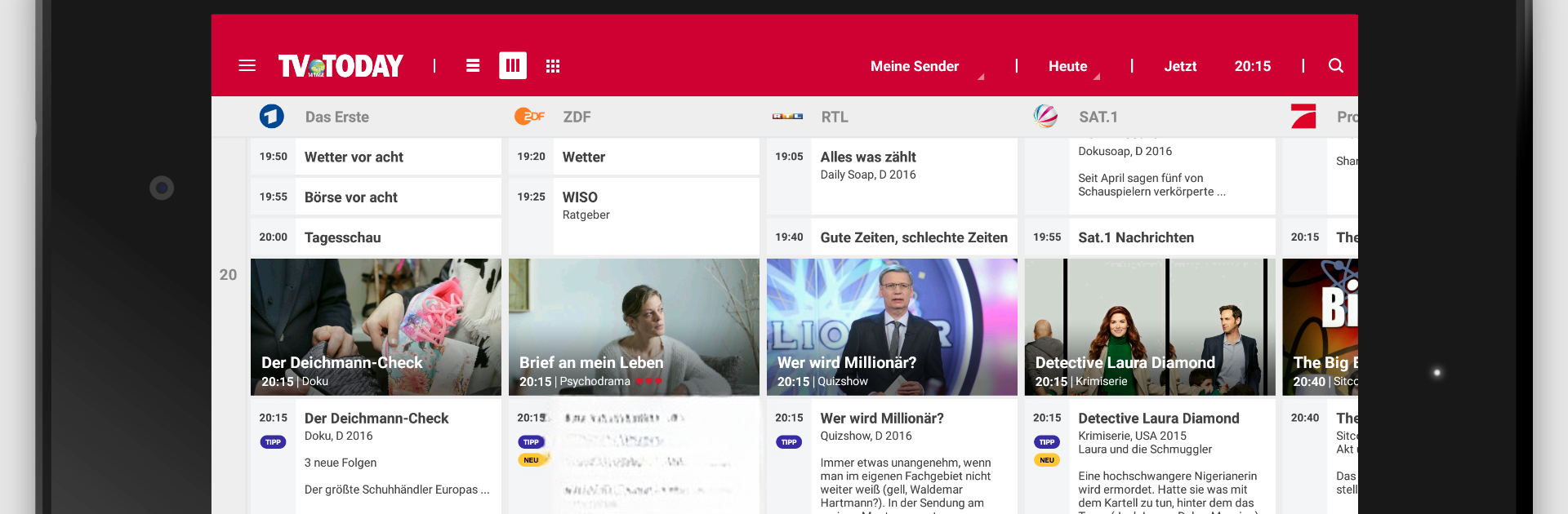
TV Today feels like a clean, no-fuss TV guide that actually helps find something worth watching instead of making someone dig for it. The start screen is built around the times that matter, with quick tabs for Now, 20:15, and 22:00, so scanning the evening is fast. There are loads of channels listed, from the big ones to niche, regional, and pay TV, and each show card has the important stuff, short description, pictures, trailer if available, and for movies there is a simple rating that says whether it is worth the time. The editorial day tips are handy too, split into films, series, documentaries, entertainment, kids, and sports, and they can include pay TV if needed.

The tools are surprisingly practical. People can set up My Channels to only see the stations they care about, add shows to a watchlist, and set reminders so nothing slips by. The 7 day view is easy to filter by channel, weekday, and time. Missed a show, the Mediathek view pulls catch-up links from broadcasters in one place. On a PC with BlueStacks it scrolls smoothly, the bigger screen makes the grids comfortable to read, and keyboard search feels quicker than tapping. There is an optional EPG Plus upgrade that adds more channels, stretches the schedule to 14 days, and removes ads, but the free version is already solid. Just note, it is focused on German programming, it does not stream live TV itself, and the social check-in bits are there if someone cares, but the main draw is the fast overview and clear info. The interface is simple rather than flashy, which is kind of the point here.

BlueStacks brings your apps to life on a bigger screen—seamless and straightforward.

How to Download and Run TV Today - TV Programm on PC or Mac

  • Download and install BlueStacks on your PC or Mac

  • Complete Google sign-in to access the Play Store, or do it later

  • Look for TV Today - TV Programm in the search bar at the top right corner

  • Click to install TV Today - TV Programm from the search results

  • Complete Google sign-in (if you skipped step 2) to install TV Today - TV Programm

  • Click the TV Today - TV Programm icon on the home screen to start playing

video
Watch Video

Minimum System Requirements

With BlueStacks 5, you can get started on a PC that fulfills the following requirements.

  • Operating System

    Microsoft Windows 7 or above, macOS 11 (Big Sur) or above

  • Processor

    Intel, AMD or Apple Silicon Processor

  • RAM

    at least 4GB

  • HDD

    10GB Free Disk Space

Note:

* You must be an Administrator on your PC. Up to date graphics drivers from Microsoft or the chipset vendor.

TV Today - TV Programm - FAQs

  • How to Run TV Today - TV Programm on Windows PC & Mac?

    Run TV Today - TV Programm on your PC or Mac by following these simple steps.

    • Click on ‘Download TV Today - TV Programm on PC’ to download BlueStacks
    • Install it and log-in to Google Play Store
    • Launch and run the app.
  • Why is BlueStacks the fastest and safest platform to play games on PC?

    BlueStacks respects your privacy and is always safe and secure to use. It does not carry any malware, spyware, or any sort of additional software that could harm your PC.

    It is engineered to optimize speed and performance for a seamless gaming experience.

  • What are TV Today - TV Programm PC requirements?

    Minimum requirement to run TV Today - TV Programm on your PC

    • OS: Microsoft Windows 7 and above:
    • Processor: Intel or AMD Processor:
    • RAM: Your PC must have at least 2GB of RAM. (Note that having 2GB or more disk space is not a substitute for RAM):
    • HDD: 5GB Free Disk Space.
    • You must be an Administrator on your PC.




