
Casse-o-player 1980s Cassette Pack

Casse-o-player 1980s Cassette Pack

Music & Audio

| Valentyn Vieshchunov

Play on PC with BlueStacks or from our cloud

  • Overview
  • How to Download

Page Modified On: January 02, 2026

Run Casse-o-player 1980s Cassette Pack on PC or Mac

Upgrade your experience. Try Casse-o-player 1980s Cassette Pack, the fantastic Music & Audio app from Valentyn Vieshchunov, from the comfort of your laptop, PC, or Mac, only on BlueStacks.

About the App

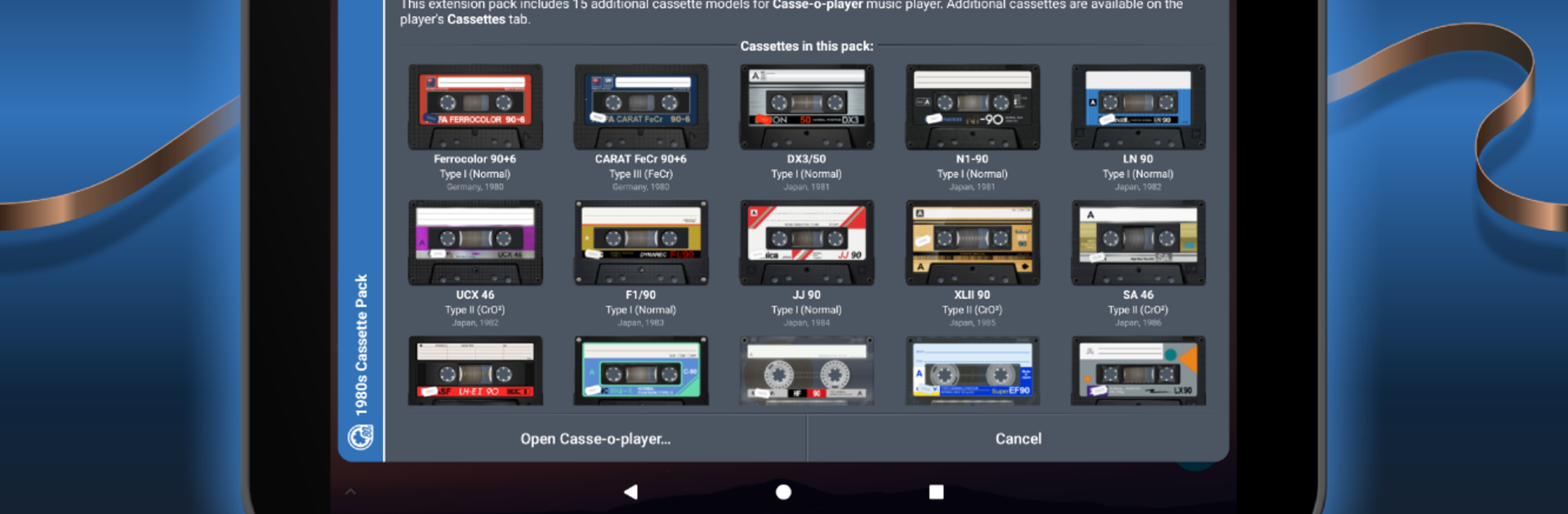
Casse-o-player 1980s Cassette Pack is a nostalgia boost for the Casse-o-player crowd, crafted by Valentyn Vieshchunov. It’s an add-on that drops a set of extra cassette designs straight into your player, so your playlists can look as good as they sound. Expect rich textures, smooth animations, and that unmistakable 1980s vibe right on your screen. This is a Music & Audio add-on, not a standalone app—so you’ll need the main Casse-o-player first.

App Features

  • 15 iconic designs: Swap between fifteen cassette models inspired by real tapes from the 1980s—think bold colors, worn labels, and era-perfect style.
  • Fully animated reels: Watch the spools turn and details come to life while your tracks play, adding a little analog charm to every song.
  • Authentic materials: From tiny screws to plastic sheen and paper textures, each cassette has a hand-built feel that hits that golden-age sweet spot.
  • Easy to find in the app: After installing, open Casse-o-player and check Cassettes > Extension packs to browse and apply your new tapes.
  • Made for version 3.0.9+: Just make sure your Casse-o-player is updated to 3.0.9 or higher before installing the pack.
  • Seamless with your setup: Works right alongside your existing library and settings—nothing to reconfigure.
  • PC-friendly option: Using BlueStacks to run Android apps on your computer? This pack looks great there too, with the same smooth animations and detail.

Switch to BlueStacks and make the most of your apps on your PC or Mac.

How to Download and Run Casse-o-player 1980s Cassette Pack on PC or Mac

  • Download and install BlueStacks on your PC or Mac

  • Complete Google sign-in to access the Play Store, or do it later

  • Look for Casse-o-player 1980s Cassette Pack in the search bar at the top right corner

  • Click to install Casse-o-player 1980s Cassette Pack from the search results

  • Complete Google sign-in (if you skipped step 2) to install Casse-o-player 1980s Cassette Pack

  • Click the Casse-o-player 1980s Cassette Pack icon on the home screen to start playing

video
Watch Video

Minimum System Requirements

With BlueStacks 5, you can get started on a PC that fulfills the following requirements.

  • Operating System

    Microsoft Windows 7 or above, macOS 11 (Big Sur) or above

  • Processor

    Intel, AMD or Apple Silicon Processor

  • RAM

    at least 4GB

  • HDD

    10GB Free Disk Space

Note:

* You must be an Administrator on your PC. Up to date graphics drivers from Microsoft or the chipset vendor.

Casse-o-player 1980s Cassette Pack - FAQs

  • How to Run Casse-o-player 1980s Cassette Pack on Windows PC & Mac?

    Run Casse-o-player 1980s Cassette Pack on your PC or Mac by following these simple steps.

    • Click on ‘Download Casse-o-player 1980s Cassette Pack on PC’ to download BlueStacks
    • Install it and log-in to Google Play Store
    • Launch and run the app.
  • Why is BlueStacks the fastest and safest platform to play games on PC?

    BlueStacks respects your privacy and is always safe and secure to use. It does not carry any malware, spyware, or any sort of additional software that could harm your PC.

    It is engineered to optimize speed and performance for a seamless gaming experience.

  • What are Casse-o-player 1980s Cassette Pack PC requirements?

    Minimum requirement to run Casse-o-player 1980s Cassette Pack on your PC

    • OS: Microsoft Windows 7 and above:
    • Processor: Intel or AMD Processor:
    • RAM: Your PC must have at least 2GB of RAM. (Note that having 2GB or more disk space is not a substitute for RAM):
    • HDD: 5GB Free Disk Space.
    • You must be an Administrator on your PC.




