
Rarities Cassette Pack

Rarities Cassette Pack

Music & Audio

| Valentyn Vieshchunov

Play on PC with BlueStacks or from our cloud

  • Overview
  • How to Download

Page Modified On: November 03, 2025

Run Rarities Cassette Pack on PC or Mac

Multitask effortlessly on your PC or Mac as you try out Rarities Cassette Pack, a Music & Audio app by Valentyn Vieshchunov on BlueStacks.

About the App

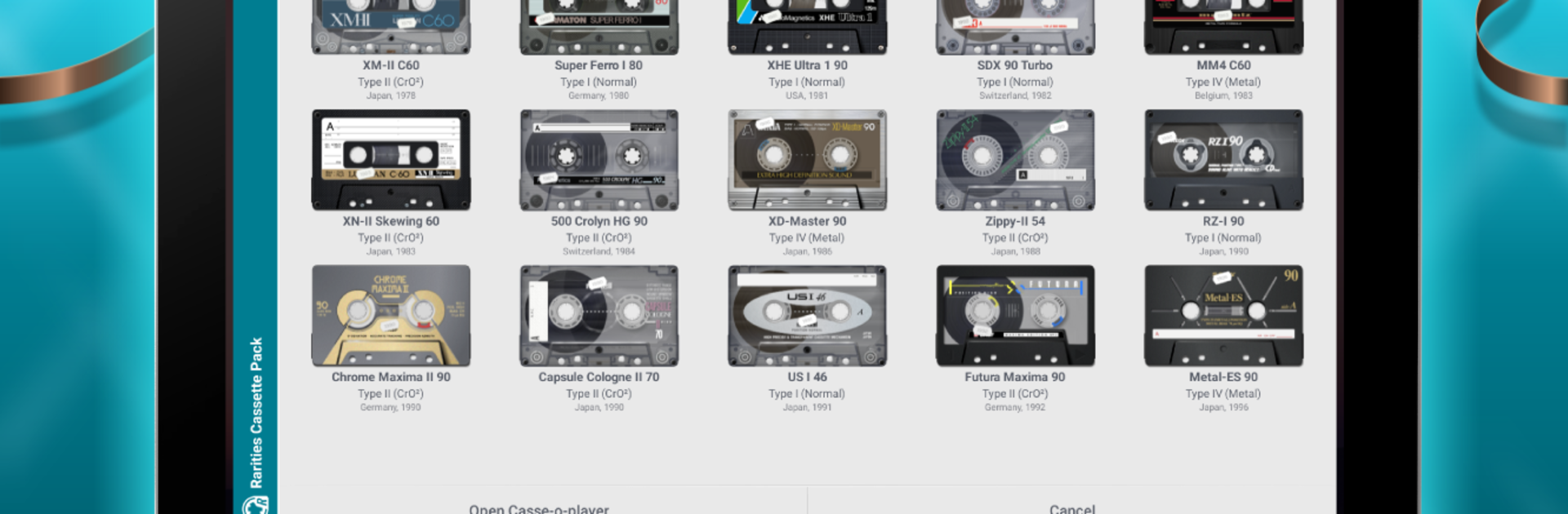
Rarities Cassette Pack is a visual add-on that brings a collector’s shelf of rare tapes right into your Casse-o-player. It’s all about the look and feel: crisp textures, moving reels, and those quirky label details you remember (or always wanted to). Expect a nostalgic, hands-on vibe every time you press play.

App Features

  • 15 rare designs: A curated set of 15 cassette models inspired by hard-to-find releases and short-run local editions—each with its own charm.
  • Fully animated reels: Watch the spools turn and the mechanics come to life in sync with your music for that classic cassette motion.
  • High-detail textures: Scuffs, stickers, translucent shells, bold label typography—the tiny touches that make these feel real.
  • Seamless add-on: Built specifically for Casse-o-player; install Rarities Cassette Pack and the new models appear alongside your existing ones.
  • Authentic vibes: Subtle design quirks and colorways mirror original tapes collectors chase, without feeling gimmicky.
  • Easy swapping: Pick a cassette to match your playlist mood—switch styles without stopping your music.
  • Looks great everywhere: Clean visuals on phones and tablets, and it pops on larger screens if you’re running Android apps on your PC with BlueStacks.
  • Purely visual: Your player’s sound and controls stay the same—this pack focuses on aesthetics and animation, nothing else.

Developer: Valentyn Vieshchunov
Genre: Music & Audio
App name: Rarities Cassette Pack

Ready to experience Rarities Cassette Pack on a bigger screen, in all its glory? Download BlueStacks now.


How to Download and Run Rarities Cassette Pack on PC or Mac

  • Download and install BlueStacks on your PC or Mac

  • Complete Google sign-in to access the Play Store, or do it later

  • Look for Rarities Cassette Pack in the search bar at the top right corner

  • Click to install Rarities Cassette Pack from the search results

  • Complete Google sign-in (if you skipped step 2) to install Rarities Cassette Pack

  • Click the Rarities Cassette Pack icon on the home screen to start playing

video
Watch Video

Minimum System Requirements

With BlueStacks 5, you can get started on a PC that fulfills the following requirements.

  • Operating System

    Microsoft Windows 7 or above, macOS 11 (Big Sur) or above

  • Processor

    Intel, AMD or Apple Silicon Processor

  • RAM

    at least 4GB

  • HDD

    10GB Free Disk Space

Note:

* You must be an Administrator on your PC. Up to date graphics drivers from Microsoft or the chipset vendor.

Rarities Cassette Pack - FAQs

  • How to Run Rarities Cassette Pack on Windows PC & Mac?

    Run Rarities Cassette Pack on your PC or Mac by following these simple steps.

    • Click on ‘Download Rarities Cassette Pack on PC’ to download BlueStacks
    • Install it and log-in to Google Play Store
    • Launch and run the app.
  • Why is BlueStacks the fastest and safest platform to play games on PC?

    BlueStacks respects your privacy and is always safe and secure to use. It does not carry any malware, spyware, or any sort of additional software that could harm your PC.

    It is engineered to optimize speed and performance for a seamless gaming experience.

  • What are Rarities Cassette Pack PC requirements?

    Minimum requirement to run Rarities Cassette Pack on your PC

    • OS: Microsoft Windows 7 and above:
    • Processor: Intel or AMD Processor:
    • RAM: Your PC must have at least 2GB of RAM. (Note that having 2GB or more disk space is not a substitute for RAM):
    • HDD: 5GB Free Disk Space.
    • You must be an Administrator on your PC.



