
Todo Agenda
Todo Agenda

Todo Agenda

Productivity

| Yuri Volkov (yvolk)

Play on PC with BlueStacks or from our cloud

  • Overview
  • How to Download

Page Modified On: September 19, 2025

Run Todo Agenda on PC or Mac

What’s better than using Todo Agenda by Yuri Volkov (yvolk)? Well, try it on a big screen, on your PC or Mac, with BlueStacks to see the difference.

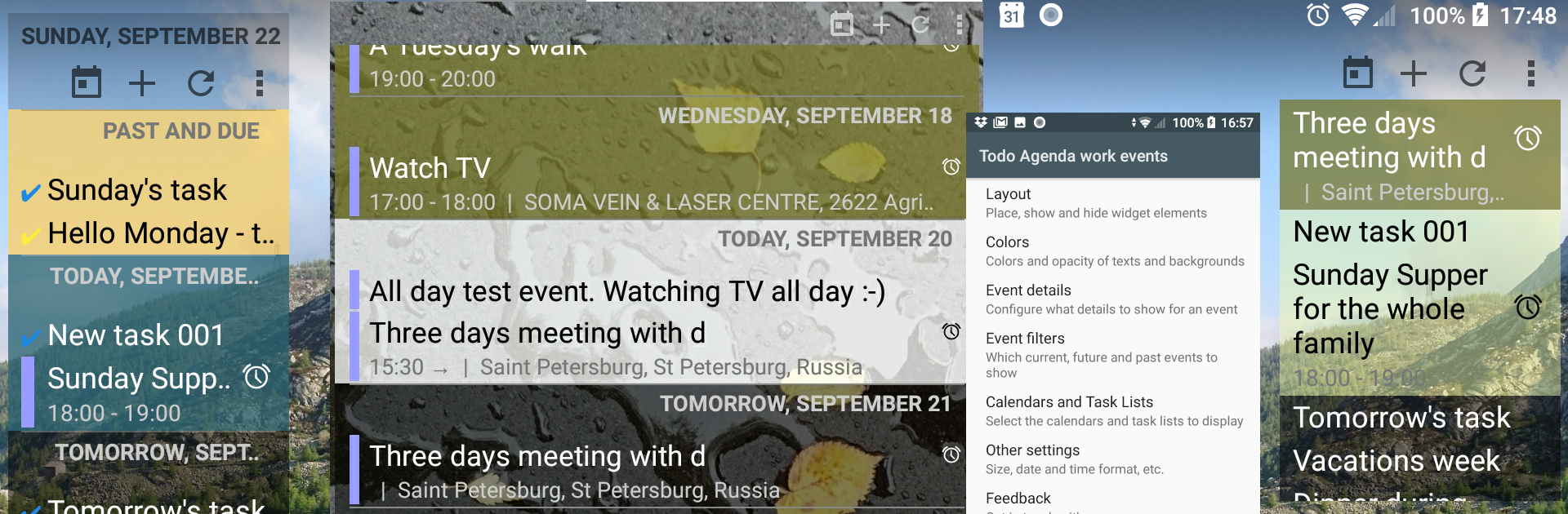
Todo Agenda feels more like a set of smart panels than a typical app. It lives as home screen widgets that show calendars and task lists in one tidy stream, so the day, tomorrow, and anything coming up are all right there without opening anything. The neat part is how much control there is. Each widget can be its own thing, with its own layout, colors, transparency, and filters. One can make a minimal, text only strip for work, another big and bold for personal stuff, and they do not clash. It updates itself the moment an event changes, and there is a quick Go to Today button when the list gets long.

There are little touches that make it feel thought out. Indicators show recurring items and alerts, duplicates can be hidden when the same meeting lands in two calendars, and headers or icons can be turned off if they get in the way. Text size is adjustable, the widget is fully resizable, and time zone lock is there for anyone who travels or works across regions. It even lets users pick how far back and forward the list goes, so past notes can stick around. Backup and restore is built in, which is handy for cloning a setup on a new phone or tablet. On PC with BlueStacks, the bigger screen and mouse make tweaking layouts and colors easier, and having a live agenda parked on the Android home screen inside the emulator feels clean. No ads, open source, and it quietly does its job without nagging.

Big screen. Bigger performance. Use BlueStacks on your PC or Mac to run your favorite apps.

How to Download and Run Todo Agenda on PC or Mac

  • Download and install BlueStacks on your PC or Mac

  • Complete Google sign-in to access the Play Store, or do it later

  • Look for Todo Agenda in the search bar at the top right corner

  • Click to install Todo Agenda from the search results

  • Complete Google sign-in (if you skipped step 2) to install Todo Agenda

  • Click the Todo Agenda icon on the home screen to start playing

video
Watch Video

Minimum System Requirements

With BlueStacks 5, you can get started on a PC that fulfills the following requirements.

  • Operating System

    Microsoft Windows 7 or above, macOS 11 (Big Sur) or above

  • Processor

    Intel, AMD or Apple Silicon Processor

  • RAM

    at least 4GB

  • HDD

    10GB Free Disk Space

Note:

* You must be an Administrator on your PC. Up to date graphics drivers from Microsoft or the chipset vendor.

Todo Agenda - FAQs

  • How to Run Todo Agenda on Windows PC & Mac?

    Run Todo Agenda on your PC or Mac by following these simple steps.

    • Click on ‘Download Todo Agenda on PC’ to download BlueStacks
    • Install it and log-in to Google Play Store
    • Launch and run the app.
  • Why is BlueStacks the fastest and safest platform to play games on PC?

    BlueStacks respects your privacy and is always safe and secure to use. It does not carry any malware, spyware, or any sort of additional software that could harm your PC.

    It is engineered to optimize speed and performance for a seamless gaming experience.

  • What are Todo Agenda PC requirements?

    Minimum requirement to run Todo Agenda on your PC

    • OS: Microsoft Windows 7 and above:
    • Processor: Intel or AMD Processor:
    • RAM: Your PC must have at least 2GB of RAM. (Note that having 2GB or more disk space is not a substitute for RAM):
    • HDD: 5GB Free Disk Space.
    • You must be an Administrator on your PC.




