




Let BlueStacks turn your PC, Mac, or laptop into the perfect home for DriveWizard Mobile, a fun Productivity app from YASKAWA ELECTRIC CORPORATION.
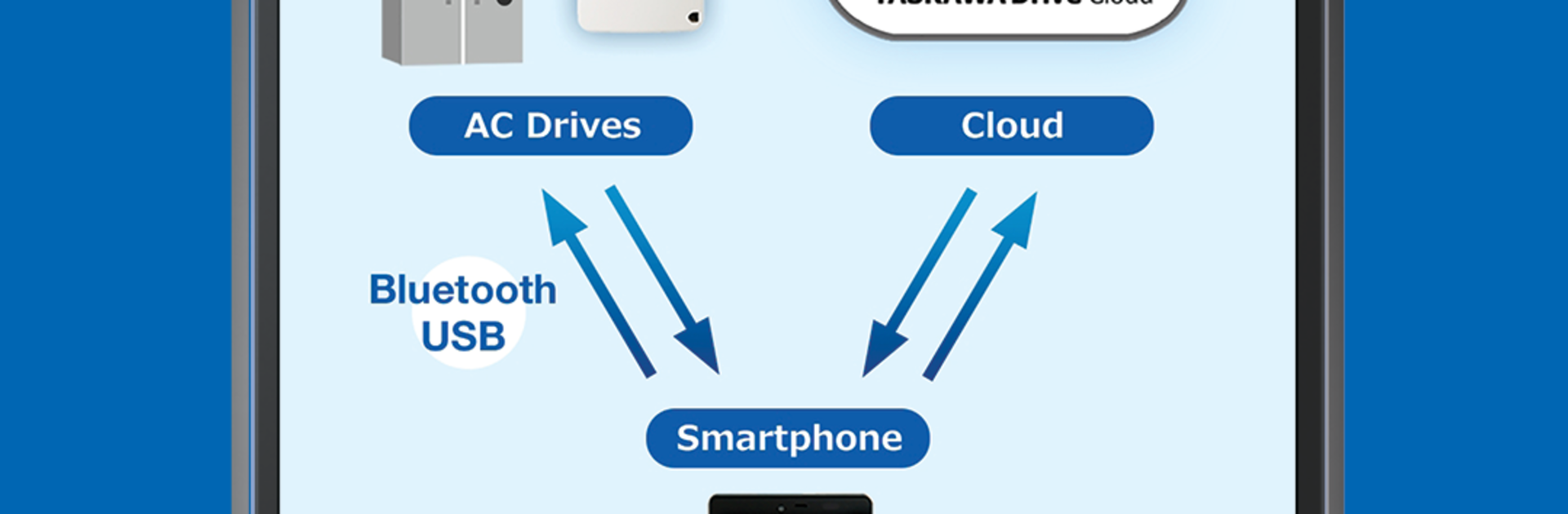
DriveWizard Mobile feels like a clean control panel for YASKAWA drives that fits in a pocket. Point it at the QR code on the faceplate or nameplate and it pulls up the exact model info, specs, catalogs, and some quick troubleshooting notes without digging through random files. When a drive is connected, the app lets a user edit parameters, start or stop, and watch live values change in real time. USB works if the phone supports USB On The Go and there is a Mini‑B port on the drive, so a proper USB‑OTG cable is needed. Bluetooth works too, but only if that optional Bluetooth LCD Keypad is installed on the drive. The wireless range is roughly room sized, about 10 meters, and walls or noisy environments can shorten it. There is also cloud backup for inverter parameters using the YASKAWA Drive Cloud, which is handy when juggling multiple panels.
On a PC with BlueStacks, the bigger screen makes long parameter lists, status bits, and alarms way easier to read and sort through. QR scanning is more natural on a phone, but for bench testing or office work the desktop view is calmer and less cramped. It supports a bunch of families like GA700, GA500, GA800, HV600, FP605 and a few others, though which ones connect can differ by region. It is built for recent Android versions and it feels very no nonsense. No fluff, just tools that get the job done, with the occasional quirk that is normal for field apps.
Eager to take your app experience to the next level? Start right away by downloading BlueStacks on your PC or Mac.





