Car Bridge 3D: Draw to Save

Car Bridge 3D: Draw to Save

Puzzle

| EPIKMOUNT JOINT STOCK COMPANY

Play on PC with BlueStacks or from our cloud

  • Overview
  • Game Features
  • How to Play

Page Modified On: November 20, 2025

Play Car Bridge 3D: Draw to Save on PC or Mac

Step into the World of Car Bridge 3D: Draw to Save, a thrilling Puzzle game from the house of EPIKMOUNT JOINT STOCK COMPANY. Play this Android game on BlueStacks App Player and experience immersive gaming on PC or Mac.

About the Game

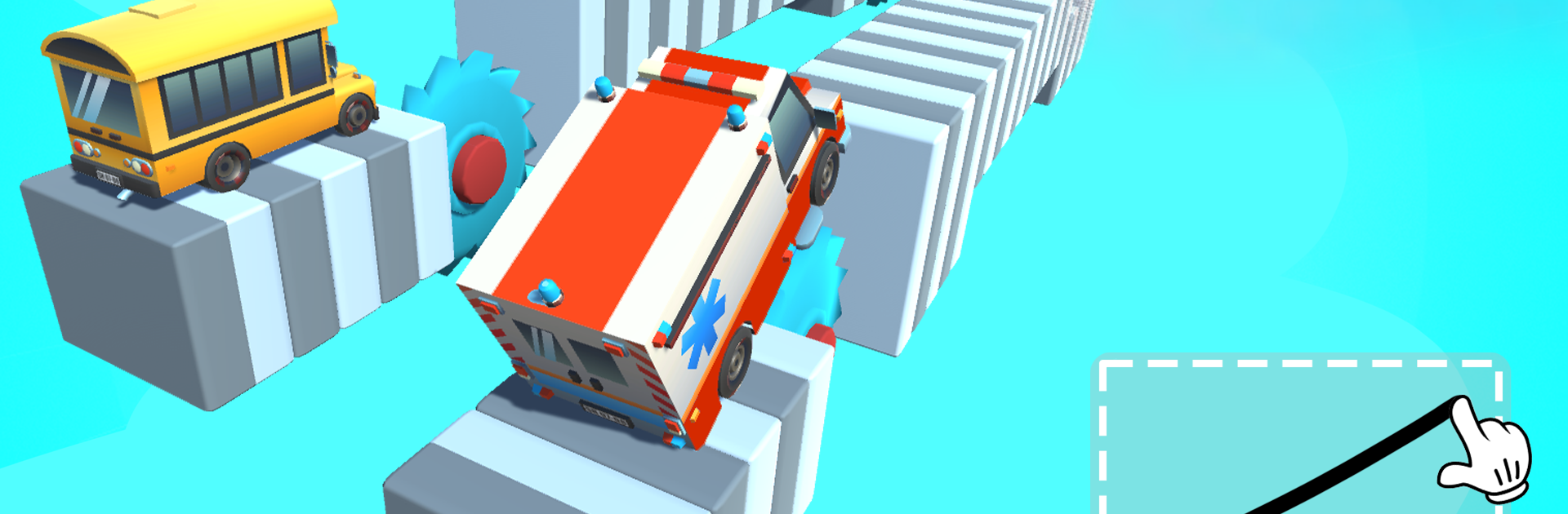
Car Bridge 3D: Draw to Save is a quirky Puzzle game where your car isn’t just a vehicle—it becomes the bridge. You sketch a single line, the car stretches to match it, and then you find out if your idea actually holds up. It’s playful, a little ridiculous in the best way, and surprisingly brainy, from EPIKMOUNT JOINT STOCK COMPANY. Prefer a mouse for precision lines? It also feels great on PC with BlueStacks.

Game Features

  • Draw-to-Bridge Twist: Instead of building with beams and planks, your car morphs to follow the line you draw, then attempts the crossing.
  • One Line, Big Decisions: You’ve got a single stroke to shape ramps, arches, or odd loops. Smart lines matter more than fancy ones.
  • Pick-Up-and-Play Controls: Touch to start, drag to sketch, lift to test—what you draw is exactly what your car tries to become.
  • 150+ Head-Scratchers: A growing set of challenges that push logic and creativity, from simple gaps to surprisingly tricky layouts.
  • Physics with Personality: Watch your stretched “car-bridge” wobble, bend, and sometimes fail in hilarious ways—then tweak and try again.
  • Friendly Retry Loop: Messed up? Redo instantly and experiment without pressure until the solution clicks.
  • Fresh Mechanics Over Time: New obstacles and ideas keep later stages from feeling samey, nudging you to rethink your usual lines.
  • No Timers, No Rush: Solve at your own pace. It’s thoughtful and relaxing, with chill music that doesn’t nag you.
  • Clean, Readable Visuals: Simple, clear scenes let you focus on the puzzle, not the clutter.

Get ready for a buttery smooth, high-performance gaming action only on BlueStacks.

Game Features

Enhancements

  • Macros
  • Multi Instance
  • Multi Instance Sync
  • Script
  • Enhancements
Macros

Macros

Automate the predictable in Car Bridge 3D: Draw to Save and transform your gameplay with Macros. Get access to inventive Macros in the BlueStacks Macro Community
Multi Instance

Multi Instance

Play Car Bridge 3D: Draw to Save on one window. And chat with your friend on the other. Press CTRL + Shift + 8 to open the Multi-Instance Manager. And start creating fresh instances or clone an existing one.
Multi Instance Sync

Multi Instance Sync

Play Car Bridge 3D: Draw to Save with the power of Multi-Instance Sync. Replicate what you are doing on the main instance on all other instances. Level up faster, play more.
Script

Script

Script your way to gaming glory in Car Bridge 3D: Draw to Save with BlueStacks Script. Write and run a set of commands to automate repeated tasks. Trigger the command by assigning it to any key.
Read More

How to Download and Play Car Bridge 3D: Draw to Save on PC or Mac

  • Download and install BlueStacks on your PC or Mac

  • Complete Google sign-in to access the Play Store, or do it later

  • Look for Car Bridge 3D: Draw to Save in the search bar at the top right corner

  • Click to install Car Bridge 3D: Draw to Save from the search results

  • Complete Google sign-in (if you skipped step 2) to install Car Bridge 3D: Draw to Save

  • Click the Car Bridge 3D: Draw to Save icon on the home screen to start playing

video
Watch Video

Minimum System Requirements

With BlueStacks 5, you can get started on a PC that fulfills the following requirements.

  • Operating System

    Microsoft Windows 7 or above, macOS 11 (Big Sur) or above

  • Processor

    Intel, AMD or Apple Silicon Processor

  • RAM

    at least 4GB

  • HDD

    10GB Free Disk Space

Note:

* You must be an Administrator on your PC. Up to date graphics drivers from Microsoft or the chipset vendor.

Car Bridge 3D: Draw to Save - FAQs

  • How to play Car Bridge 3D: Draw to Save on Windows PC & Mac?

    Play Car Bridge 3D: Draw to Save on your PC or Mac by following these simple steps.

    • Click on 'Play Car Bridge 3D: Draw to Save on PC’ to download BlueStacks
    • Install it and log-in to Google Play Store
    • Launch and play the game.
  • Why is BlueStacks the fastest and safest platform to play games on PC?

    BlueStacks respects your privacy and is always safe and secure to use. It does not carry any malware, spyware, or any sort of additional software that could harm your PC.

    It is engineered to optimize speed and performance for a seamless gaming experience.

  • What are Car Bridge 3D: Draw to Save PC requirements?

    Minimum requirement to run Car Bridge 3D: Draw to Save on your PC

    • OS: Microsoft Windows 7 or above MacOS 11 (Big Sur) or above
    • Processor: Intel, AMD or Apple Silicon Processor
    • RAM: Your PC must have at least 4GB of RAM. (Note that having 4GB or more disk space is not a substitute for RAM)
    • HDD: 10GB Free Disk Space.
    • You must be an Administrator on your PC.