Puzzle & Rogue
Puzzle & Rogue

Puzzle & Rogue

Puzzle

| Owl Games Inc.

Play on PC with BlueStacks or from our cloud

  • Overview
  • Game Features
  • How to Play

Page Modified On: June 13, 2025

Play Puzzle & Rogue on PC or Mac

Bring your A-game to Puzzle & Rogue, the Puzzle game sensation from Owl Games Inc.. Give your gameplay the much-needed boost with precise game controls, high FPS graphics, and top-tier features on your PC or Mac with BlueStacks.

About the Game

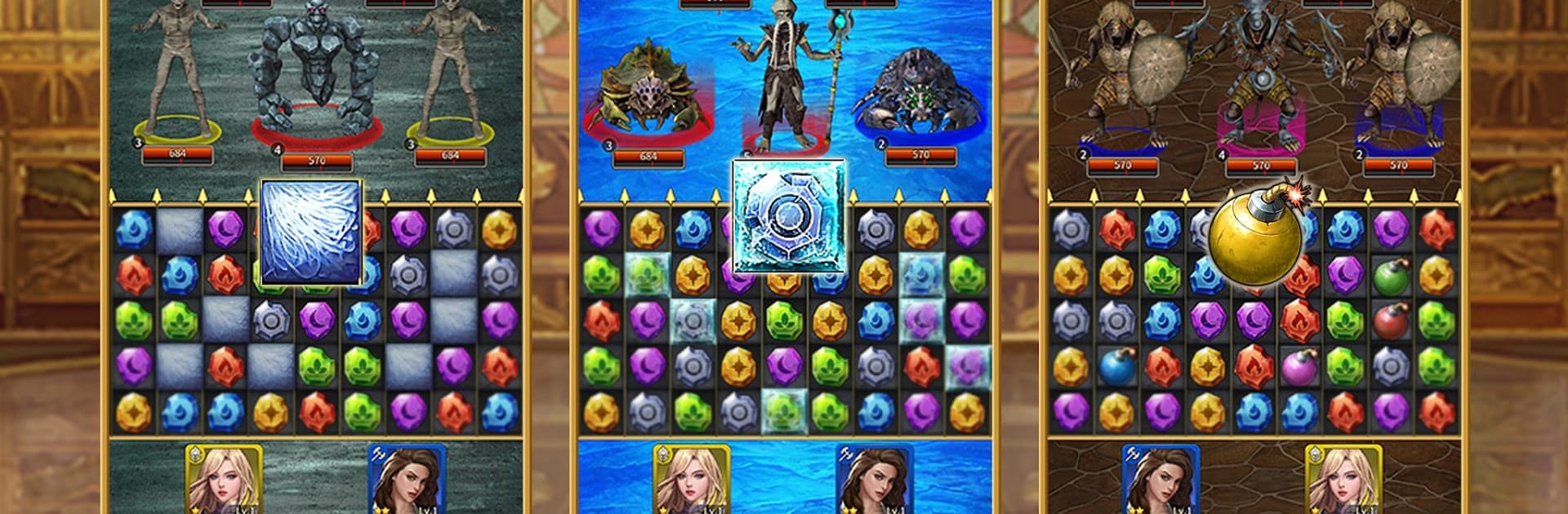
Puzzle & Rogue from Owl Games Inc. isn’t just your everyday puzzle title—it’s a clever remix of match-3 challenges and classic RPG elements, all rolled into one wild adventure. You’ll line up colorful blocks, send heroes charging into battle, and never quite know what twist the next dungeon holds. Whether you’re in it for the single-player vibe or want to prove yourself against others, there’s a mountain of content waiting… and honestly, you’ll probably find “just one more game” turning into a whole night.

Game Features

  • Match-3 Battles with a Twist
    Think you’ve mastered match-3 puzzles? Every combo matters, and here, it fuels your heroes’ attacks. There’s always a new way to outsmart monsters and rack up victories.

  • Procedurally Generated Dungeons
    No two journeys are the same. Maps, events, and loot all change every run, so each playthrough throws fresh surprises your way.

  • Massive Hero & Monster Collection
    You’ve got a buffet of over a hundred heroes to build your team, plus stacks of weird and wild monsters waiting to mess with your plans.

  • Hero Progression & Customization
    Level up your favorite champions, unlock their signature skills, and customize their gear for an edge in battle. There’s also crafting—because sometimes beating up baddies isn’t enough; you gotta make cool weapons with their loot.

  • Distinct Hero Classes
    Every hero class brings something different to the table. Want tanks? Healers? Damage dealers or oddballs with wild abilities? Mix and match to suit your strategy.

  • Tons of Game Modes
    Got a competitive itch? Try out multiplayer options, challenge guild dungeons, or climb the PvP ranks. Prefer to play solo? There’s more single-player content than you can shake a sword at.

  • Unique Block Mechanics
    It’s not just about matching three. Special blocks can pop up if you plan ahead—trigger them at just the right time, and watch things explode (in the best way).

  • Deep Strategy Choices
    Tinker with party formations and tweak everyone’s skills. It’s not just about raw power—thinking ahead and outsmarting your opponents can flip a fight on its head.

  • Crafting Gear
    Use the loot you find to craft new weapons and armor, giving your heroes that extra push they need against tougher foes.

  • Ideal with BlueStacks
    Want to get the most out of the Puzzle genre? Playing on BlueStacks offers smooth controls and a slick setup, perfect for marathon puzzle sessions.

Make your gaming sessions memorable with precise controls that give you an edge in close combats and visuals that pop up, bringing every character to life.


Game Features

Enhancements

  • Macros
  • Multi Instance
  • Multi Instance Sync
  • Script
  • Enhancements
Macros

Macros

Automate the predictable in Puzzle & Rogue and transform your gameplay with Macros. Get access to inventive Macros in the BlueStacks Macro Community
Multi Instance

Multi Instance

Play Puzzle & Rogue on one window. And chat with your friend on the other. Press CTRL + Shift + 8 to open the Multi-Instance Manager. And start creating fresh instances or clone an existing one.
Multi Instance Sync

Multi Instance Sync

Play Puzzle & Rogue with the power of Multi-Instance Sync. Replicate what you are doing on the main instance on all other instances. Level up faster, play more.
Script

Script

Script your way to gaming glory in Puzzle & Rogue with BlueStacks Script. Write and run a set of commands to automate repeated tasks. Trigger the command by assigning it to any key.
Read More

How to Download and Play Puzzle & Rogue on PC or Mac

  • Download and install BlueStacks on your PC or Mac

  • Complete Google sign-in to access the Play Store, or do it later

  • Look for Puzzle & Rogue in the search bar at the top right corner

  • Click to install Puzzle & Rogue from the search results

  • Complete Google sign-in (if you skipped step 2) to install Puzzle & Rogue

  • Click the Puzzle & Rogue icon on the home screen to start playing

video
Watch Video

Minimum System Requirements

With BlueStacks 5, you can get started on a PC that fulfills the following requirements.

  • Operating System

    Microsoft Windows 7 or above, macOS 11 (Big Sur) or above

  • Processor

    Intel, AMD or Apple Silicon Processor

  • RAM

    at least 4GB

  • HDD

    10GB Free Disk Space

Note:

* You must be an Administrator on your PC. Up to date graphics drivers from Microsoft or the chipset vendor.

Puzzle & Rogue - FAQs

  • How to play Puzzle & Rogue on Windows PC & Mac?

    Play Puzzle & Rogue on your PC or Mac by following these simple steps.

    • Click on 'Play Puzzle & Rogue on PC’ to download BlueStacks
    • Install it and log-in to Google Play Store
    • Launch and play the game.
  • Why is BlueStacks the fastest and safest platform to play games on PC?

    BlueStacks respects your privacy and is always safe and secure to use. It does not carry any malware, spyware, or any sort of additional software that could harm your PC.

    It is engineered to optimize speed and performance for a seamless gaming experience.

  • What are Puzzle & Rogue PC requirements?

    Minimum requirement to run Puzzle & Rogue on your PC

    • OS: Microsoft Windows 7 or above MacOS 11 (Big Sur) or above
    • Processor: Intel, AMD or Apple Silicon Processor
    • RAM: Your PC must have at least 4GB of RAM. (Note that having 4GB or more disk space is not a substitute for RAM)
    • HDD: 10GB Free Disk Space.
    • You must be an Administrator on your PC.