Unsolved Case: Elderwick f2p

Unsolved Case: Elderwick f2p

Puzzle

| Do Games Limited

Play on PC with BlueStacks or from our cloud

  • Overview
  • Game Features
  • How to Play

Page Modified On: June 25, 2026

Play Unsolved Case: Elderwick f2p on PC or Mac

Bring your A-game to Unsolved Case: Elderwick f2p, the Puzzle game sensation from Do Games Limited. Give your gameplay the much-needed boost with precise game controls, high FPS graphics, and top-tier features on your PC or Mac with BlueStacks.

About the Game

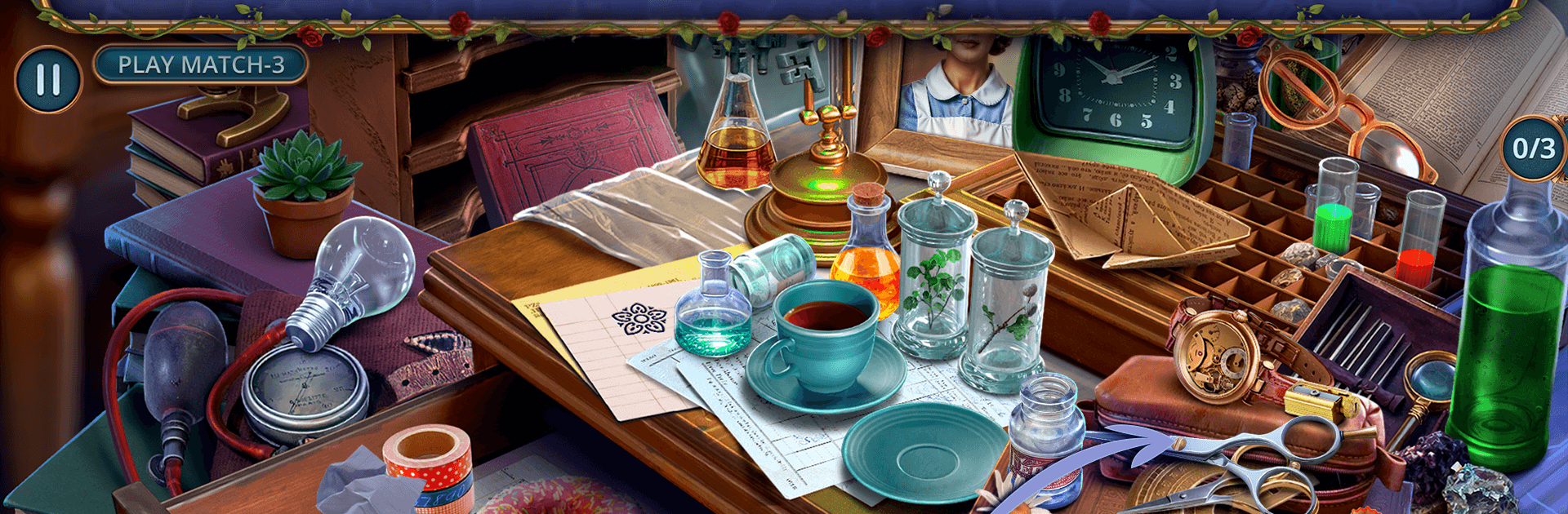
Unsolved Case: Elderwick f2p is a story-driven Puzzle adventure set in a sleepy English village with more secrets than hedgerows. You play as Mavis Donahue, a sharp, retired local who sees fleeting echoes of the past, and you’ll team up with Detective Marcus Partridge to untangle a murder that rattles every cottage on the lane. Expect moody hidden-object scenes, curious side puzzles, and a steady trail of clues that lead from cozy kitchens to locked greenhouses and moonlit gardens.

Game Features

  • Cozy-but-creepy setting: Stroll through teapot-warm homes, shuttered shops, and ivy-covered cottages while a very human fear creeps in after dusk.
  • An unlikely sleuth: Step into Mavis Donahue’s shoes—a retiree with a gift for catching glimpses of what used to be—and put those visions to work.
  • Partnered investigation: Trade notes with Detective Marcus Partridge, compare timelines, and connect threads others miss.
  • Search and find scenes: Examine richly detailed locations and pick out telling objects that nudge the case forward, one careful discovery at a time.
  • Supernatural assists: Use brief flashes of the past to reconstruct moments, verify alibis, and spot what the killer hoped you’d overlook.
  • Puzzles with purpose: Decode unsettling letters, track forged threats, and pry open suspicious spaces as the “accident” theory falls apart.
  • A tangled village plot: Follow the money, the rumors, and a suspicious “development company” in a case that targets stubborn residents one by one.
  • Story-first pacing: Enjoy a grounded mystery that rewards observation and deduction rather than rushing you through.
  • Plays nicely on PC: Prefer a larger screen and mouse precision for hidden-object hunting? It runs smoothly with BlueStacks.

Start your journey now. Download the game on BlueStacks, invite your friends, and march on a new adventure.


Game Features

Enhancements

  • Macros
  • Multi Instance
  • Multi Instance Sync
  • Script
  • Enhancements
Macros

Macros

Automate the predictable in Unsolved Case: Elderwick f2p and transform your gameplay with Macros. Get access to inventive Macros in the BlueStacks Macro Community
Multi Instance

Multi Instance

Play Unsolved Case: Elderwick f2p on one window. And chat with your friend on the other. Press CTRL + Shift + 8 to open the Multi-Instance Manager. And start creating fresh instances or clone an existing one.
Multi Instance Sync

Multi Instance Sync

Play Unsolved Case: Elderwick f2p with the power of Multi-Instance Sync. Replicate what you are doing on the main instance on all other instances. Level up faster, play more.
Script

Script

Script your way to gaming glory in Unsolved Case: Elderwick f2p with BlueStacks Script. Write and run a set of commands to automate repeated tasks. Trigger the command by assigning it to any key.
Read More

How to Download and Play Unsolved Case: Elderwick f2p on PC or Mac

  • Download and install BlueStacks on your PC or Mac

  • Complete Google sign-in to access the Play Store, or do it later

  • Look for Unsolved Case: Elderwick f2p in the search bar at the top right corner

  • Click to install Unsolved Case: Elderwick f2p from the search results

  • Complete Google sign-in (if you skipped step 2) to install Unsolved Case: Elderwick f2p

  • Click the Unsolved Case: Elderwick f2p icon on the home screen to start playing

video
Watch Video

Minimum System Requirements

With BlueStacks 5, you can get started on a PC that fulfills the following requirements.

  • Operating System

    Microsoft Windows 7 or above, macOS 11 (Big Sur) or above

  • Processor

    Intel, AMD or Apple Silicon Processor

  • RAM

    at least 4GB

  • HDD

    10GB Free Disk Space

Note:

* You must be an Administrator on your PC. Up to date graphics drivers from Microsoft or the chipset vendor.

Unsolved Case: Elderwick f2p - FAQs

  • How to play Unsolved Case: Elderwick f2p on Windows PC & Mac?

    Play Unsolved Case: Elderwick f2p on your PC or Mac by following these simple steps.

    • Click on 'Play Unsolved Case: Elderwick f2p on PC’ to download BlueStacks
    • Install it and log-in to Google Play Store
    • Launch and play the game.
  • Why is BlueStacks the fastest and safest platform to play games on PC?

    BlueStacks respects your privacy and is always safe and secure to use. It does not carry any malware, spyware, or any sort of additional software that could harm your PC.

    It is engineered to optimize speed and performance for a seamless gaming experience.

  • What are Unsolved Case: Elderwick f2p PC requirements?

    Minimum requirement to run Unsolved Case: Elderwick f2p on your PC

    • OS: Microsoft Windows 7 or above MacOS 11 (Big Sur) or above
    • Processor: Intel, AMD or Apple Silicon Processor
    • RAM: Your PC must have at least 4GB of RAM. (Note that having 4GB or more disk space is not a substitute for RAM)
    • HDD: 10GB Free Disk Space.
    • You must be an Administrator on your PC.