Blocky Demolition Derby

Blocky Demolition Derby

Racing

| Integer (Technology)

Play on PC with BlueStacks or from our cloud

  • Overview
  • Game Features
  • How to Play

Page Modified On: July 03, 2025

Play Blocky Demolition Derby on PC or Mac

From the innovators and creators at Integer (Technology), Blocky Demolition Derby is another fun addition to the World of Racing games. Go beyond your mobile screen and play it bigger and better on your PC or Mac. An immersive experience awaits you.

About the Game

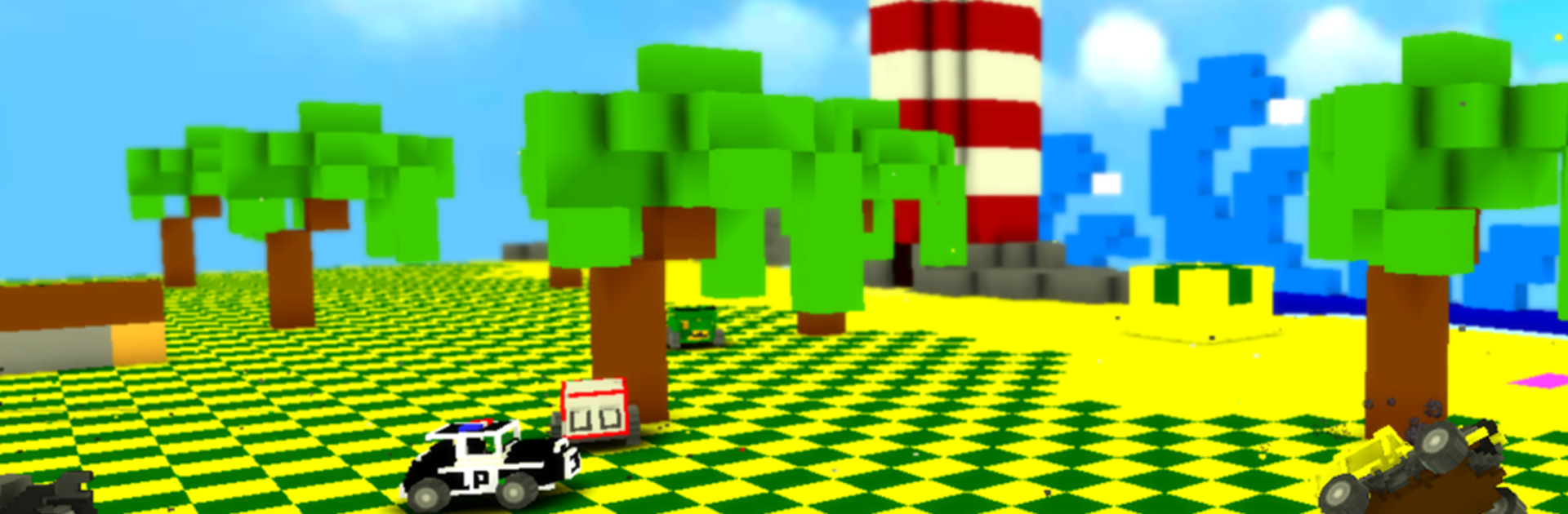
Blocky Demolition Derby brings wild, chaotic fun to the racing genre, ditching fancy paint jobs for boxy cars and gleeful destruction. If you’ve ever wanted to crash cars just to see what happens—yes, while everything explodes into a shower of chunky cubes—this is your playground. Smashing, dodging, and outsmarting other drivers (or tanks!) is the heart of the game, and let’s be honest: half the fun is watching your rivals fall to pieces. Fire it up on your phone or, for snazzier visuals, check it out on BlueStacks.

Game Features

  • Wild Derby Modes
    There’s more than one way to cause mayhem, so try everything from classic demolition brawls to bringing out heavy artillery in tank battles and other war-themed events.

  • Explosive Crashes, Real-Time Destruction
    Collisions aren’t just for show. Watch as cars literally break apart in real-time—bumpers, doors, and even entire chunks go flying thanks to the clever physics engine.

  • Loads of Blocky Rides
    Pick your favorite from about 30 different cars, each with its own quirks. Want to go for style, speed, or maybe you’re just here to cause the loudest crash? Take your pick.

  • Customize and Upgrade
    Spend your derby winnings on upgrades that actually matter. Armor up to take more hits, fine-tune your engine for speed, or play around with boost options for that surprise knockout hit.

  • Tons of Arenas
    Dare to try your luck in over 20 colorful arenas—each with its own traps, layouts, and opportunities for spectacular stunts.

  • Blocky Editor
    Feeling creative? Hop into the blocky editor to tweak existing rides or build your own from scratch. No two cars need to look (or explode) the same.

  • Smooth Performance & Lively Visuals
    Everything runs slick, looks bright, and feels engaging, whether you’re on mobile or using BlueStacks for a bigger, bolder display.

  • Tactical Tips
    Strategy counts here: pick your targets, avoid reckless head-on smashes with tougher foes, and time your attacks for maximum chaos. Boost at just the right moment for a little extra punch.

Slay your opponents with your epic moves. Play it your way on BlueStacks and dominate the battlefield.


Game Features

Enhancements

  • Macros
  • Multi Instance
  • Multi Instance Sync
  • Script
  • Enhancements
Macros

Macros

Automate the predictable in Blocky Demolition Derby and transform your gameplay with Macros. Get access to inventive Macros in the BlueStacks Macro Community
Multi Instance

Multi Instance

Play Blocky Demolition Derby on one window. And chat with your friend on the other. Press CTRL + Shift + 8 to open the Multi-Instance Manager. And start creating fresh instances or clone an existing one.
Multi Instance Sync

Multi Instance Sync

Play Blocky Demolition Derby with the power of Multi-Instance Sync. Replicate what you are doing on the main instance on all other instances. Level up faster, play more.
Script

Script

Script your way to gaming glory in Blocky Demolition Derby with BlueStacks Script. Write and run a set of commands to automate repeated tasks. Trigger the command by assigning it to any key.
Read More

How to Download and Play Blocky Demolition Derby on PC or Mac

  • Download and install BlueStacks on your PC or Mac

  • Complete Google sign-in to access the Play Store, or do it later

  • Look for Blocky Demolition Derby in the search bar at the top right corner

  • Click to install Blocky Demolition Derby from the search results

  • Complete Google sign-in (if you skipped step 2) to install Blocky Demolition Derby

  • Click the Blocky Demolition Derby icon on the home screen to start playing

video
Watch Video

Minimum System Requirements

With BlueStacks 5, you can get started on a PC that fulfills the following requirements.

  • Operating System

    Microsoft Windows 7 or above, macOS 11 (Big Sur) or above

  • Processor

    Intel, AMD or Apple Silicon Processor

  • RAM

    at least 4GB

  • HDD

    10GB Free Disk Space

Note:

* You must be an Administrator on your PC. Up to date graphics drivers from Microsoft or the chipset vendor.

Blocky Demolition Derby - FAQs

  • How to play Blocky Demolition Derby on Windows PC & Mac?

    Play Blocky Demolition Derby on your PC or Mac by following these simple steps.

    • Click on 'Play Blocky Demolition Derby on PC’ to download BlueStacks
    • Install it and log-in to Google Play Store
    • Launch and play the game.
  • Why is BlueStacks the fastest and safest platform to play games on PC?

    BlueStacks respects your privacy and is always safe and secure to use. It does not carry any malware, spyware, or any sort of additional software that could harm your PC.

    It is engineered to optimize speed and performance for a seamless gaming experience.

  • What are Blocky Demolition Derby PC requirements?

    Minimum requirement to run Blocky Demolition Derby on your PC

    • OS: Microsoft Windows 7 or above MacOS 11 (Big Sur) or above
    • Processor: Intel, AMD or Apple Silicon Processor
    • RAM: Your PC must have at least 4GB of RAM. (Note that having 4GB or more disk space is not a substitute for RAM)
    • HDD: 10GB Free Disk Space.
    • You must be an Administrator on your PC.