Grau e Fuga: Online
Grau e Fuga: Online

Grau e Fuga: Online

Racing

| Studios Infinity

Play on PC with BlueStacks or from our cloud

  • Overview
  • Game Features
  • How to Play

Page Modified On: May 18, 2026

Play Grau e Fuga: Online on PC or Mac

Join millions to experience Grau e Fuga: Online, an exciting Racing game from Studios Infinity. With BlueStacks App Player, you are always a step ahead of your opponent, ready to outplay them with faster gameplay and better control with the mouse and keyboard on your PC or Mac.

About the Game

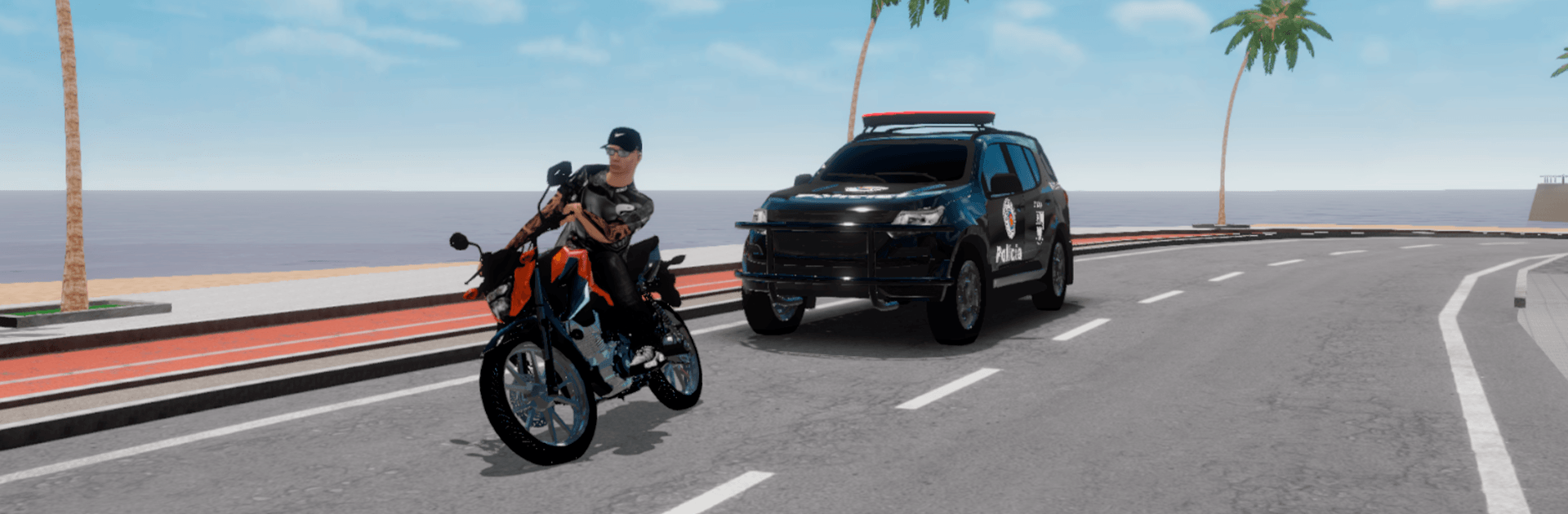
Grau e Fuga: Online puts the thrill of Brazilian street riding in your hands. It’s a fast, free-spirited Racing experience where you and your friends jump online to try wild stunts, quick getaways, and long cruises through sprawling city streets. Pick your bike, find your line, and show off your skills while the world rushes by.

Game Features

  • Authentic Brazilian Streets: Ride through lively neighborhoods and broad avenues that capture the pace and vibe of Brazil’s urban roads.
  • Online With Friends: Squad up in real time, pull off synchronized tricks, and turn any straightaway into your group’s personal showcase.
  • Stunt-Ready Motorcycles: From balanced wheelies to tight stoppies, bikes respond with punchy handling that rewards timing, control, and style.
  • Quick Getaways: Feel the rush of snapping decisions and clean escapes—cut corners, thread gaps, and keep your speed up when things get hectic.
  • Free-Roam Exploration: Prefer to cruise? Explore every block, scout new lines, and discover your favorite hangout spots to meet other riders.
  • Bikes You’ll Want to Ride: Hop on some of the country’s most iconic two-wheel machines, each with its own feel and personality on the asphalt.
  • Smooth on PC: Want the big-screen, keyboard feel? Play through BlueStacks for crisp visuals and responsive controls without losing that street-level intensity.
  • Built for Replays: Try a move, nail it, then push it further—short sessions or long nights both feel great thanks to quick restarts and jump-right-in pacing.

Created by Studios Infinity, Grau e Fuga: Online keeps things focused on speed, flow, and the shared rush of riding with a crew.

Start your journey now. Download the game on BlueStacks, invite your friends, and march on a new adventure.


Game Features

Enhancements

  • Macros
  • Multi Instance
  • Multi Instance Sync
  • Script
  • Enhancements
Macros

Macros

Automate the predictable in Grau e Fuga: Online and transform your gameplay with Macros. Get access to inventive Macros in the BlueStacks Macro Community
Multi Instance

Multi Instance

Play Grau e Fuga: Online on one window. And chat with your friend on the other. Press CTRL + Shift + 8 to open the Multi-Instance Manager. And start creating fresh instances or clone an existing one.
Multi Instance Sync

Multi Instance Sync

Play Grau e Fuga: Online with the power of Multi-Instance Sync. Replicate what you are doing on the main instance on all other instances. Level up faster, play more.
Script

Script

Script your way to gaming glory in Grau e Fuga: Online with BlueStacks Script. Write and run a set of commands to automate repeated tasks. Trigger the command by assigning it to any key.
Read More

How to Download and Play Grau e Fuga: Online on PC or Mac

  • Download and install BlueStacks on your PC or Mac

  • Complete Google sign-in to access the Play Store, or do it later

  • Look for Grau e Fuga: Online in the search bar at the top right corner

  • Click to install Grau e Fuga: Online from the search results

  • Complete Google sign-in (if you skipped step 2) to install Grau e Fuga: Online

  • Click the Grau e Fuga: Online icon on the home screen to start playing

video
Watch Video

Minimum System Requirements

With BlueStacks 5, you can get started on a PC that fulfills the following requirements.

  • Operating System

    Microsoft Windows 7 or above, macOS 11 (Big Sur) or above

  • Processor

    Intel, AMD or Apple Silicon Processor

  • RAM

    at least 4GB

  • HDD

    10GB Free Disk Space

Note:

* You must be an Administrator on your PC. Up to date graphics drivers from Microsoft or the chipset vendor.

Grau e Fuga: Online - FAQs

  • How to play Grau e Fuga: Online on Windows PC & Mac?

    Play Grau e Fuga: Online on your PC or Mac by following these simple steps.

    • Click on 'Play Grau e Fuga: Online on PC’ to download BlueStacks
    • Install it and log-in to Google Play Store
    • Launch and play the game.
  • Why is BlueStacks the fastest and safest platform to play games on PC?

    BlueStacks respects your privacy and is always safe and secure to use. It does not carry any malware, spyware, or any sort of additional software that could harm your PC.

    It is engineered to optimize speed and performance for a seamless gaming experience.

  • What are Grau e Fuga: Online PC requirements?

    Minimum requirement to run Grau e Fuga: Online on your PC

    • OS: Microsoft Windows 7 or above MacOS 11 (Big Sur) or above
    • Processor: Intel, AMD or Apple Silicon Processor
    • RAM: Your PC must have at least 4GB of RAM. (Note that having 4GB or more disk space is not a substitute for RAM)
    • HDD: 10GB Free Disk Space.
    • You must be an Administrator on your PC.