Drift Car Street Racing

Drift Car Street Racing

Racing

| Game Pickle

Play on PC with BlueStacks or from our cloud

  • Overview
  • Game Features
  • How to Play

Page Modified On: July 27, 2026

Play Drift Car Street Racing on PC or Mac

Explore a whole new adventure with Drift Car Street Racing, a Racing game created by Game Pickle. Experience great gameplay with BlueStacks, the most popular gaming platform to play Android games on your PC or Mac.

About the Game

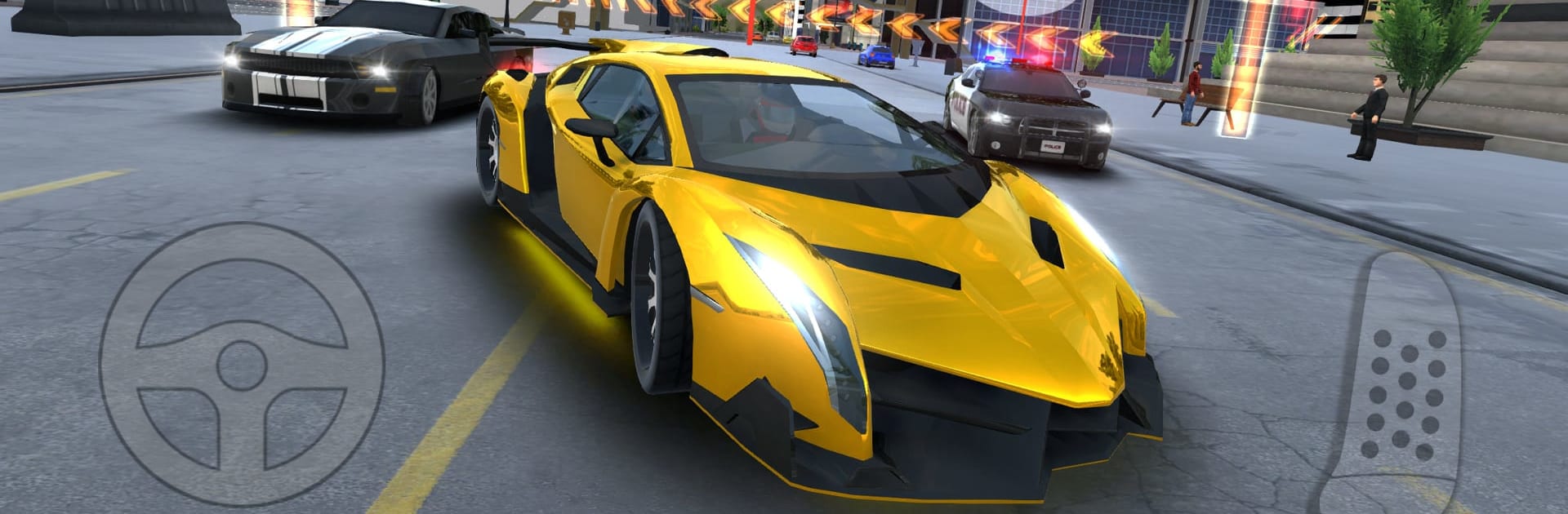
Drift Car Street Racing is a street-smart, open-world Racing game built around stylish drifts, fast sprints, and a whole lot of freedom. Pick your favorite ride, flip between drift and race modes on the fly, and blast through city blocks and off-road trails while stacking cash from missions and risky driving. Want a quick chase, a clean lap, or just to slide around a corner like you own it? It’s all here.

Game Features

  • Open-world playground: Cruise a massive map with cities, highways, forest backroads, canyons, and dirt routes to explore at your pace.
  • 40+ mission types: Kick off races, sprints, circuits, drift runs, knockdowns, time trials, near-miss tasks, and speed-trap challenges from dozens of map markers with a handy mini-map.
  • Switchable driving styles: Tap to swap between race mode for grip and drift mode for controlled slides whenever the road changes.
  • Police pursuits: Trip a radar and patrol cars light you up—lose them with smart lines, shortcuts, or raw speed.
  • Traffic throwdowns: NPC drivers may challenge you; thread through traffic and prove you’re the quicker wheelman.
  • 15 distinctive rides: Muscle cars, supercars, SUVs, and 4x4s—each with its own feel and personality.
  • Deep tuning and style: Upgrade engine, turbo, brakes, suspension, transmission, and tires; tweak camber; add spoilers, neon, plates, and fresh paint to build your perfect setup.
  • Skill pays extra: Earn more for top speed, tight near-misses, long chained drifts, and bold opposite-lane runs in two-way mode.
  • Smooth feel, clean look: Responsive touch or tilt controls, dynamic camera angles, realistic handling, and sharp 3D visuals.
  • Scenic discoveries: Spot rivers, lakes, an old temple, an airport, farms, ruins, and campgrounds while you roam.
  • Plays great on PC: Prefer a bigger screen and keyboard? Fire it up on BlueStacks for a comfy setup.

Ready to top the leaderboard? We bet you do. Let precise controls and sharp visuals optimized on BlueStacks lead you to victory.


Game Features

Enhancements

  • Macros
  • Multi Instance
  • Multi Instance Sync
  • Script
  • Enhancements
Macros

Macros

Automate the predictable in Drift Car Street Racing and transform your gameplay with Macros. Get access to inventive Macros in the BlueStacks Macro Community
Multi Instance

Multi Instance

Play Drift Car Street Racing on one window. And chat with your friend on the other. Press CTRL + Shift + 8 to open the Multi-Instance Manager. And start creating fresh instances or clone an existing one.
Multi Instance Sync

Multi Instance Sync

Play Drift Car Street Racing with the power of Multi-Instance Sync. Replicate what you are doing on the main instance on all other instances. Level up faster, play more.
Script

Script

Script your way to gaming glory in Drift Car Street Racing with BlueStacks Script. Write and run a set of commands to automate repeated tasks. Trigger the command by assigning it to any key.
Read More

How to Download and Play Drift Car Street Racing on PC or Mac

  • Download and install BlueStacks on your PC or Mac

  • Complete Google sign-in to access the Play Store, or do it later

  • Look for Drift Car Street Racing in the search bar at the top right corner

  • Click to install Drift Car Street Racing from the search results

  • Complete Google sign-in (if you skipped step 2) to install Drift Car Street Racing

  • Click the Drift Car Street Racing icon on the home screen to start playing

video
Watch Video

Minimum System Requirements

With BlueStacks 5, you can get started on a PC that fulfills the following requirements.

  • Operating System

    Microsoft Windows 7 or above, macOS 11 (Big Sur) or above

  • Processor

    Intel, AMD or Apple Silicon Processor

  • RAM

    at least 4GB

  • HDD

    10GB Free Disk Space

Note:

* You must be an Administrator on your PC. Up to date graphics drivers from Microsoft or the chipset vendor.

Drift Car Street Racing - FAQs

  • How to play Drift Car Street Racing on Windows PC & Mac?

    Play Drift Car Street Racing on your PC or Mac by following these simple steps.

    • Click on 'Play Drift Car Street Racing on PC’ to download BlueStacks
    • Install it and log-in to Google Play Store
    • Launch and play the game.
  • Why is BlueStacks the fastest and safest platform to play games on PC?

    BlueStacks respects your privacy and is always safe and secure to use. It does not carry any malware, spyware, or any sort of additional software that could harm your PC.

    It is engineered to optimize speed and performance for a seamless gaming experience.

  • What are Drift Car Street Racing PC requirements?

    Minimum requirement to run Drift Car Street Racing on your PC

    • OS: Microsoft Windows 7 or above MacOS 11 (Big Sur) or above
    • Processor: Intel, AMD or Apple Silicon Processor
    • RAM: Your PC must have at least 4GB of RAM. (Note that having 4GB or more disk space is not a substitute for RAM)
    • HDD: 10GB Free Disk Space.
    • You must be an Administrator on your PC.