Max Speed: 3D Stunt Race

Max Speed: 3D Stunt Race

Racing

| SMOKOKO LTD

Play on PC with BlueStacks or from our cloud

  • Overview
  • Game Features
  • How to Play

Page Modified On: August 11, 2026

Play Max Speed: 3D Stunt Race on PC or Mac

Step into the World of Max Speed: 3D Stunt Race, a thrilling Racing game from the house of SMOKOKO LTD. Play this Android game on BlueStacks App Player and experience immersive gaming on PC or Mac.

About the Game

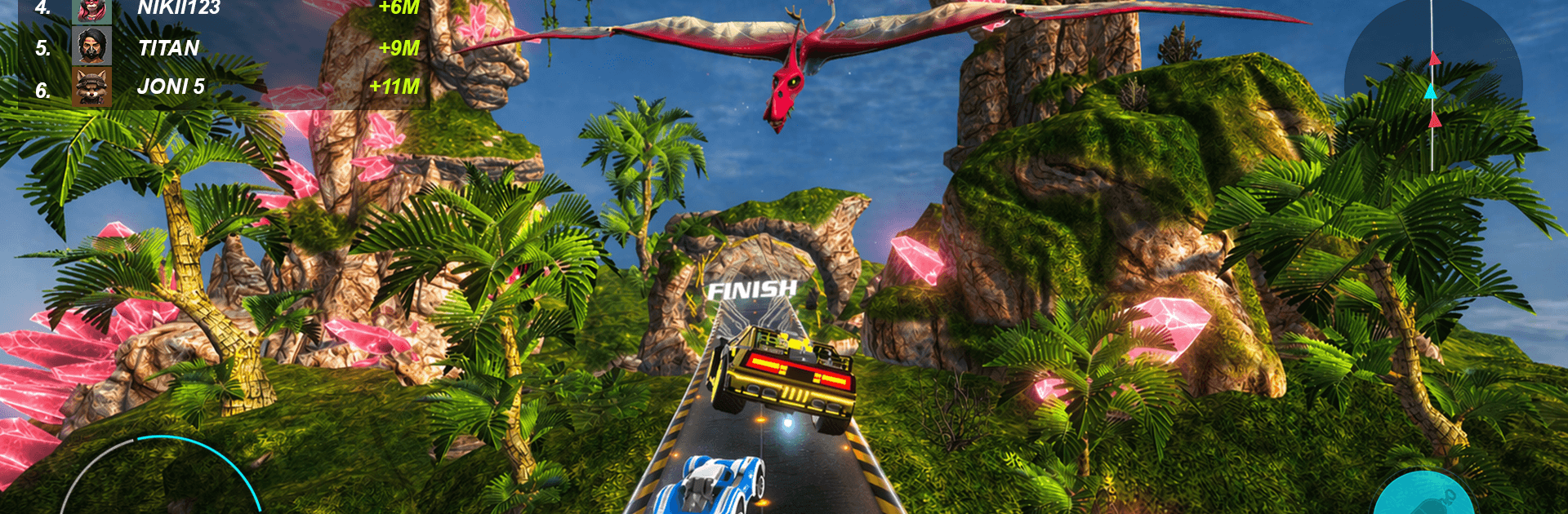
Max Speed: 3D Stunt Race throws you onto outrageous 3D tracks built for big air, dirty drifts, and photo‑finish showdowns. It’s fast, flashy, and a little bit chaotic in the best way—one minute you’re flying over waterfalls and dinosaurs, the next you’re threading a cave lit by giant mushrooms. Chase new cars, nail tougher tricks, and keep pushing your limits. Prefer a bigger screen? It also runs smoothly on BlueStacks.

Game Features

  • Wild 3D tracks: Sprint across floating islands, icy valleys, lava-lined roads, and glowing caverns—each with fresh hazards, shortcuts, and stunt spots.
  • Pick your ride: Choose from 11 distinct cars, from low-slung speedsters to burly off-road beasts, each with its own feel.
  • Tune it your way: Bolt on turbo and nitro, stiffen suspension, tweak chip tuning, and paint it loud. Spoilers, skins, and colorful finishes make your car unmistakably yours.
  • Stunts that matter: Front flips, backflips, barrel rolls, and combo jumps aren’t just for show—they can shave seconds and save sloppy landings.
  • Modes for every mood: Tackle a multi-chapter Career, jump into Tournaments, or squeeze in quick Daily Races. Season Pass challenges keep the goals coming.
  • Real driving, real risk: Master drifts, time your boosts, and thread obstacles at full tilt. Precision beats brute speed.
  • Challenge variety: Face 11 race types, including time trials, checkpoint sprints, and elimination runs that crank up the pressure.
  • Earn and collect: Open rewards to snag currencies, boosters, car and paint cards, skins, and avatars. Track milestones with in-game achievements and grow your garage.

Start playing Max Speed: 3D Stunt Race on BlueStacks and get a smoother, more comfortable PC or Mac setup.


Game Features

Enhancements

  • Macros
  • Multi Instance
  • Multi Instance Sync
  • Script
  • Enhancements
Macros

Macros

Automate the predictable in Max Speed: 3D Stunt Race and transform your gameplay with Macros. Get access to inventive Macros in the BlueStacks Macro Community
Multi Instance

Multi Instance

Play Max Speed: 3D Stunt Race on one window. And chat with your friend on the other. Press CTRL + Shift + 8 to open the Multi-Instance Manager. And start creating fresh instances or clone an existing one.
Multi Instance Sync

Multi Instance Sync

Play Max Speed: 3D Stunt Race with the power of Multi-Instance Sync. Replicate what you are doing on the main instance on all other instances. Level up faster, play more.
Script

Script

Script your way to gaming glory in Max Speed: 3D Stunt Race with BlueStacks Script. Write and run a set of commands to automate repeated tasks. Trigger the command by assigning it to any key.
Read More

How to Download and Play Max Speed: 3D Stunt Race on PC or Mac

  • Download and install BlueStacks on your PC or Mac

  • Complete Google sign-in to access the Play Store, or do it later

  • Look for Max Speed: 3D Stunt Race in the search bar at the top right corner

  • Click to install Max Speed: 3D Stunt Race from the search results

  • Complete Google sign-in (if you skipped step 2) to install Max Speed: 3D Stunt Race

  • Click the Max Speed: 3D Stunt Race icon on the home screen to start playing

video
Watch Video

Minimum System Requirements

With BlueStacks 5, you can get started on a PC that fulfills the following requirements.

  • Operating System

    Microsoft Windows 7 or above, macOS 11 (Big Sur) or above

  • Processor

    Intel, AMD or Apple Silicon Processor

  • RAM

    at least 4GB

  • HDD

    10GB Free Disk Space

Note:

* You must be an Administrator on your PC. Up to date graphics drivers from Microsoft or the chipset vendor.

Max Speed: 3D Stunt Race - FAQs

  • How to play Max Speed: 3D Stunt Race on Windows PC & Mac?

    Play Max Speed: 3D Stunt Race on your PC or Mac by following these simple steps.

    • Click on 'Play Max Speed: 3D Stunt Race on PC’ to download BlueStacks
    • Install it and log-in to Google Play Store
    • Launch and play the game.
  • Why is BlueStacks the fastest and safest platform to play games on PC?

    BlueStacks respects your privacy and is always safe and secure to use. It does not carry any malware, spyware, or any sort of additional software that could harm your PC.

    It is engineered to optimize speed and performance for a seamless gaming experience.

  • What are Max Speed: 3D Stunt Race PC requirements?

    Minimum requirement to run Max Speed: 3D Stunt Race on your PC

    • OS: Microsoft Windows 7 or above MacOS 11 (Big Sur) or above
    • Processor: Intel, AMD or Apple Silicon Processor
    • RAM: Your PC must have at least 4GB of RAM. (Note that having 4GB or more disk space is not a substitute for RAM)
    • HDD: 10GB Free Disk Space.
    • You must be an Administrator on your PC.