Mini4WD
Mini4WD

Mini4WD

Racing

| D_bEAR

Play on PC with BlueStacks or from our cloud

  • Overview
  • Game Features
  • How to Play

Page Modified On: January 09, 2026

Play Mini4WD on PC or Mac

Bring your A-game to Mini4WD, the Racing game sensation from D_bEAR. Give your gameplay the much-needed boost with precise game controls, high FPS graphics, and top-tier features on your PC or Mac with BlueStacks.

About the Game

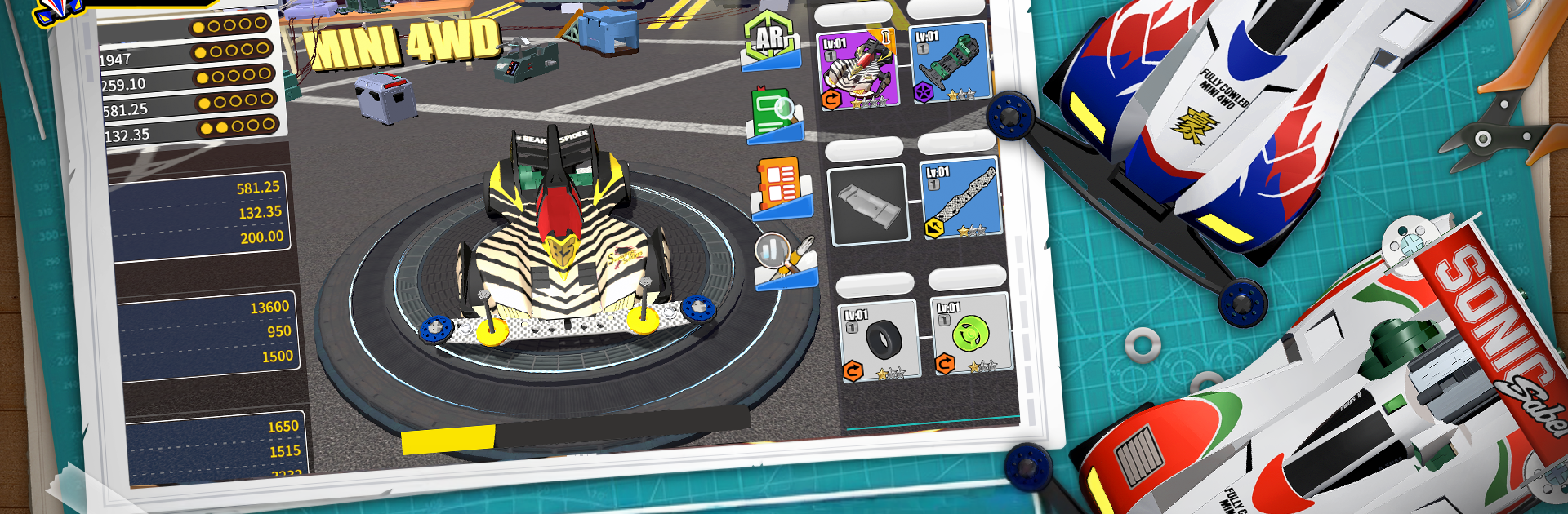
Mini4WD from D_bEAR is a Racing game all about building, tuning, and unleashing tiny speed machines on serious tracks. Swap and tweak real-world-style parts to shape how your car accelerates, grips, and holds up over long runs, then watch it burn through story events and live races. Prefer a bigger screen? It plays great on BlueStacks too.

Game Features

  • Authentic Classics, Fresh Energy: Recognizable mini racers and familiar personalities make a comeback with a modern touch, bringing that nostalgic model-car spirit to your screen.

  • Build It Your Way: Mix bodyshells, chassis, motors, and more. With hundreds of components, you can tune performance and style until your car feels exactly right.

  • DIY Looks That Pop: Paint jobs, decals, color swaps, and cosmetic mods let you craft a ride that stands out on the grid as much as it does on the timing board.

  • Real Performance Tuning: Speed, acceleration, battery life, stability—every part affects how your car behaves. Match your setup to different track demands and chase the perfect run.

  • Tracks That Feel Real: Hear the motor whine, sense the tire friction, and launch with a simple tap. The focus is on smart prep and timing rather than complicated controls.

  • Fair, Fast Head-to-Head: Go toe-to-toe with friends or other players in live competitions that put your build and tuning choices to the test.

  • Story for the Fans: Play through a classic-style campaign packed with throwbacks and rival moments, a nice nod to the roots of Mini 4WD racing.

Get ready for a buttery smooth, high-performance gaming action only on BlueStacks.

Game Features

Enhancements

  • Macros
  • Multi Instance
  • Multi Instance Sync
  • Script
  • Enhancements
Macros

Macros

Automate the predictable in Mini4WD and transform your gameplay with Macros. Get access to inventive Macros in the BlueStacks Macro Community
Multi Instance

Multi Instance

Play Mini4WD on one window. And chat with your friend on the other. Press CTRL + Shift + 8 to open the Multi-Instance Manager. And start creating fresh instances or clone an existing one.
Multi Instance Sync

Multi Instance Sync

Play Mini4WD with the power of Multi-Instance Sync. Replicate what you are doing on the main instance on all other instances. Level up faster, play more.
Script

Script

Script your way to gaming glory in Mini4WD with BlueStacks Script. Write and run a set of commands to automate repeated tasks. Trigger the command by assigning it to any key.
Read More

How to Download and Play Mini4WD on PC or Mac

  • Download and install BlueStacks on your PC or Mac

  • Complete Google sign-in to access the Play Store, or do it later

  • Look for Mini4WD in the search bar at the top right corner

  • Click to install Mini4WD from the search results

  • Complete Google sign-in (if you skipped step 2) to install Mini4WD

  • Click the Mini4WD icon on the home screen to start playing

video
Watch Video

Minimum System Requirements

With BlueStacks 5, you can get started on a PC that fulfills the following requirements.

  • Operating System

    Microsoft Windows 7 or above, macOS 11 (Big Sur) or above

  • Processor

    Intel, AMD or Apple Silicon Processor

  • RAM

    at least 4GB

  • HDD

    10GB Free Disk Space

Note:

* You must be an Administrator on your PC. Up to date graphics drivers from Microsoft or the chipset vendor.

Mini4WD - FAQs

  • How to play Mini4WD on Windows PC & Mac?

    Play Mini4WD on your PC or Mac by following these simple steps.

    • Click on 'Play Mini4WD on PC’ to download BlueStacks
    • Install it and log-in to Google Play Store
    • Launch and play the game.
  • Why is BlueStacks the fastest and safest platform to play games on PC?

    BlueStacks respects your privacy and is always safe and secure to use. It does not carry any malware, spyware, or any sort of additional software that could harm your PC.

    It is engineered to optimize speed and performance for a seamless gaming experience.

  • What are Mini4WD PC requirements?

    Minimum requirement to run Mini4WD on your PC

    • OS: Microsoft Windows 7 or above MacOS 11 (Big Sur) or above
    • Processor: Intel, AMD or Apple Silicon Processor
    • RAM: Your PC must have at least 4GB of RAM. (Note that having 4GB or more disk space is not a substitute for RAM)
    • HDD: 10GB Free Disk Space.
    • You must be an Administrator on your PC.