Offroad Rally: Car Driving 3D

Offroad Rally: Car Driving 3D

Racing

| Buggies Bros.

Play on PC with BlueStacks or from our cloud

  • Overview
  • Game Features
  • How to Play

Page Modified On: October 12, 2026

Play Offroad Rally: Car Driving 3D on PC or Mac

Play Offroad Rally: Car Driving 3D by Buggies Bros. on PC or Mac with BlueStacks. Use a bigger screen, mouse and keyboard controls, and smoother performance while you play.

About the Game

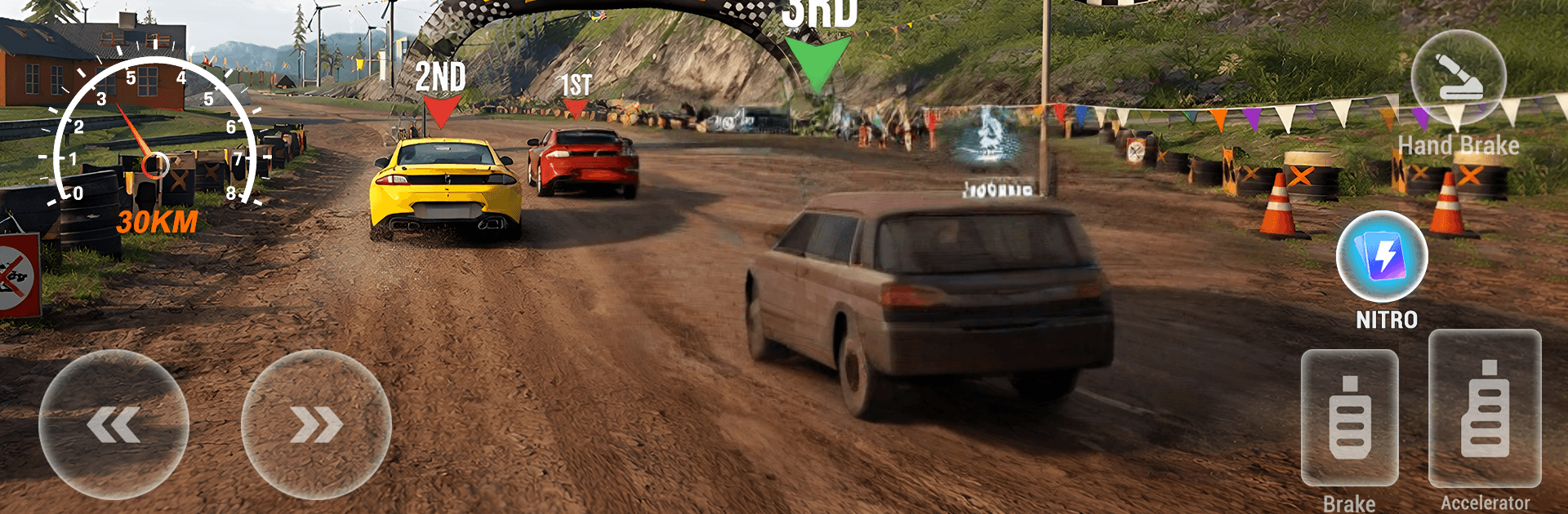
Offroad Rally: Car Driving 3D puts you on rough tracks where mud, rocks, and ruts keep you honest at every turn. It’s a no-frills off-road Racing ride with smooth handling, quick-hit missions, and time trials that test precision. If you like a bigger view and tighter inputs, it also plays comfortably on PC with BlueStacks.

Game Features

  • Authentic handling: Feel the weight of your car as grip shifts between gravel, mud, and rock.
  • Mission-based runs: Knock out focused objectives that sharpen timing, control, and consistency across varied routes.
  • Time trials that matter: Learn lines, shave seconds, and push for cleaner, faster stages.
  • Free drive exploration: Wander open terrain to practice techniques, scout shortcuts, or just fling dirt for fun.
  • Tough terrain and obstacles: Tackle ruts, bumps, steep climbs, and sketchy descents that punish sloppy throttle.
  • Multiple control layouts: Choose tilt, a virtual steering wheel, or classic buttons—whatever feels right in your hands.
  • Dynamic weather: Rain, fog, and clear skies change visibility and traction, so you’ll adapt on the fly.
  • Smooth, responsive feel: Snappy inputs and stable handling help you correct slides and thread tight corners.
  • Progression and collectibles: Find items, chase goals, and see steady improvement run after run.
  • Offline play: Hit the trails anytime without needing a connection.
  • Built-in screenshots: Capture clutch saves, wild drifts, and those perfect, mud-splattered vistas.

Ready to top the leaderboard? We bet you do. Let precise controls and sharp visuals optimized on BlueStacks lead you to victory.


Game Features

Enhancements

  • Macros
  • Multi Instance
  • Multi Instance Sync
  • Script
  • Enhancements
Macros

Macros

Automate the predictable in Offroad Rally: Car Driving 3D and transform your gameplay with Macros. Get access to inventive Macros in the BlueStacks Macro Community
Multi Instance

Multi Instance

Play Offroad Rally: Car Driving 3D on one window. And chat with your friend on the other. Press CTRL + Shift + 8 to open the Multi-Instance Manager. And start creating fresh instances or clone an existing one.
Multi Instance Sync

Multi Instance Sync

Play Offroad Rally: Car Driving 3D with the power of Multi-Instance Sync. Replicate what you are doing on the main instance on all other instances. Level up faster, play more.
Script

Script

Script your way to gaming glory in Offroad Rally: Car Driving 3D with BlueStacks Script. Write and run a set of commands to automate repeated tasks. Trigger the command by assigning it to any key.
Read More

How to Download and Play Offroad Rally: Car Driving 3D on PC or Mac

  • Download and install BlueStacks on your PC or Mac

  • Complete Google sign-in to access the Play Store, or do it later

  • Look for Offroad Rally: Car Driving 3D in the search bar at the top right corner

  • Click to install Offroad Rally: Car Driving 3D from the search results

  • Complete Google sign-in (if you skipped step 2) to install Offroad Rally: Car Driving 3D

  • Click the Offroad Rally: Car Driving 3D icon on the home screen to start playing

video
Watch Video

Minimum System Requirements

With BlueStacks 5, you can get started on a PC that fulfills the following requirements.

  • Operating System

    Microsoft Windows 7 or above, macOS 11 (Big Sur) or above

  • Processor

    Intel, AMD or Apple Silicon Processor

  • RAM

    at least 4GB

  • HDD

    10GB Free Disk Space

Note:

* You must be an Administrator on your PC. Up to date graphics drivers from Microsoft or the chipset vendor.

Offroad Rally: Car Driving 3D - FAQs

  • How to play Offroad Rally: Car Driving 3D on Windows PC & Mac?

    Play Offroad Rally: Car Driving 3D on your PC or Mac by following these simple steps.

    • Click on 'Play Offroad Rally: Car Driving 3D on PC’ to download BlueStacks
    • Install it and log-in to Google Play Store
    • Launch and play the game.
  • Why is BlueStacks the fastest and safest platform to play games on PC?

    BlueStacks respects your privacy and is always safe and secure to use. It does not carry any malware, spyware, or any sort of additional software that could harm your PC.

    It is engineered to optimize speed and performance for a seamless gaming experience.

  • What are Offroad Rally: Car Driving 3D PC requirements?

    Minimum requirement to run Offroad Rally: Car Driving 3D on your PC

    • OS: Microsoft Windows 7 or above MacOS 11 (Big Sur) or above
    • Processor: Intel, AMD or Apple Silicon Processor
    • RAM: Your PC must have at least 4GB of RAM. (Note that having 4GB or more disk space is not a substitute for RAM)
    • HDD: 10GB Free Disk Space.
    • You must be an Administrator on your PC.