Pro Racer: Car Racing Offline

Pro Racer: Car Racing Offline

Racing

| Funverse IEG

Play on PC with BlueStacks or from our cloud

  • Overview
  • Game Features
  • How to Play

Page Modified On: September 25, 2026

Play Pro Racer: Car Racing Offline on PC or Mac

Explore a whole new adventure with Pro Racer: Car Racing Offline, a Racing game created by Funverse IEG. Experience great gameplay with BlueStacks, the most popular gaming platform to play Android games on your PC or Mac.

About the Game

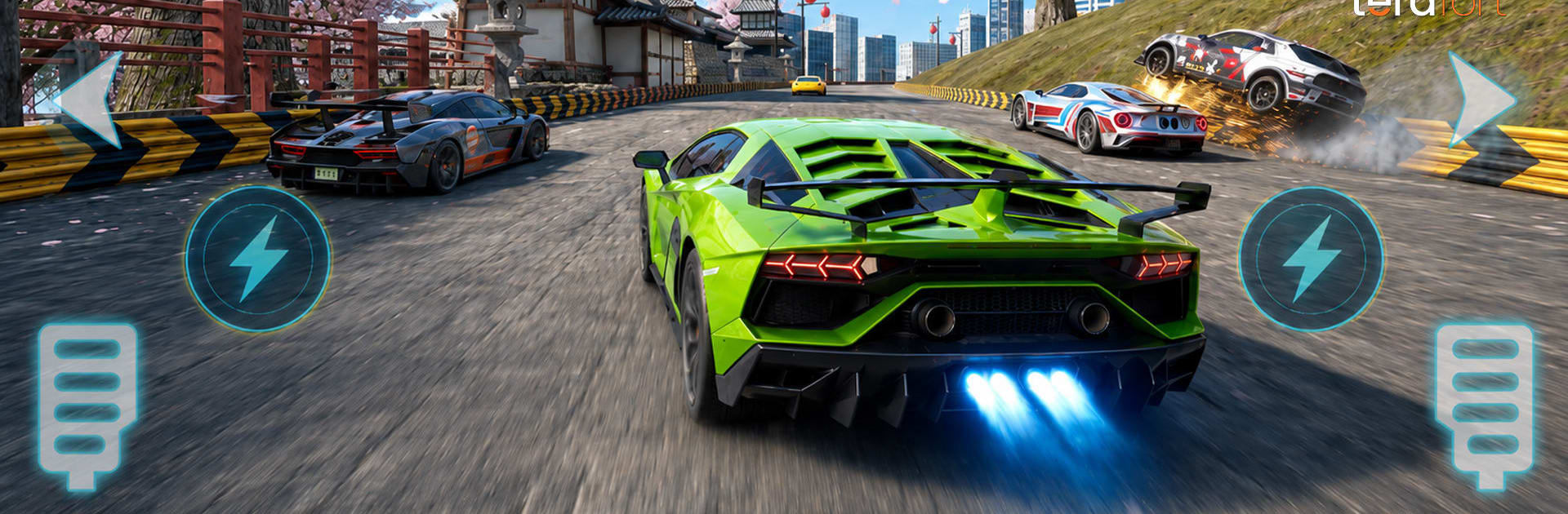
Pro Racer: Car Racing Offline drops you into fast, white‑knuckle street action you can play absolutely anywhere. It’s a Racing game built for both quick bursts and long sessions—no connection needed. Climb a multi‑season career, collect modern cars, and master a mix of sprints, drifts, and circuits; if you like a bigger screen, it also runs smoothly on BlueStacks.

Game Features

  • Career Ladder: Tackle five championship seasons with 100+ events, moving from rookie streets to a Grand Masters showdown.
  • World‑City Courses: Rip through urban highways, coastal runs, sweeping bridges, and tight technical circuits, each with its own rhythm.
  • Six Ways to Compete: Jump into City Sprint, Elimination, Drift, Drag, Time Trial, and multi‑lap Circuit events.
  • Build Your Garage: Unlock 30+ modern machines across C, B, A, and S classes, each with detailed stats for top speed, acceleration, NOS, and handling.
  • Tune & Personalize: Squeeze out extra performance with upgrades, fine‑tune parts in the Mod Shop, and stand out with custom paint and liveries.
  • Choose Your Controls: Pick what feels right—virtual steering wheel, tap buttons, or tilt your device for natural steering.
  • Go All‑Out With Nitro: Charge NOS, weave through traffic, launch off ramps for air time, and use knockdowns to carve a clear path.
  • Damage & Repairs: Impacts matter here—manage wear and fix up your ride between events to stay competitive.
  • License Progression: Earn XP to raise your driver license tier and unlock tougher competitions along the way.
  • Achievements To Chase: Knock out 50+ challenges that celebrate clean lines, huge drifts, clutch wins, and smart tuning.

Start playing Pro Racer: Car Racing Offline on BlueStacks and get a smoother, more comfortable PC or Mac setup.


Game Features

Enhancements

  • Macros
  • Multi Instance
  • Multi Instance Sync
  • Script
  • Enhancements
Macros

Macros

Automate the predictable in Pro Racer: Car Racing Offline and transform your gameplay with Macros. Get access to inventive Macros in the BlueStacks Macro Community
Multi Instance

Multi Instance

Play Pro Racer: Car Racing Offline on one window. And chat with your friend on the other. Press CTRL + Shift + 8 to open the Multi-Instance Manager. And start creating fresh instances or clone an existing one.
Multi Instance Sync

Multi Instance Sync

Play Pro Racer: Car Racing Offline with the power of Multi-Instance Sync. Replicate what you are doing on the main instance on all other instances. Level up faster, play more.
Script

Script

Script your way to gaming glory in Pro Racer: Car Racing Offline with BlueStacks Script. Write and run a set of commands to automate repeated tasks. Trigger the command by assigning it to any key.
Read More

How to Download and Play Pro Racer: Car Racing Offline on PC or Mac

  • Download and install BlueStacks on your PC or Mac

  • Complete Google sign-in to access the Play Store, or do it later

  • Look for Pro Racer: Car Racing Offline in the search bar at the top right corner

  • Click to install Pro Racer: Car Racing Offline from the search results

  • Complete Google sign-in (if you skipped step 2) to install Pro Racer: Car Racing Offline

  • Click the Pro Racer: Car Racing Offline icon on the home screen to start playing

video
Watch Video

Minimum System Requirements

With BlueStacks 5, you can get started on a PC that fulfills the following requirements.

  • Operating System

    Microsoft Windows 7 or above, macOS 11 (Big Sur) or above

  • Processor

    Intel, AMD or Apple Silicon Processor

  • RAM

    at least 4GB

  • HDD

    10GB Free Disk Space

Note:

* You must be an Administrator on your PC. Up to date graphics drivers from Microsoft or the chipset vendor.

Pro Racer: Car Racing Offline - FAQs

  • How to play Pro Racer: Car Racing Offline on Windows PC & Mac?

    Play Pro Racer: Car Racing Offline on your PC or Mac by following these simple steps.

    • Click on 'Play Pro Racer: Car Racing Offline on PC’ to download BlueStacks
    • Install it and log-in to Google Play Store
    • Launch and play the game.
  • Why is BlueStacks the fastest and safest platform to play games on PC?

    BlueStacks respects your privacy and is always safe and secure to use. It does not carry any malware, spyware, or any sort of additional software that could harm your PC.

    It is engineered to optimize speed and performance for a seamless gaming experience.

  • What are Pro Racer: Car Racing Offline PC requirements?

    Minimum requirement to run Pro Racer: Car Racing Offline on your PC

    • OS: Microsoft Windows 7 or above MacOS 11 (Big Sur) or above
    • Processor: Intel, AMD or Apple Silicon Processor
    • RAM: Your PC must have at least 4GB of RAM. (Note that having 4GB or more disk space is not a substitute for RAM)
    • HDD: 10GB Free Disk Space.
    • You must be an Administrator on your PC.