RPM: Next
RPM: Next

RPM: Next

Racing

| AKILLIMUM TECHNOLOGY OÜ

Play on PC with BlueStacks or from our cloud

  • Overview
  • Game Features
  • How to Play

Page Modified On: July 20, 2026

Play RPM: Next on PC or Mac

Bring your A-game to RPM: Next, the Racing game sensation from AKILLIMUM TECHNOLOGY OÜ. Give your gameplay the much-needed boost with precise game controls, high FPS graphics, and top-tier features on your PC or Mac with BlueStacks.

About the Game

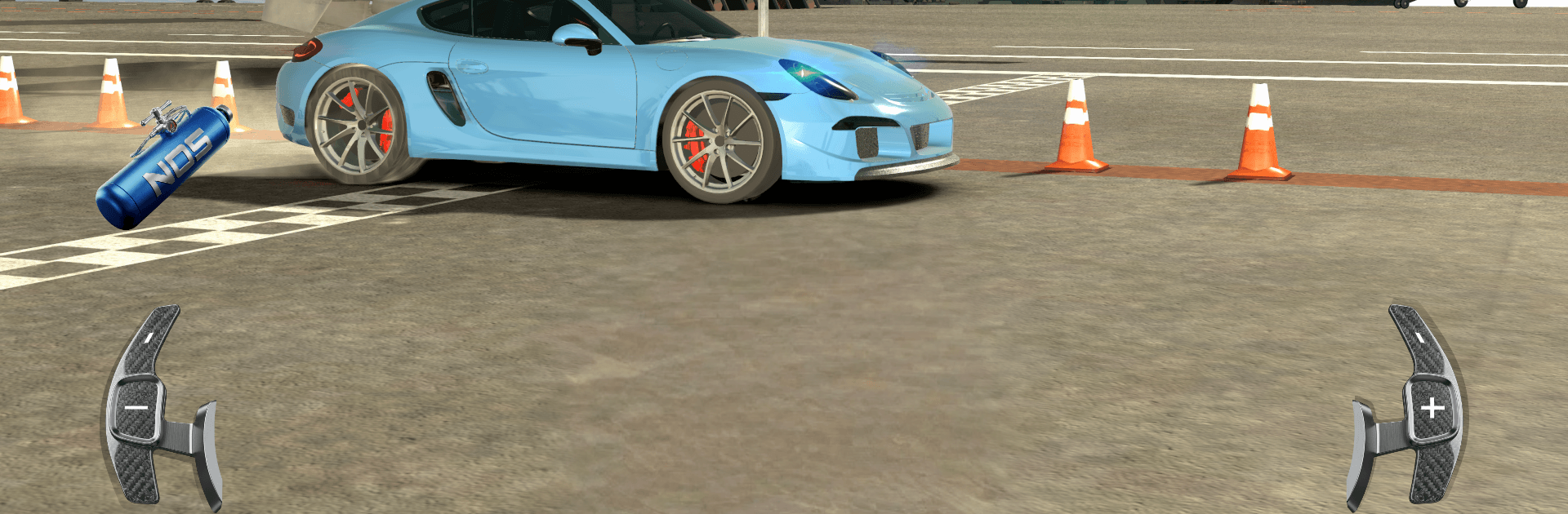
RPM: Next drops you into gritty, straight-line street battles where timing and tuning matter more than flashy drift tricks. Crews control the city block by block, and you’re out to take their turf one perfectly timed run at a time. It’s a focused tech demo that spotlights the heart of drag racing—clean launches, crisp shifts, and machines built to win. Prefer a bigger screen? It plays smoothly on PC with BlueStacks.

Game Features

  • City Takeover Campaign: Work across a living city map where each district belongs to a different crew. Win races to cut into their control, then challenge the boss to claim the block.
  • Precision Drag Racing: Nail the launch, watch your revs, and hit each gear right on cue. Miss the window and you’ll feel it—this physics-driven model rewards tight execution.
  • Build Your Beast: Tinker in the garage with engines, nitrous, suspension, and gearbox tweaks. Upgrades aren’t just cosmetic—you’ll feel the gains down the strip.
  • High-Impact Presentation: Punchy engine audio, tire scream, and sharp visual touches make every run feel tense and loud, like you’re shoulder-to-shoulder on the asphalt.
  • Boss Showdowns: Each leader drives differently. Learn their habits, counter their rhythm, and send them packing to expand your turf.
  • Tech Demo Focus: This release zeroes in on core systems and handling. It’s a clean slice of the experience with more modes, vehicles, and surprises planned down the road.

Start your journey now. Download the game on BlueStacks, invite your friends, and march on a new adventure.


Game Features

Enhancements

  • Macros
  • Multi Instance
  • Multi Instance Sync
  • Script
  • Enhancements
Macros

Macros

Automate the predictable in RPM: Next and transform your gameplay with Macros. Get access to inventive Macros in the BlueStacks Macro Community
Multi Instance

Multi Instance

Play RPM: Next on one window. And chat with your friend on the other. Press CTRL + Shift + 8 to open the Multi-Instance Manager. And start creating fresh instances or clone an existing one.
Multi Instance Sync

Multi Instance Sync

Play RPM: Next with the power of Multi-Instance Sync. Replicate what you are doing on the main instance on all other instances. Level up faster, play more.
Script

Script

Script your way to gaming glory in RPM: Next with BlueStacks Script. Write and run a set of commands to automate repeated tasks. Trigger the command by assigning it to any key.
Read More

How to Download and Play RPM: Next on PC or Mac

  • Download and install BlueStacks on your PC or Mac

  • Complete Google sign-in to access the Play Store, or do it later

  • Look for RPM: Next in the search bar at the top right corner

  • Click to install RPM: Next from the search results

  • Complete Google sign-in (if you skipped step 2) to install RPM: Next

  • Click the RPM: Next icon on the home screen to start playing

video
Watch Video

Minimum System Requirements

With BlueStacks 5, you can get started on a PC that fulfills the following requirements.

  • Operating System

    Microsoft Windows 7 or above, macOS 11 (Big Sur) or above

  • Processor

    Intel, AMD or Apple Silicon Processor

  • RAM

    at least 4GB

  • HDD

    10GB Free Disk Space

Note:

* You must be an Administrator on your PC. Up to date graphics drivers from Microsoft or the chipset vendor.

RPM: Next - FAQs

  • How to play RPM: Next on Windows PC & Mac?

    Play RPM: Next on your PC or Mac by following these simple steps.

    • Click on 'Play RPM: Next on PC’ to download BlueStacks
    • Install it and log-in to Google Play Store
    • Launch and play the game.
  • Why is BlueStacks the fastest and safest platform to play games on PC?

    BlueStacks respects your privacy and is always safe and secure to use. It does not carry any malware, spyware, or any sort of additional software that could harm your PC.

    It is engineered to optimize speed and performance for a seamless gaming experience.

  • What are RPM: Next PC requirements?

    Minimum requirement to run RPM: Next on your PC

    • OS: Microsoft Windows 7 or above MacOS 11 (Big Sur) or above
    • Processor: Intel, AMD or Apple Silicon Processor
    • RAM: Your PC must have at least 4GB of RAM. (Note that having 4GB or more disk space is not a substitute for RAM)
    • HDD: 10GB Free Disk Space.
    • You must be an Administrator on your PC.