Chiến Binh Devias
Chiến Binh Devias

Chiến Binh Devias

Role Playing

| Nguyen Dinh Vuong

Play on PC with BlueStacks or from our cloud

  • Overview
  • Game Features
  • How to Play

Page Modified On: April 24, 2026

Play Chiến Binh Devias on PC or Mac

From the innovators and creators at Nguyen Dinh Vuong, Chiến Binh Devias is another fun addition to the World of Role Playing games. Go beyond your mobile screen and play it bigger and better on your PC or Mac. An immersive experience awaits you.

About the Game

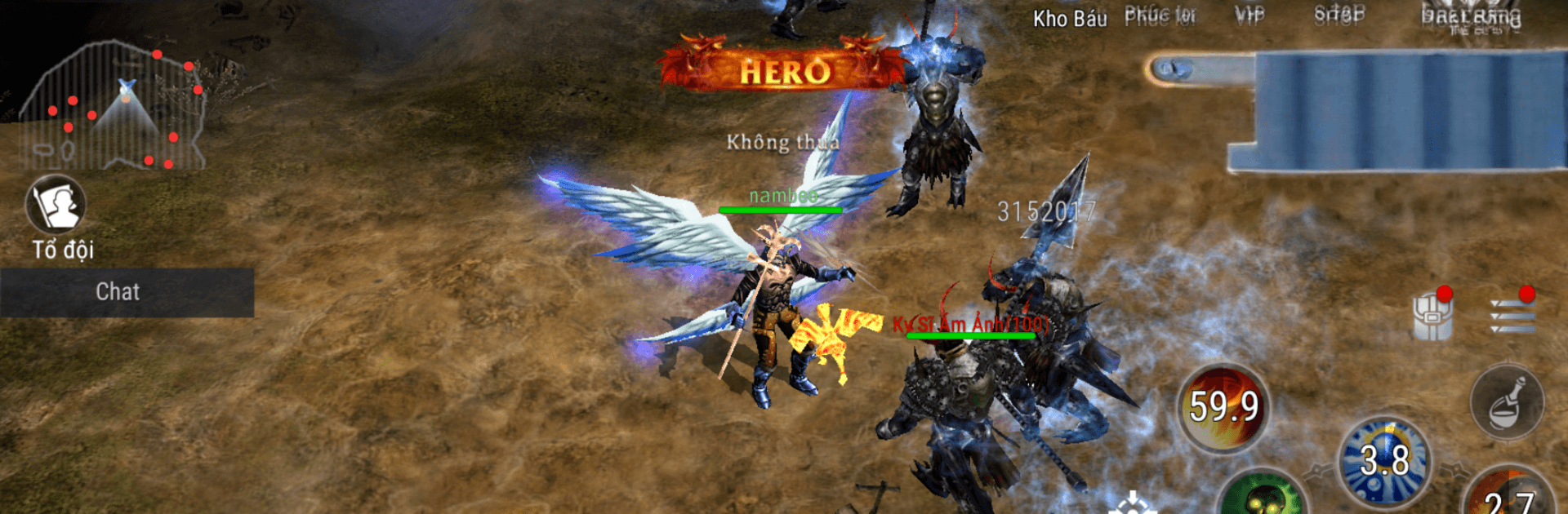
Chiến Binh Devias drops you into a harsh, mystical land where the cold bites and darker things bite harder. You pick a path—blade, spell, or something in between—and push back the shadow threatening to swallow Devias whole. Built by Nguyen Dinh Vuong, it’s a Role Playing world made for long sessions on mobile (and it feels right at home on BlueStacks if you like a keyboard and mouse).

Game Features

  • A realm on the brink: Explore a snow‑swept kingdom caught between ancient magic and invading darkness, with humans, elves, and fearsome creatures all tangled in the fight for survival.
  • Classes with identity: Jump in as a battle-tested warrior, a sharp-minded mage, or other specialized roles. Each choice nudges your playstyle in a different direction, from close‑quarters brawling to devastating spellwork.
  • Real-time, reactive combat: Time your skills, weave in basic attacks, and manage cooldowns to survive brutal clashes. Big hits feel hefty; spells crackle and leave a mark.
  • Party up for tougher foes: Some threats won’t fall alone. Link up with other players for challenging encounters, coordinate your abilities, and watch the battlefield turn in your favor.
  • Quests with mystery: Track down rumors, clear out corrupted zones, and uncover what’s poisoning the heart of Devias—one clue, one dungeon, one boss at a time.
  • Meaningful progression: Grow stronger with new abilities and better gear as you refine a build that actually fits how you like to fight.
  • Living world vibes: Meet allies and rivals in bustling hubs, share strategies, and form squads that stick together when things get messy.
  • Looks that tell a story: Frosted ruins, haunted forests, and glittering spell effects set the mood, whether you’re roaming solo or pushing endgame challenges with friends.

Slay your opponents with your epic moves. Play it your way on BlueStacks and dominate the battlefield.


Game Features

Enhancements

  • Macros
  • Rerolling
  • Eco Mode
  • Multi Instance Sync
  • Enhancements
Macros

Macros

Focus more on the fun part of the game, skip the tedious aspects. Master Chiến Binh Devias with Macros. Record yourself completing the monotonous tasks you wish to automate and replay them later with just one keypress.
Rerolling

Rerolling

Speed up the rerolling process in Chiến Binh Devias. Perform multiple summons and keep looking for the best Heroes. Use Multi-Instance sync to replicate the rerolling mechanism in all instances.
Eco Mode

Eco Mode

Farm in-game resources with ease in Chiến Binh Devias. Enable the Eco Mode when running the game in multiple instances. And lower your PC's resource consumption.
Multi Instance Sync

Multi Instance Sync

With the Multi-instance Sync, you can do even more in Chiến Binh Devias. Sync the action of the main instance and repeat them in real time for all other instances. Sync and sit back, let the game progress unfold.
Read More

How to Download and Play Chiến Binh Devias on PC or Mac

  • Download and install BlueStacks on your PC or Mac

  • Complete Google sign-in to access the Play Store, or do it later

  • Look for Chiến Binh Devias in the search bar at the top right corner

  • Click to install Chiến Binh Devias from the search results

  • Complete Google sign-in (if you skipped step 2) to install Chiến Binh Devias

  • Click the Chiến Binh Devias icon on the home screen to start playing

video
Watch Video

Minimum System Requirements

With BlueStacks 5, you can get started on a PC that fulfills the following requirements.

  • Operating System

    Microsoft Windows 7 or above, macOS 11 (Big Sur) or above

  • Processor

    Intel, AMD or Apple Silicon Processor

  • RAM

    at least 4GB

  • HDD

    10GB Free Disk Space

Note:

* You must be an Administrator on your PC. Up to date graphics drivers from Microsoft or the chipset vendor.

Chiến Binh Devias - FAQs

  • How to play Chiến Binh Devias on Windows PC & Mac?

    Play Chiến Binh Devias on your PC or Mac by following these simple steps.

    • Click on 'Play Chiến Binh Devias on PC’ to download BlueStacks
    • Install it and log-in to Google Play Store
    • Launch and play the game.
  • Why is BlueStacks the fastest and safest platform to play games on PC?

    BlueStacks respects your privacy and is always safe and secure to use. It does not carry any malware, spyware, or any sort of additional software that could harm your PC.

    It is engineered to optimize speed and performance for a seamless gaming experience.

  • What are Chiến Binh Devias PC requirements?

    Minimum requirement to run Chiến Binh Devias on your PC

    • OS: Microsoft Windows 7 or above MacOS 11 (Big Sur) or above
    • Processor: Intel, AMD or Apple Silicon Processor
    • RAM: Your PC must have at least 4GB of RAM. (Note that having 4GB or more disk space is not a substitute for RAM)
    • HDD: 10GB Free Disk Space.
    • You must be an Administrator on your PC.