Tyrant's Blessing
Tyrant's Blessing

Tyrant's Blessing

Role Playing

| Freedom Games LLC

Play on PC with BlueStacks or from our cloud

  • Overview
  • Game Features
  • How to Play

Page Modified On: November 28, 2025

Play Tyrant's Blessing on PC or Mac

Bring your A-game to Tyrant’s Blessing, the Role Playing game sensation from Freedom Games LLC. Give your gameplay the much-needed boost with precise game controls, high FPS graphics, and top-tier features on your PC or Mac with BlueStacks.

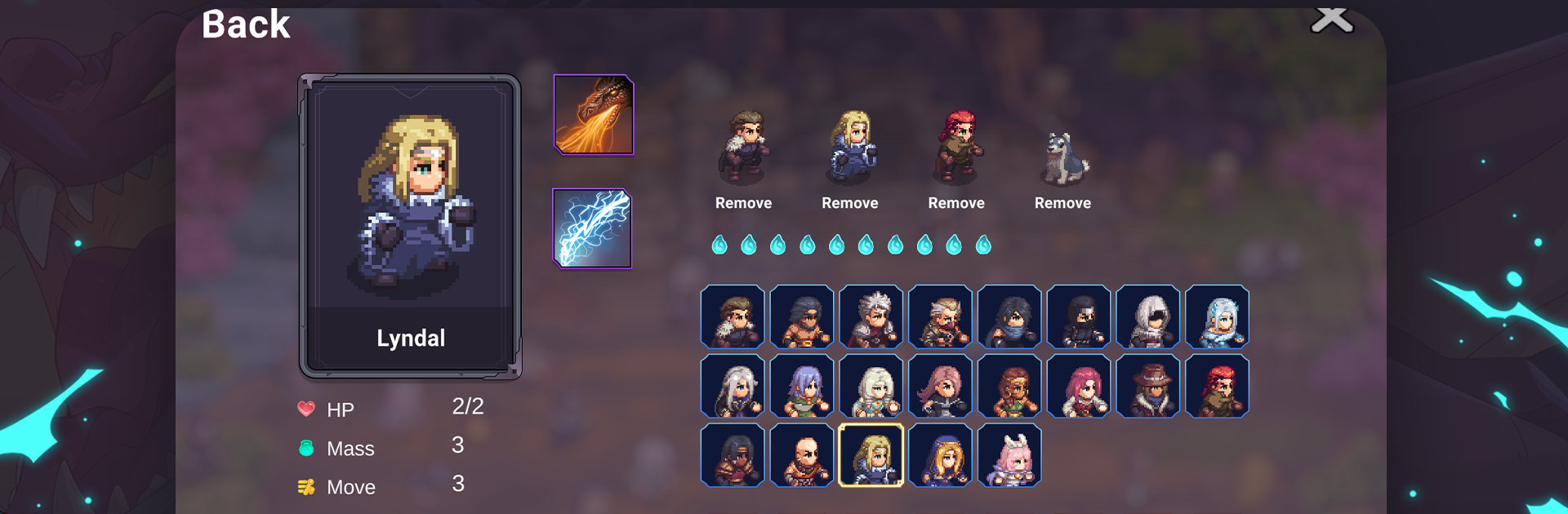
Tyrant’s Blessing is a turn-based tactics game about an undead overlord who sold Tyberia a paradise with no pain and no death, then twisted the promise by making everyone die first. What it feels like to play is a steady push across a ruined island with a small squad that really matters. Every move is telegraphed, so enemies show what they will do next, and the fun is in outthinking that. You plan placements, shove skeletons into hazards, throw up dust to block sight, hop into bushes, chain fire and ice with the terrain, and bodyguard the fragile heroes with the tougher ones. There is a trick where your movement leaves a shadow behind and that can still get smacked if you do not account for it, which turns each turn into a tidy little puzzle.

Outside the fights it runs on day-by-day choices. Pick battles or rescue jobs, argue with yourself about whether saving a kid is worth the time, and roll into random events that can help or burn resources. The roster is a mix of around twenty heroes with strong personalities and different kits, but a run will not show them all and some will fall for good. An assassin excels in cramped maps, an archer suffers up close, a few bring pets that tip a fight. On PC with BlueStacks it plays smooth with mouse clicks, easy to read grids, and quick restarts when a plan goes sideways.

Slay your opponents with your epic moves. Play it your way on BlueStacks and dominate the battlefield.


Game Features

Enhancements

  • Macros
  • Rerolling
  • Eco Mode
  • Multi Instance Sync
  • Enhancements
Macros

Macros

Focus more on the fun part of the game, skip the tedious aspects. Master Tyrant's Blessing with Macros. Record yourself completing the monotonous tasks you wish to automate and replay them later with just one keypress.
Rerolling

Rerolling

Speed up the rerolling process in Tyrant's Blessing. Perform multiple summons and keep looking for the best Heroes. Use Multi-Instance sync to replicate the rerolling mechanism in all instances.
Eco Mode

Eco Mode

Farm in-game resources with ease in Tyrant's Blessing. Enable the Eco Mode when running the game in multiple instances. And lower your PC's resource consumption.
Multi Instance Sync

Multi Instance Sync

With the Multi-instance Sync, you can do even more in Tyrant's Blessing. Sync the action of the main instance and repeat them in real time for all other instances. Sync and sit back, let the game progress unfold.
Read More

How to Download and Play Tyrant's Blessing on PC or Mac

  • Download and install BlueStacks on your PC or Mac

  • Complete Google sign-in to access the Play Store, or do it later

  • Look for Tyrant's Blessing in the search bar at the top right corner

  • Click to install Tyrant's Blessing from the search results

  • Complete Google sign-in (if you skipped step 2) to install Tyrant's Blessing

  • Click the Tyrant's Blessing icon on the home screen to start playing

video
Watch Video

Minimum System Requirements

With BlueStacks 5, you can get started on a PC that fulfills the following requirements.

  • Operating System

    Microsoft Windows 7 or above, macOS 11 (Big Sur) or above

  • Processor

    Intel, AMD or Apple Silicon Processor

  • RAM

    at least 4GB

  • HDD

    10GB Free Disk Space

Note:

* You must be an Administrator on your PC. Up to date graphics drivers from Microsoft or the chipset vendor.

Tyrant's Blessing - FAQs

  • How to play Tyrant's Blessing on Windows PC & Mac?

    Play Tyrant's Blessing on your PC or Mac by following these simple steps.

    • Click on 'Play Tyrant's Blessing on PC’ to download BlueStacks
    • Install it and log-in to Google Play Store
    • Launch and play the game.
  • Why is BlueStacks the fastest and safest platform to play games on PC?

    BlueStacks respects your privacy and is always safe and secure to use. It does not carry any malware, spyware, or any sort of additional software that could harm your PC.

    It is engineered to optimize speed and performance for a seamless gaming experience.

  • What are Tyrant's Blessing PC requirements?

    Minimum requirement to run Tyrant's Blessing on your PC

    • OS: Microsoft Windows 7 or above MacOS 11 (Big Sur) or above
    • Processor: Intel, AMD or Apple Silicon Processor
    • RAM: Your PC must have at least 4GB of RAM. (Note that having 4GB or more disk space is not a substitute for RAM)
    • HDD: 10GB Free Disk Space.
    • You must be an Administrator on your PC.