38 Wins: Football Draft

38 Wins: Football Draft

Simulation

| Honey Badger

Play on PC with BlueStacks or from our cloud

  • Overview
  • Game Features
  • How to Play

Page Modified On: September 25, 2026

Play 38 Wins: Football Draft on PC or Mac

Explore a whole new adventure with 38 Wins: Football Draft, a Simulation game created by Honey Badger. Experience great gameplay with BlueStacks, the most popular gaming platform to play Android games on your PC or Mac.

About the Game

38 Wins: Football Draft is all about chasing the dream season—thirty-eight matches, zero slips. This Simulation puts you in the hot seat as a one-person recruitment team, drafting from real club lineups tied to specific seasons and molding them into a starting XI. Want a bigger view while you theorycraft? It feels right at home on BlueStacks.

Game Features

  • Spin the Season: Hit the wheel to land on a real club and a specific season, then work with that exact squad—one spin, one pool of players.
  • Draft Smart: Pick one player each round and drop them into your formation; every pick comes with six key ratings—pace, shooting, passing, dribbling, defending, and physicality.
  • Build Your XI: Make 11 thoughtful selections to complete your lineup; even modest teams can hide a match-winner if you spot the right fit.
  • Season Simulator: Watch a full 38-game projection play out and see where you land on the ladder—from scraping by to the mythical 38-0-0.
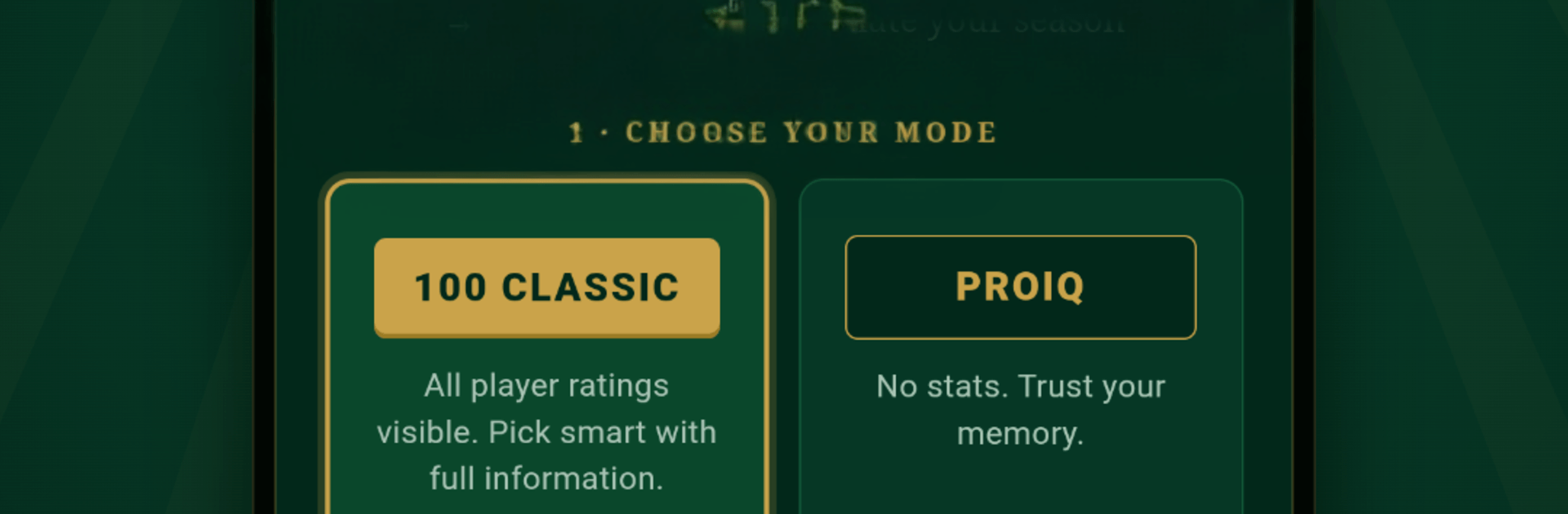
  • Two Modes, Two Mindsets: Go Classic to see full stats and min-max your choices, or try Pro IQ where stats are hidden and only names and positions guide you.
  • Formation Flexibility: Slot players where they shine and fine-tune roles to cover weaknesses or double down on strengths.
  • Global Leaderboards: Stack your best seasons against players around the world and see how your perfect run measures up.
  • Endless Replays: New spins keep the challenge fresh, pushing you to rethink picks, experiment with builds, and chase that flawless record.

Ready to top the leaderboard? We bet you do. Let precise controls and sharp visuals optimized on BlueStacks lead you to victory.


Game Features

Enhancements

  • Macros
  • Multi Instance
  • Multi Instance Sync
  • Script
  • Enhancements
Macros

Macros

Automate the predictable in 38 Wins: Football Draft and transform your gameplay with Macros. Get access to inventive Macros in the BlueStacks Macro Community
Multi Instance

Multi Instance

Play 38 Wins: Football Draft on one window. And chat with your friend on the other. Press CTRL + Shift + 8 to open the Multi-Instance Manager. And start creating fresh instances or clone an existing one.
Multi Instance Sync

Multi Instance Sync

Play 38 Wins: Football Draft with the power of Multi-Instance Sync. Replicate what you are doing on the main instance on all other instances. Level up faster, play more.
Script

Script

Script your way to gaming glory in 38 Wins: Football Draft with BlueStacks Script. Write and run a set of commands to automate repeated tasks. Trigger the command by assigning it to any key.
Read More

How to Download and Play 38 Wins: Football Draft on PC or Mac

  • Download and install BlueStacks on your PC or Mac

  • Complete Google sign-in to access the Play Store, or do it later

  • Look for 38 Wins: Football Draft in the search bar at the top right corner

  • Click to install 38 Wins: Football Draft from the search results

  • Complete Google sign-in (if you skipped step 2) to install 38 Wins: Football Draft

  • Click the 38 Wins: Football Draft icon on the home screen to start playing

video
Watch Video

Minimum System Requirements

With BlueStacks 5, you can get started on a PC that fulfills the following requirements.

  • Operating System

    Microsoft Windows 7 or above, macOS 11 (Big Sur) or above

  • Processor

    Intel, AMD or Apple Silicon Processor

  • RAM

    at least 4GB

  • HDD

    10GB Free Disk Space

Note:

* You must be an Administrator on your PC. Up to date graphics drivers from Microsoft or the chipset vendor.

38 Wins: Football Draft - FAQs

  • How to play 38 Wins: Football Draft on Windows PC & Mac?

    Play 38 Wins: Football Draft on your PC or Mac by following these simple steps.

    • Click on 'Play 38 Wins: Football Draft on PC’ to download BlueStacks
    • Install it and log-in to Google Play Store
    • Launch and play the game.
  • Why is BlueStacks the fastest and safest platform to play games on PC?

    BlueStacks respects your privacy and is always safe and secure to use. It does not carry any malware, spyware, or any sort of additional software that could harm your PC.

    It is engineered to optimize speed and performance for a seamless gaming experience.

  • What are 38 Wins: Football Draft PC requirements?

    Minimum requirement to run 38 Wins: Football Draft on your PC

    • OS: Microsoft Windows 7 or above MacOS 11 (Big Sur) or above
    • Processor: Intel, AMD or Apple Silicon Processor
    • RAM: Your PC must have at least 4GB of RAM. (Note that having 4GB or more disk space is not a substitute for RAM)
    • HDD: 10GB Free Disk Space.
    • You must be an Administrator on your PC.