Airport Truck Simulator 3D

Airport Truck Simulator 3D

Simulation

| Kick Time Studios

Play on PC with BlueStacks or from our cloud

  • Overview
  • Game Features
  • How to Play

Page Modified On: September 07, 2026

Play Airport Truck Simulator 3D on PC or Mac

Airport Truck Simulator 3D by Kick Time Studios has plenty to keep you busy. BlueStacks lets you play it on PC or Mac with more screen space, better control, and fewer mobile limits.

About the Game

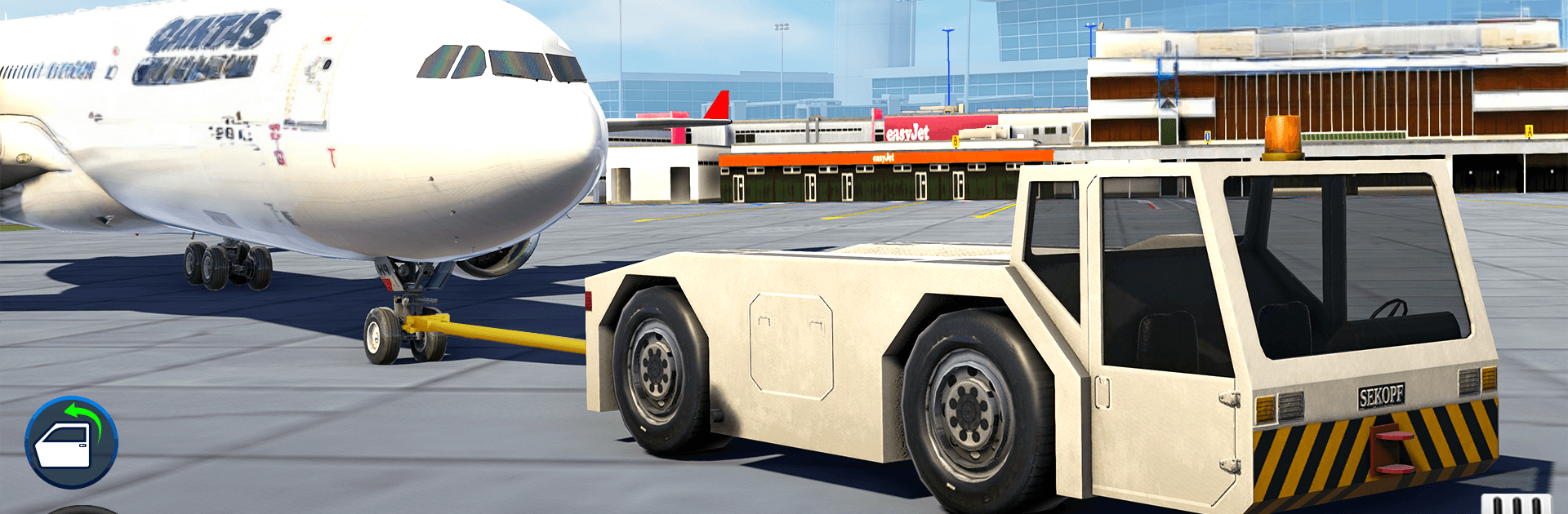
Airport Truck Simulator 3D drops you into the heart of a working airfield, where massive machines, tight schedules, and careful driving all come together. This Simulation experience puts you in charge of fueling aircraft, moving heavy loads, and tackling runway emergencies while weaving through service roads and gates. If you like playing on a larger display with steady controls, it runs nicely on BlueStacks too.

Game Features

  • Big American Rigs: Haul fuel, freight, and gear with tankers, long trailers, and heavy-duty rescue trucks built for the tarmac.
  • Weighty Handling: Feel authentic physics as loads shift, brakes bite, and long rigs swing wide—precision counts when you’re inches from a jet.
  • Mission Variety: Top off parked aircraft, load up cargo planes, respond with fire trucks, and transport cargo between terminals, hangars, and runways.
  • Open-Airport Driving: Explore service roads, gates, and maintenance zones, then roll out onto connected city streets for longer hauls.
  • Airport-Scale Challenges: Navigate tight turns, narrow lanes, and busy ground operations that keep every run focused and satisfying.
  • Upgrades and Garages: Unlock garages, improve performance, and expand your lineup to handle heavier jobs and tougher routes.
  • Clear Progression: Complete tasks, master new areas of the airfield, and take on bigger responsibilities as your skills grow.

Start playing Airport Truck Simulator 3D on BlueStacks and get a smoother, more comfortable PC or Mac setup.


Game Features

Enhancements

  • Macros
  • Multi Instance
  • Multi Instance Sync
  • Script
  • Enhancements
Macros

Macros

Automate the predictable in Airport Truck Simulator 3D and transform your gameplay with Macros. Get access to inventive Macros in the BlueStacks Macro Community
Multi Instance

Multi Instance

Play Airport Truck Simulator 3D on one window. And chat with your friend on the other. Press CTRL + Shift + 8 to open the Multi-Instance Manager. And start creating fresh instances or clone an existing one.
Multi Instance Sync

Multi Instance Sync

Play Airport Truck Simulator 3D with the power of Multi-Instance Sync. Replicate what you are doing on the main instance on all other instances. Level up faster, play more.
Script

Script

Script your way to gaming glory in Airport Truck Simulator 3D with BlueStacks Script. Write and run a set of commands to automate repeated tasks. Trigger the command by assigning it to any key.
Read More

How to Download and Play Airport Truck Simulator 3D on PC or Mac

  • Download and install BlueStacks on your PC or Mac

  • Complete Google sign-in to access the Play Store, or do it later

  • Look for Airport Truck Simulator 3D in the search bar at the top right corner

  • Click to install Airport Truck Simulator 3D from the search results

  • Complete Google sign-in (if you skipped step 2) to install Airport Truck Simulator 3D

  • Click the Airport Truck Simulator 3D icon on the home screen to start playing

video
Watch Video

Minimum System Requirements

With BlueStacks 5, you can get started on a PC that fulfills the following requirements.

  • Operating System

    Microsoft Windows 7 or above, macOS 11 (Big Sur) or above

  • Processor

    Intel, AMD or Apple Silicon Processor

  • RAM

    at least 4GB

  • HDD

    10GB Free Disk Space

Note:

* You must be an Administrator on your PC. Up to date graphics drivers from Microsoft or the chipset vendor.

Airport Truck Simulator 3D - FAQs

  • How to play Airport Truck Simulator 3D on Windows PC & Mac?

    Play Airport Truck Simulator 3D on your PC or Mac by following these simple steps.

    • Click on 'Play Airport Truck Simulator 3D on PC’ to download BlueStacks
    • Install it and log-in to Google Play Store
    • Launch and play the game.
  • Why is BlueStacks the fastest and safest platform to play games on PC?

    BlueStacks respects your privacy and is always safe and secure to use. It does not carry any malware, spyware, or any sort of additional software that could harm your PC.

    It is engineered to optimize speed and performance for a seamless gaming experience.

  • What are Airport Truck Simulator 3D PC requirements?

    Minimum requirement to run Airport Truck Simulator 3D on your PC

    • OS: Microsoft Windows 7 or above MacOS 11 (Big Sur) or above
    • Processor: Intel, AMD or Apple Silicon Processor
    • RAM: Your PC must have at least 4GB of RAM. (Note that having 4GB or more disk space is not a substitute for RAM)
    • HDD: 10GB Free Disk Space.
    • You must be an Administrator on your PC.