Animal Hospital: Anomaly Game

Animal Hospital: Anomaly Game

Simulation

| THEMA ARCHITECTS LIMITED

Play on PC with BlueStacks or from our cloud

  • Overview
  • Game Features
  • How to Play

Page Modified On: August 17, 2026

Play Animal Hospital: Anomaly Game on PC or Mac

Animal Hospital: Anomaly Game by THEMA ARCHITECTS LIMITED has plenty to keep you busy. BlueStacks lets you play it on PC or Mac with more screen space, better control, and fewer mobile limits.

About the Game

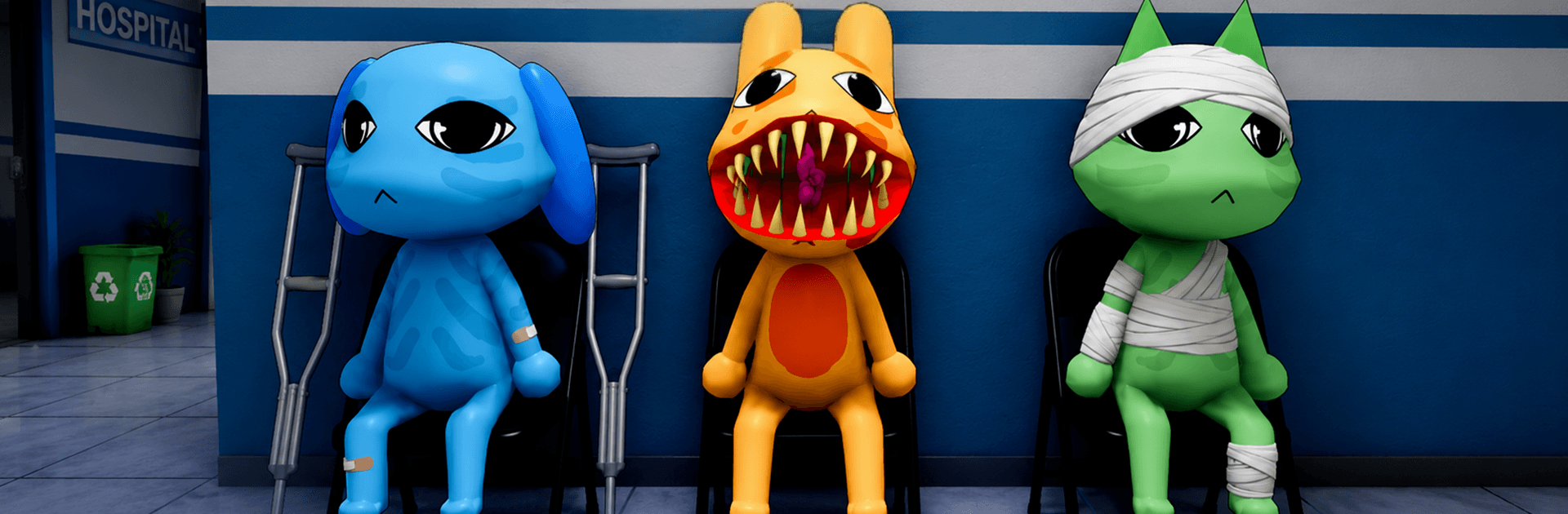
Night shifts at an animal clinic are supposed to be calm—until the walls start whispering with weird little changes. In Animal Hospital: Anomaly Game, you’re the lone staffer roaming after dark, watching rooms, patients, and equipment while your brain plays spot-the-difference with reality. This creepy-cute Simulation leans on sharp observation and memory as you catch subtle shifts before they spiral. Prefer playing on a bigger screen? It runs smoothly on PC with BlueStacks.

Game Features

  • Watch Every Room: Cycle through wards, labs, and waiting areas to keep tabs on lights, doors, tools, cages, and more.
  • Spot the Odd Stuff: Report anomalies the moment you notice them—misplaced gear, flickers, strange shadows, or animals that suddenly don’t look quite right.
  • Cute, Weird Patients: Adorable critters with bandages and big eyes… and the occasional unsettling stare that makes you double-check the monitor.
  • Memory Workout: Rooms look normal at first. Minutes later, tiny details shift. Remember what used to be there to catch what changed.
  • Smooth, No-Fuss Controls: Simple interactions keep the focus on observing, not wrestling with menus.
  • Rising Challenge: Each run ramps up the tension with trickier rooms, faster changes, and surprises that test your focus.
  • Atmospheric Hospital Vibe: Dim corridors, sterile equipment, and that late-night hush build a mood that’s eerie without being over the top.
  • Quick Sessions or Deep Dives: Sneak in a few minutes or settle in and scrutinize every corner like a true night-shift pro.

Ready to top the leaderboard? We bet you do. Let precise controls and sharp visuals optimized on BlueStacks lead you to victory.


Game Features

Enhancements

  • Macros
  • Multi Instance
  • Multi Instance Sync
  • Script
  • Enhancements
Macros

Macros

Automate the predictable in Animal Hospital: Anomaly Game and transform your gameplay with Macros. Get access to inventive Macros in the BlueStacks Macro Community
Multi Instance

Multi Instance

Play Animal Hospital: Anomaly Game on one window. And chat with your friend on the other. Press CTRL + Shift + 8 to open the Multi-Instance Manager. And start creating fresh instances or clone an existing one.
Multi Instance Sync

Multi Instance Sync

Play Animal Hospital: Anomaly Game with the power of Multi-Instance Sync. Replicate what you are doing on the main instance on all other instances. Level up faster, play more.
Script

Script

Script your way to gaming glory in Animal Hospital: Anomaly Game with BlueStacks Script. Write and run a set of commands to automate repeated tasks. Trigger the command by assigning it to any key.
Read More

How to Download and Play Animal Hospital: Anomaly Game on PC or Mac

  • Download and install BlueStacks on your PC or Mac

  • Complete Google sign-in to access the Play Store, or do it later

  • Look for Animal Hospital: Anomaly Game in the search bar at the top right corner

  • Click to install Animal Hospital: Anomaly Game from the search results

  • Complete Google sign-in (if you skipped step 2) to install Animal Hospital: Anomaly Game

  • Click the Animal Hospital: Anomaly Game icon on the home screen to start playing

video
Watch Video

Minimum System Requirements

With BlueStacks 5, you can get started on a PC that fulfills the following requirements.

  • Operating System

    Microsoft Windows 7 or above, macOS 11 (Big Sur) or above

  • Processor

    Intel, AMD or Apple Silicon Processor

  • RAM

    at least 4GB

  • HDD

    10GB Free Disk Space

Note:

* You must be an Administrator on your PC. Up to date graphics drivers from Microsoft or the chipset vendor.

Animal Hospital: Anomaly Game - FAQs

  • How to play Animal Hospital: Anomaly Game on Windows PC & Mac?

    Play Animal Hospital: Anomaly Game on your PC or Mac by following these simple steps.

    • Click on 'Play Animal Hospital: Anomaly Game on PC’ to download BlueStacks
    • Install it and log-in to Google Play Store
    • Launch and play the game.
  • Why is BlueStacks the fastest and safest platform to play games on PC?

    BlueStacks respects your privacy and is always safe and secure to use. It does not carry any malware, spyware, or any sort of additional software that could harm your PC.

    It is engineered to optimize speed and performance for a seamless gaming experience.

  • What are Animal Hospital: Anomaly Game PC requirements?

    Minimum requirement to run Animal Hospital: Anomaly Game on your PC

    • OS: Microsoft Windows 7 or above MacOS 11 (Big Sur) or above
    • Processor: Intel, AMD or Apple Silicon Processor
    • RAM: Your PC must have at least 4GB of RAM. (Note that having 4GB or more disk space is not a substitute for RAM)
    • HDD: 10GB Free Disk Space.
    • You must be an Administrator on your PC.