Bad Cat Angry Granny Prankster

Bad Cat Angry Granny Prankster

Simulation

| Rift Tech

Play on PC with BlueStacks or from our cloud

  • Overview
  • Game Features
  • How to Play

Page Modified On: July 27, 2026

Play Bad Cat Angry Granny Prankster on PC or Mac

Bring your A-game to Bad Cat Angry Granny Prankster, the Simulation game sensation from Rift Tech. Give your gameplay the much-needed boost with precise game controls, high FPS graphics, and top-tier features on your PC or Mac with BlueStacks.

About the Game

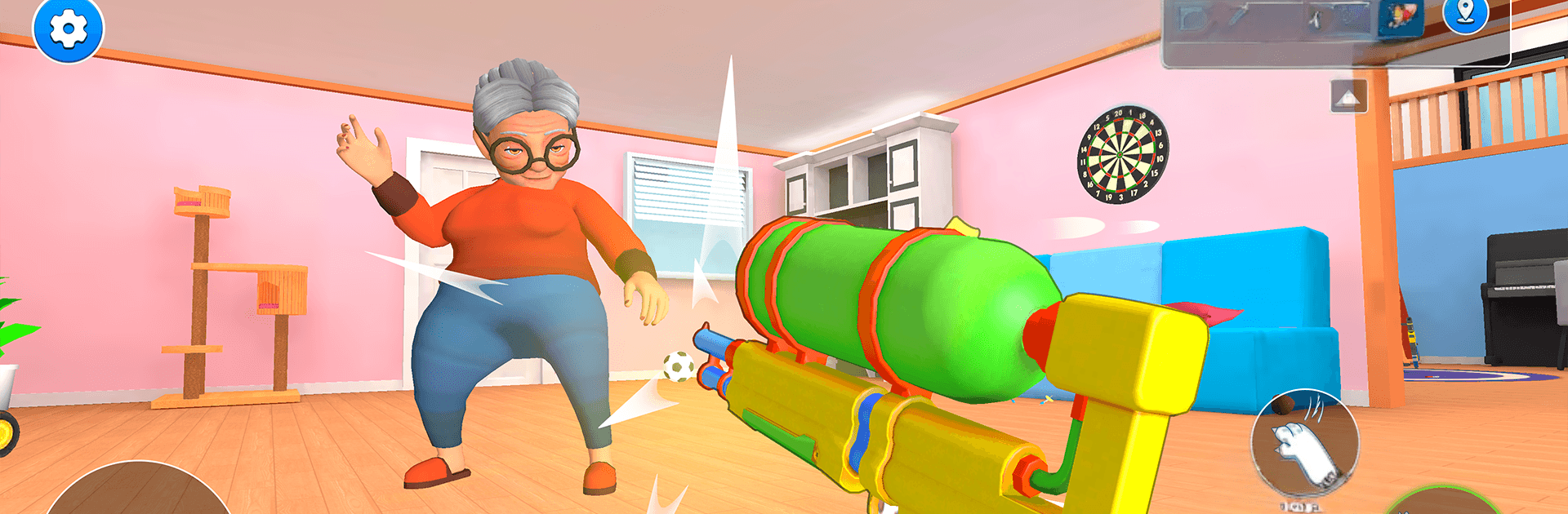
Bad Cat Angry Granny Prankster is a mischievous Simulation where you play as a troublemaking kitty loose in Granny’s house. Poke, swipe, and “accidentally” knock things over while staying one paw ahead of her watchful eye. It’s a playful mix of stealth, slapstick chaos, and clever objectives that turn every room into a new setup for laughs.

Game Features

  • Prank Playground: Explore a fully interactive home stuffed with props to push, shelves to clear, and secrets to uncover. If it looks fragile, it probably is.
  • First-Person Feline: See the world from kitty height with smooth, responsive controls—pounce onto counters, slide under furniture, and bolt when you hear footsteps.
  • Outsmart Granny: A reactive AI patrols the house. Create distractions, use hiding spots, and time your moves to stay unseen while the mess piles up.
  • Goals with Gags: Tackle bite-sized missions and light puzzle bits—chain pranks together, find keys, flip switches, and spark hilarious reactions.
  • Unlock New Rooms: Move from the living room to the kitchen, attic, basement, and more, each space adding fresh tricks, hazards, and objectives.
  • Style Your Menace: Swap between cat skins, colors, and accessories to match your brand of chaos—from cuddly to completely unhinged.
  • Big Sounds, Bigger Reactions: Clattering vases, shocking gasps, and goofy animations make every perfectly timed shove feel extra satisfying.
  • Hidden Paths and Shortcuts: Duck into vents, squeeze behind furniture, and discover secret routes that keep you two steps ahead.
  • Play Anywhere: No connection? No problem. Enjoy offline mayhem whenever you feel like being a tiny tornado.
  • Daily Extras: Optional challenges add a steady drip of rewards and new reasons to stir the pot.
  • PC-Friendly Option: Prefer a bigger view and comfy controls? Bad Cat Angry Granny Prankster also plays nicely on BlueStacks.

Start your journey now. Download the game on BlueStacks, invite your friends, and march on a new adventure.


Game Features

Enhancements

  • Macros
  • Multi Instance
  • Multi Instance Sync
  • Script
  • Enhancements
Macros

Macros

Automate the predictable in Bad Cat Angry Granny Prankster and transform your gameplay with Macros. Get access to inventive Macros in the BlueStacks Macro Community
Multi Instance

Multi Instance

Play Bad Cat Angry Granny Prankster on one window. And chat with your friend on the other. Press CTRL + Shift + 8 to open the Multi-Instance Manager. And start creating fresh instances or clone an existing one.
Multi Instance Sync

Multi Instance Sync

Play Bad Cat Angry Granny Prankster with the power of Multi-Instance Sync. Replicate what you are doing on the main instance on all other instances. Level up faster, play more.
Script

Script

Script your way to gaming glory in Bad Cat Angry Granny Prankster with BlueStacks Script. Write and run a set of commands to automate repeated tasks. Trigger the command by assigning it to any key.
Read More

How to Download and Play Bad Cat Angry Granny Prankster on PC or Mac

  • Download and install BlueStacks on your PC or Mac

  • Complete Google sign-in to access the Play Store, or do it later

  • Look for Bad Cat Angry Granny Prankster in the search bar at the top right corner

  • Click to install Bad Cat Angry Granny Prankster from the search results

  • Complete Google sign-in (if you skipped step 2) to install Bad Cat Angry Granny Prankster

  • Click the Bad Cat Angry Granny Prankster icon on the home screen to start playing

video
Watch Video

Minimum System Requirements

With BlueStacks 5, you can get started on a PC that fulfills the following requirements.

  • Operating System

    Microsoft Windows 7 or above, macOS 11 (Big Sur) or above

  • Processor

    Intel, AMD or Apple Silicon Processor

  • RAM

    at least 4GB

  • HDD

    10GB Free Disk Space

Note:

* You must be an Administrator on your PC. Up to date graphics drivers from Microsoft or the chipset vendor.

Bad Cat Angry Granny Prankster - FAQs

  • How to play Bad Cat Angry Granny Prankster on Windows PC & Mac?

    Play Bad Cat Angry Granny Prankster on your PC or Mac by following these simple steps.

    • Click on 'Play Bad Cat Angry Granny Prankster on PC’ to download BlueStacks
    • Install it and log-in to Google Play Store
    • Launch and play the game.
  • Why is BlueStacks the fastest and safest platform to play games on PC?

    BlueStacks respects your privacy and is always safe and secure to use. It does not carry any malware, spyware, or any sort of additional software that could harm your PC.

    It is engineered to optimize speed and performance for a seamless gaming experience.

  • What are Bad Cat Angry Granny Prankster PC requirements?

    Minimum requirement to run Bad Cat Angry Granny Prankster on your PC

    • OS: Microsoft Windows 7 or above MacOS 11 (Big Sur) or above
    • Processor: Intel, AMD or Apple Silicon Processor
    • RAM: Your PC must have at least 4GB of RAM. (Note that having 4GB or more disk space is not a substitute for RAM)
    • HDD: 10GB Free Disk Space.
    • You must be an Administrator on your PC.