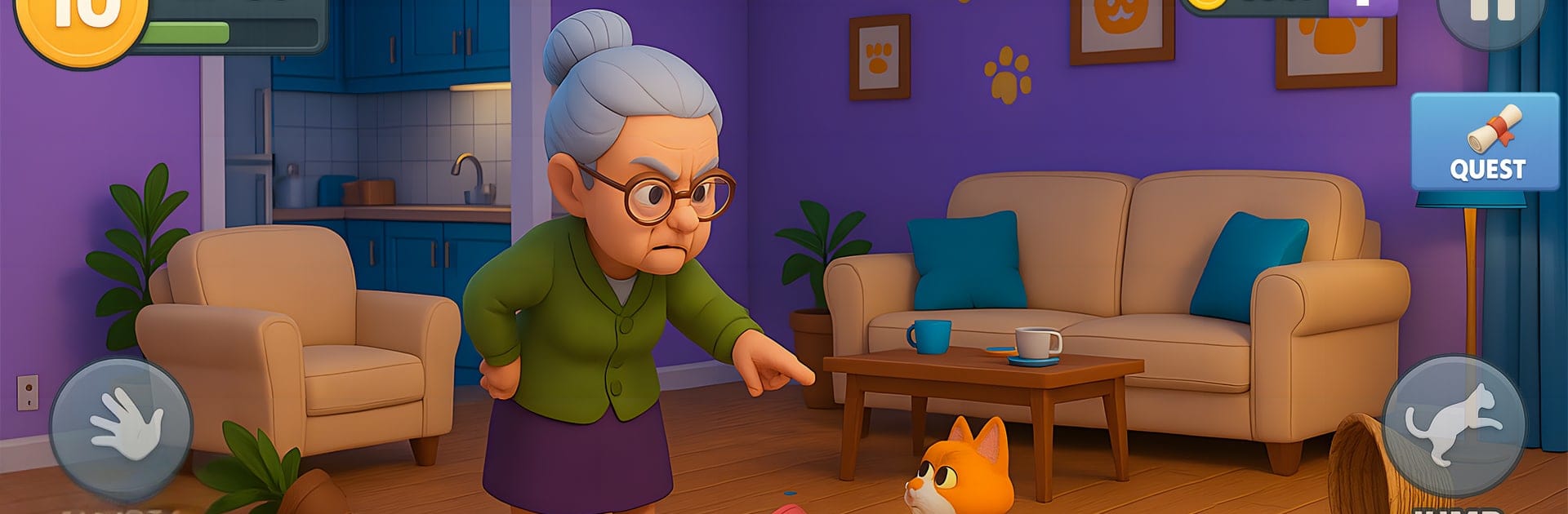
Kitty vs Granny House Chaos

Kitty vs Granny House Chaos

Simulation

| K9 Studio

Play on PC with BlueStacks or from our cloud

  • Overview
  • Game Features
  • How to Play

Page Modified On: June 02, 2026

Play Kitty vs Granny House Chaos on PC or Mac

Explore a whole new adventure with Kitty vs Granny House Chaos, a Simulation game created by K9 Studio. Experience great gameplay with BlueStacks, the most popular gaming platform to play Android games on your PC or Mac.

About the Game

Kitty vs Granny House Chaos is a goofy, high-energy Simulation where you play as a troublemaking cat with one goal: stir up the house without getting caught. It’s a mix of sneaky pranks and frantic chases as you tip, scratch, and scatter everything in sight. Granny’s fast, grumpy, and always two steps behind—unless you mess up and she’s suddenly right on your tail.

Game Features

  • Play as a Mischief-Maker: Sprint across floors, leap onto furniture, scratch surfaces, and send objects flying like a tiny furry tornado.
  • A Whole House to Wreck: Explore the kitchen, bedroom, living room, and more—each space has new toys to prod and fresh hiding spots to discover.
  • Pranks with Personality: Knock over vases, spill food, and create silly chain reactions that leave Granny fuming and you purring.
  • Outrun an Angry Granny: She’s quick and persistent, rolling pin in hand. Duck behind chairs, slide under tables, and time your escapes to stay free.
  • Levels that Keep You Guessing: Unlock new rooms and challenges that ramp up the chaos with each win.
  • Easy, Addictive Controls: Pick-up-and-play taps and swipes make it simple to cause trouble, whether you’ve got a minute or an hour.
  • Fresh Laughs Every Chase: Try new routes, switch up your hiding spots, and find unexpected ways to pull off the perfect prank.
  • Plays Great on PC: Prefer a bigger screen and smooth controls? Kitty vs Granny House Chaos feels right at home on BlueStacks.

Ready to top the leaderboard? We bet you do. Let precise controls and sharp visuals optimized on BlueStacks lead you to victory.


Game Features

Enhancements

  • Macros
  • Multi Instance
  • Multi Instance Sync
  • Script
  • Enhancements
Macros

Macros

Automate the predictable in Kitty vs Granny House Chaos and transform your gameplay with Macros. Get access to inventive Macros in the BlueStacks Macro Community
Multi Instance

Multi Instance

Play Kitty vs Granny House Chaos on one window. And chat with your friend on the other. Press CTRL + Shift + 8 to open the Multi-Instance Manager. And start creating fresh instances or clone an existing one.
Multi Instance Sync

Multi Instance Sync

Play Kitty vs Granny House Chaos with the power of Multi-Instance Sync. Replicate what you are doing on the main instance on all other instances. Level up faster, play more.
Script

Script

Script your way to gaming glory in Kitty vs Granny House Chaos with BlueStacks Script. Write and run a set of commands to automate repeated tasks. Trigger the command by assigning it to any key.
Read More

How to Download and Play Kitty vs Granny House Chaos on PC or Mac

  • Download and install BlueStacks on your PC or Mac

  • Complete Google sign-in to access the Play Store, or do it later

  • Look for Kitty vs Granny House Chaos in the search bar at the top right corner

  • Click to install Kitty vs Granny House Chaos from the search results

  • Complete Google sign-in (if you skipped step 2) to install Kitty vs Granny House Chaos

  • Click the Kitty vs Granny House Chaos icon on the home screen to start playing

video
Watch Video

Minimum System Requirements

With BlueStacks 5, you can get started on a PC that fulfills the following requirements.

  • Operating System

    Microsoft Windows 7 or above, macOS 11 (Big Sur) or above

  • Processor

    Intel, AMD or Apple Silicon Processor

  • RAM

    at least 4GB

  • HDD

    10GB Free Disk Space

Note:

* You must be an Administrator on your PC. Up to date graphics drivers from Microsoft or the chipset vendor.

Kitty vs Granny House Chaos - FAQs

  • How to play Kitty vs Granny House Chaos on Windows PC & Mac?

    Play Kitty vs Granny House Chaos on your PC or Mac by following these simple steps.

    • Click on 'Play Kitty vs Granny House Chaos on PC’ to download BlueStacks
    • Install it and log-in to Google Play Store
    • Launch and play the game.
  • Why is BlueStacks the fastest and safest platform to play games on PC?

    BlueStacks respects your privacy and is always safe and secure to use. It does not carry any malware, spyware, or any sort of additional software that could harm your PC.

    It is engineered to optimize speed and performance for a seamless gaming experience.

  • What are Kitty vs Granny House Chaos PC requirements?

    Minimum requirement to run Kitty vs Granny House Chaos on your PC

    • OS: Microsoft Windows 7 or above MacOS 11 (Big Sur) or above
    • Processor: Intel, AMD or Apple Silicon Processor
    • RAM: Your PC must have at least 4GB of RAM. (Note that having 4GB or more disk space is not a substitute for RAM)
    • HDD: 10GB Free Disk Space.
    • You must be an Administrator on your PC.