Bloom and Cinder
Bloom and Cinder

Bloom and Cinder

Simulation

| Voidberry

Play on PC with BlueStacks or from our cloud

  • Overview
  • Game Features
  • How to Play

Page Modified On: September 02, 2025

Play Bloom and Cinder on PC or Mac

Explore a whole new adventure with Bloom and Cinder, a Simulation game created by Voidberry. Experience great gameplay with BlueStacks, the most popular gaming platform to play Android games on your PC or Mac.

About the Game

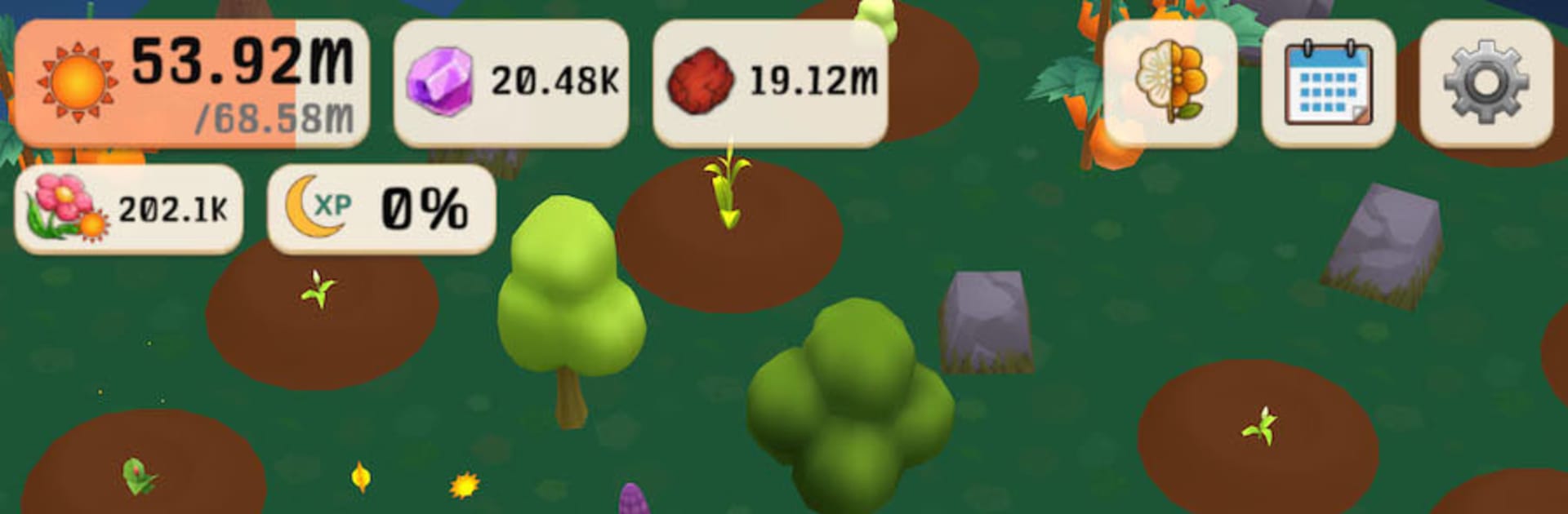
Bloom and Cinder is a cozy Simulation that blends gentle merge puzzles with a slow-growing garden you bring back to life. Made by Voidberry, it’s a warm, reflective experience about finding small sparks of hope as you coax color and light into shadowy islands. Explore at your own pace, nurture magical blooms, and stumble into friendly faces who make the mist feel a little less heavy.

Game Features

  • Magical Flowers, Many Looks: Collect and merge over 140 unique blossoms, each with distinct designs and optional skins to unlock as you play.
  • Merge, Match, Reveal: Combine items to create stronger plants and tools, then use them to push back the fog and uncover hidden corners of the world.
  • A World That Grows With You: Your garden physically expands, opening new islands, resources, and surprises as your collection blossoms.
  • Buildings and Quirky Friends: Set up helpful structures, meet charming characters, and unlock handy abilities that make tending your sanctuary feel easier and more personal.
  • Story and Daily Quests: Short, chill objectives guide you without pressure—perfect for a quick check-in or a longer, thoughtful session.
  • Cozy Customization: Arrange glowing flowers, mystical trees, and homey decorations to craft a space that feels calm, bright, and uniquely yours.
  • Gentle Audio and Visuals: Soft nature ambience, subtle effects, and a soothing palette keep the vibe mellow and restorative.
  • No Pressure Play: No forced ads, no intrusive timers—just uninterrupted time with your garden and your thoughts.
  • Offline Friendly: Play anywhere, anytime, even without an internet connection.
  • Optional Big-Screen Comfort: Prefer a larger view? Bloom and Cinder also feels great on PC with BlueStacks.

Slay your opponents with your epic moves. Play it your way on BlueStacks and dominate the battlefield.


Game Features

Enhancements

  • Macros
  • Multi Instance
  • Multi Instance Sync
  • Script
  • Enhancements
Macros

Macros

Automate the predictable in Bloom and Cinder and transform your gameplay with Macros. Get access to inventive Macros in the BlueStacks Macro Community
Multi Instance

Multi Instance

Play Bloom and Cinder on one window. And chat with your friend on the other. Press CTRL + Shift + 8 to open the Multi-Instance Manager. And start creating fresh instances or clone an existing one.
Multi Instance Sync

Multi Instance Sync

Play Bloom and Cinder with the power of Multi-Instance Sync. Replicate what you are doing on the main instance on all other instances. Level up faster, play more.
Script

Script

Script your way to gaming glory in Bloom and Cinder with BlueStacks Script. Write and run a set of commands to automate repeated tasks. Trigger the command by assigning it to any key.
Read More

How to Download and Play Bloom and Cinder on PC or Mac

  • Download and install BlueStacks on your PC or Mac

  • Complete Google sign-in to access the Play Store, or do it later

  • Look for Bloom and Cinder in the search bar at the top right corner

  • Click to install Bloom and Cinder from the search results

  • Complete Google sign-in (if you skipped step 2) to install Bloom and Cinder

  • Click the Bloom and Cinder icon on the home screen to start playing

video
Watch Video

Minimum System Requirements

With BlueStacks 5, you can get started on a PC that fulfills the following requirements.

  • Operating System

    Microsoft Windows 7 or above, macOS 11 (Big Sur) or above

  • Processor

    Intel, AMD or Apple Silicon Processor

  • RAM

    at least 4GB

  • HDD

    10GB Free Disk Space

Note:

* You must be an Administrator on your PC. Up to date graphics drivers from Microsoft or the chipset vendor.

Bloom and Cinder - FAQs

  • How to play Bloom and Cinder on Windows PC & Mac?

    Play Bloom and Cinder on your PC or Mac by following these simple steps.

    • Click on 'Play Bloom and Cinder on PC’ to download BlueStacks
    • Install it and log-in to Google Play Store
    • Launch and play the game.
  • Why is BlueStacks the fastest and safest platform to play games on PC?

    BlueStacks respects your privacy and is always safe and secure to use. It does not carry any malware, spyware, or any sort of additional software that could harm your PC.

    It is engineered to optimize speed and performance for a seamless gaming experience.

  • What are Bloom and Cinder PC requirements?

    Minimum requirement to run Bloom and Cinder on your PC

    • OS: Microsoft Windows 7 or above MacOS 11 (Big Sur) or above
    • Processor: Intel, AMD or Apple Silicon Processor
    • RAM: Your PC must have at least 4GB of RAM. (Note that having 4GB or more disk space is not a substitute for RAM)
    • HDD: 10GB Free Disk Space.
    • You must be an Administrator on your PC.