Brother's Pho Restaurant

Brother's Pho Restaurant

Simulation

| HLD team

Play on PC with BlueStacks or from our cloud

  • Overview
  • Game Features
  • How to Play

Page Modified On: December 05, 2025

Play Brother's Pho Restaurant on PC or Mac

From the innovators and creators at HLD team, Brother’s Pho Restaurant is another fun addition to the World of Simulation games. Go beyond your mobile screen and play it bigger and better on your PC or Mac. An immersive experience awaits you.

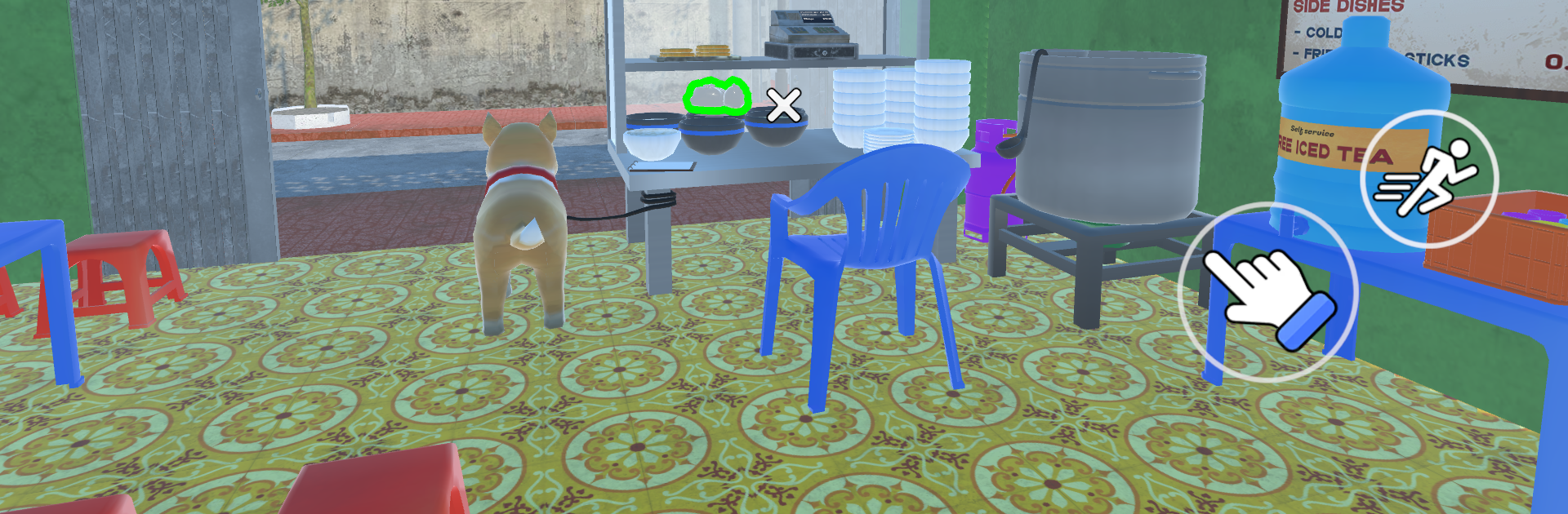
Brother’s Pho Restaurant plays like a slow-burn horror wrapped around a tiny pho shop. Players step into Mr. Hai’s shoes, open the doors in a quiet Hanoi neighborhood, chat with locals, and keep bowls moving across the counter. It starts cozy, almost slice-of-life, with small routines and that warm kitchen rhythm. Then the tension creeps in. Street gossip turns strange, nights feel longer, and the village stops feeling safe. The neat part is how the ordinary and the unsettling overlap. The kitchen work matters, from prepping broth to assembling orders fast, because money and reputation decide how well the shop holds together when things get ugly. If orders are missed during a busy rush, money gets tight, and that pressure bleeds right into the scares.

The atmosphere leans Vietnamese in a grounded way, full of little touches that feel lived in rather than touristy. Retro-styled visuals do a lot with lighting and shadow, and the sound design sells empty alleys and late-night footsteps. There are boss encounters and environmental puzzles sprinkled in, not impossible, but tense enough to keep shoulders clenched. Petting the dog between shifts is a small, welcome breather, especially when the story digs into Mr. Hai’s past and why the village whispers hit so hard. On PC through BlueStacks, mouse clicks make serving cleaner and the bigger screen turns those dark corners into real problems. Anyone who likes narrative-heavy horror mixed with light management will get a lot to chew on here. It is methodical, careful, and the shop that feels safe at first slowly stops being that, which lands harder than any quick jump.

Make your gaming sessions memorable with precise controls that give you an edge in close combats and visuals that pop up, bringing every character to life.


Game Features

Enhancements

  • Macros
  • Multi Instance
  • Multi Instance Sync
  • Script
  • Enhancements
Macros

Macros

Automate the predictable in Brother's Pho Restaurant and transform your gameplay with Macros. Get access to inventive Macros in the BlueStacks Macro Community
Multi Instance

Multi Instance

Play Brother's Pho Restaurant on one window. And chat with your friend on the other. Press CTRL + Shift + 8 to open the Multi-Instance Manager. And start creating fresh instances or clone an existing one.
Multi Instance Sync

Multi Instance Sync

Play Brother's Pho Restaurant with the power of Multi-Instance Sync. Replicate what you are doing on the main instance on all other instances. Level up faster, play more.
Script

Script

Script your way to gaming glory in Brother's Pho Restaurant with BlueStacks Script. Write and run a set of commands to automate repeated tasks. Trigger the command by assigning it to any key.
Read More

How to Download and Play Brother's Pho Restaurant on PC or Mac

  • Download and install BlueStacks on your PC or Mac

  • Complete Google sign-in to access the Play Store, or do it later

  • Look for Brother's Pho Restaurant in the search bar at the top right corner

  • Click to install Brother's Pho Restaurant from the search results

  • Complete Google sign-in (if you skipped step 2) to install Brother's Pho Restaurant

  • Click the Brother's Pho Restaurant icon on the home screen to start playing

video
Watch Video

Minimum System Requirements

With BlueStacks 5, you can get started on a PC that fulfills the following requirements.

  • Operating System

    Microsoft Windows 7 or above, macOS 11 (Big Sur) or above

  • Processor

    Intel, AMD or Apple Silicon Processor

  • RAM

    at least 4GB

  • HDD

    10GB Free Disk Space

Note:

* You must be an Administrator on your PC. Up to date graphics drivers from Microsoft or the chipset vendor.

Brother's Pho Restaurant - FAQs

  • How to play Brother's Pho Restaurant on Windows PC & Mac?

    Play Brother's Pho Restaurant on your PC or Mac by following these simple steps.

    • Click on 'Play Brother's Pho Restaurant on PC’ to download BlueStacks
    • Install it and log-in to Google Play Store
    • Launch and play the game.
  • Why is BlueStacks the fastest and safest platform to play games on PC?

    BlueStacks respects your privacy and is always safe and secure to use. It does not carry any malware, spyware, or any sort of additional software that could harm your PC.

    It is engineered to optimize speed and performance for a seamless gaming experience.

  • What are Brother's Pho Restaurant PC requirements?

    Minimum requirement to run Brother's Pho Restaurant on your PC

    • OS: Microsoft Windows 7 or above MacOS 11 (Big Sur) or above
    • Processor: Intel, AMD or Apple Silicon Processor
    • RAM: Your PC must have at least 4GB of RAM. (Note that having 4GB or more disk space is not a substitute for RAM)
    • HDD: 10GB Free Disk Space.
    • You must be an Administrator on your PC.