Build Plane Aviation Assembly

Build Plane Aviation Assembly

Simulation

| Hyper Joy Games

Play on PC with BlueStacks or from our cloud

  • Overview
  • Game Features
  • How to Play

Page Modified On: June 02, 2026

Play Build Plane Aviation Assembly on PC or Mac

Build Plane Aviation Assembly by Hyper Joy Games has plenty to keep you busy. BlueStacks lets you play it on PC or Mac with more screen space, better control, and fewer mobile limits.

About the Game

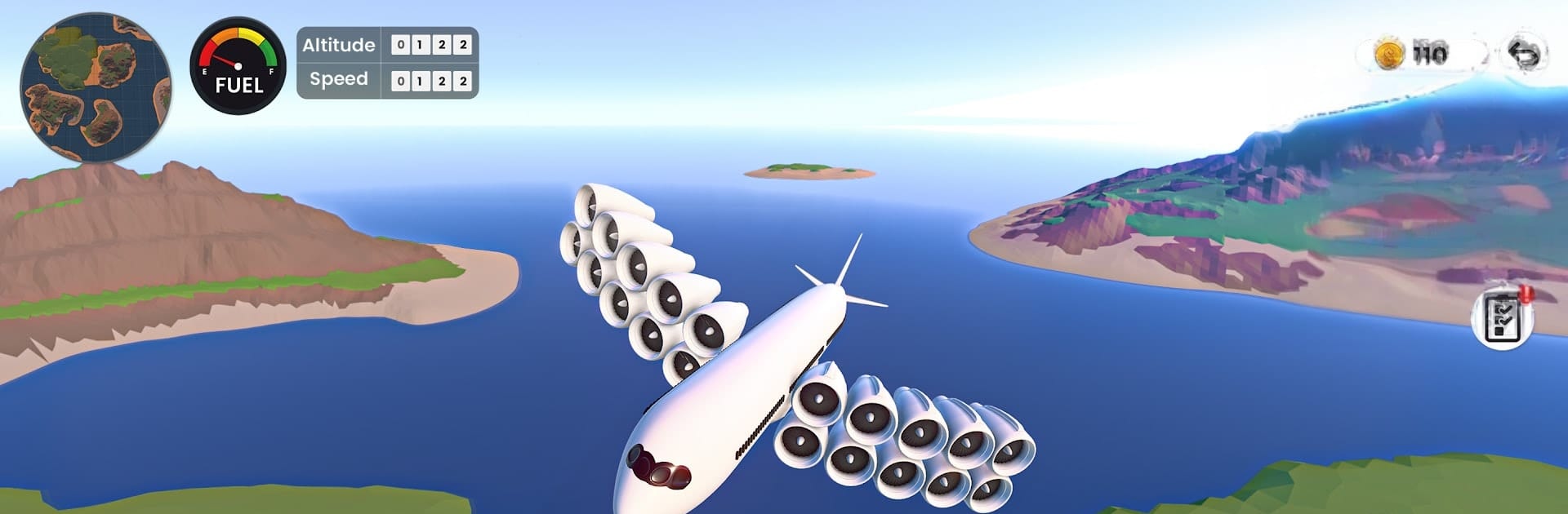
Build Plane Aviation Assembly is all about tinkering, testing, and taking to the skies. You’re not just flying—you’re building the aircraft you’ll pilot, piece by piece, then seeing how your design handles the real thing. It’s a hands-on Simulation with a relaxed, sandbox vibe where every decision on the workbench shows up in the air. Prefer playing on a bigger screen? It runs smoothly on BlueStacks, too.

Game Features

  • Build it your way: Pick wings, engines, fuel tanks, and more, then balance speed, range, and payload. Make a nimble jet, a chunky cargo hauler, or a playful paper-style flyer—your call.
  • Paint and decals: Give your creations a look that matches their personality with colors, liveries, and custom markings.
  • Real flight feel: Practice takeoffs, nail your landings, and manage in-flight maneuvering with responsive controls that reward careful piloting.
  • Missions that matter: Put your designs to the test with cargo deliveries, tricky approaches, fuel management challenges, and other skill-check scenarios to earn currency and unlock fresh parts.
  • Progress your tech: Work through a clear upgrade path—better engines, bigger tanks, smarter aerodynamics—to refine each build.
  • A world to explore: Hop between islands and biomes, discover new airfields, and find hidden components tucked around the map.
  • Creative sandbox: Switch to unlimited building and experiment without constraints—prototype wild ideas or recreate classics until they fly just right.
  • Play at your pace: Quick test flights or long-haul routes, careful engineering or pure experimentation—there’s room for both.
  • Genre: Simulation

Start your journey now. Download the game on BlueStacks, invite your friends, and march on a new adventure.


Game Features

Enhancements

  • Macros
  • Multi Instance
  • Multi Instance Sync
  • Script
  • Enhancements
Macros

Macros

Automate the predictable in Build Plane Aviation Assembly and transform your gameplay with Macros. Get access to inventive Macros in the BlueStacks Macro Community
Multi Instance

Multi Instance

Play Build Plane Aviation Assembly on one window. And chat with your friend on the other. Press CTRL + Shift + 8 to open the Multi-Instance Manager. And start creating fresh instances or clone an existing one.
Multi Instance Sync

Multi Instance Sync

Play Build Plane Aviation Assembly with the power of Multi-Instance Sync. Replicate what you are doing on the main instance on all other instances. Level up faster, play more.
Script

Script

Script your way to gaming glory in Build Plane Aviation Assembly with BlueStacks Script. Write and run a set of commands to automate repeated tasks. Trigger the command by assigning it to any key.
Read More

How to Download and Play Build Plane Aviation Assembly on PC or Mac

  • Download and install BlueStacks on your PC or Mac

  • Complete Google sign-in to access the Play Store, or do it later

  • Look for Build Plane Aviation Assembly in the search bar at the top right corner

  • Click to install Build Plane Aviation Assembly from the search results

  • Complete Google sign-in (if you skipped step 2) to install Build Plane Aviation Assembly

  • Click the Build Plane Aviation Assembly icon on the home screen to start playing

video
Watch Video

Minimum System Requirements

With BlueStacks 5, you can get started on a PC that fulfills the following requirements.

  • Operating System

    Microsoft Windows 7 or above, macOS 11 (Big Sur) or above

  • Processor

    Intel, AMD or Apple Silicon Processor

  • RAM

    at least 4GB

  • HDD

    10GB Free Disk Space

Note:

* You must be an Administrator on your PC. Up to date graphics drivers from Microsoft or the chipset vendor.

Build Plane Aviation Assembly - FAQs

  • How to play Build Plane Aviation Assembly on Windows PC & Mac?

    Play Build Plane Aviation Assembly on your PC or Mac by following these simple steps.

    • Click on 'Play Build Plane Aviation Assembly on PC’ to download BlueStacks
    • Install it and log-in to Google Play Store
    • Launch and play the game.
  • Why is BlueStacks the fastest and safest platform to play games on PC?

    BlueStacks respects your privacy and is always safe and secure to use. It does not carry any malware, spyware, or any sort of additional software that could harm your PC.

    It is engineered to optimize speed and performance for a seamless gaming experience.

  • What are Build Plane Aviation Assembly PC requirements?

    Minimum requirement to run Build Plane Aviation Assembly on your PC

    • OS: Microsoft Windows 7 or above MacOS 11 (Big Sur) or above
    • Processor: Intel, AMD or Apple Silicon Processor
    • RAM: Your PC must have at least 4GB of RAM. (Note that having 4GB or more disk space is not a substitute for RAM)
    • HDD: 10GB Free Disk Space.
    • You must be an Administrator on your PC.