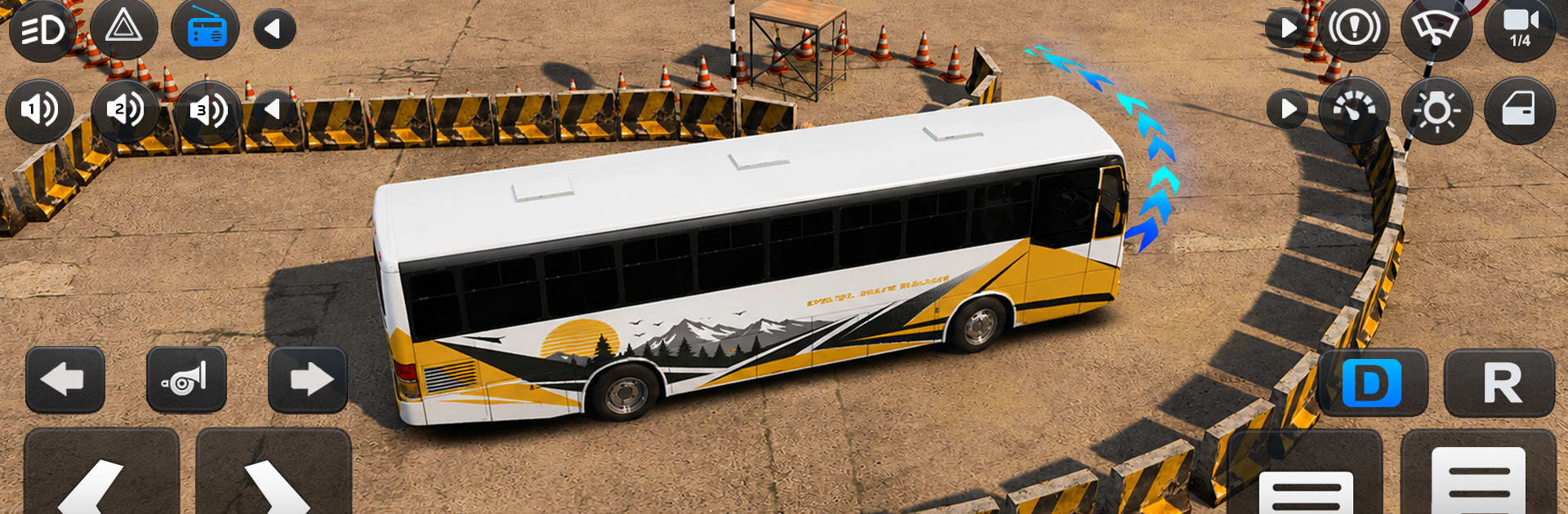
Bus Simulator Master

Bus Simulator Master

Simulation

| 7Seas Entertainment Limited

Play on PC with BlueStacks or from our cloud

  • Overview
  • Game Features
  • How to Play

Page Modified On: August 03, 2026

Play Bus Simulator Master on PC or Mac

Step into the World of Bus Simulator Master, a thrilling Simulation game from the house of 7Seas Entertainment Limited. Play this Android game on BlueStacks App Player and experience immersive gaming on PC or Mac.

About the Game

Bus Simulator Master hands you the keys to big-city coaches and long-haul tour buses with a focus on believable driving and smooth, satisfying progression. It’s a Simulation game that mixes realism with freedom—serious routes when you want structure, relaxed cruising when you don’t, and competitive runs when you’re feeling bold.

Game Features

  • Authentic driving feel: Weighty steering, careful braking, and responsive physics make every turn and stoplight matter. Weather and traffic keep you alert, so good planning actually pays off.

  • Missions Mode: Tackle dispatch-assigned routes with real responsibilities—keep to time, handle traffic, satisfy passengers, and arrive in one piece. Finish successfully to earn coins and unlock new buses and premium customization.

  • Free Roam: No timetable, no pressure. Pick any bus from your garage, choose a map, and just drive—coastal roads, busy downtown grids, or winding mountain passes. Explore, practice, or park and enjoy the view.

  • Tour Mode: Turn a route into a scenic trip. Guide riders through coastal cliffs, historic districts, and other postcard-worthy spots while keeping the ride smooth and comfortable.

  • Multiplayer Mode: Jump into lobbies for head-to-head time trials or team up for convoy runs where coordination matters. Race to finish cleanly—or prove you’re the most reliable driver under pressure.

  • Big, varied maps: From tight city streets to wide coastal highways and steep hill climbs, each area asks you to read the road and drive accordingly.

  • Progress that sticks: Earn rewards by completing challenges and expand your collection. Strong performance opens the door to more powerful, real-world-inspired buses.

  • Deep Garage customization: Tune the look and feel of your fleet with detailed options, then take your signature ride back onto the streets.

  • Rich 3D presentation: Detailed cabins, crisp exteriors, and atmospheric environments make every route feel alive and worth revisiting.

  • Optional PC play with BlueStacks: Prefer a bigger screen and keyboard controls? The game runs smoothly on BlueStacks while keeping all your mobile progress intact.

BlueStacks gives you more room to focus on the game and less time adjusting around mobile limitations.


Game Features

Enhancements

  • Macros
  • Multi Instance
  • Multi Instance Sync
  • Script
  • Enhancements
Macros

Macros

Automate the predictable in Bus Simulator Master and transform your gameplay with Macros. Get access to inventive Macros in the BlueStacks Macro Community
Multi Instance

Multi Instance

Play Bus Simulator Master on one window. And chat with your friend on the other. Press CTRL + Shift + 8 to open the Multi-Instance Manager. And start creating fresh instances or clone an existing one.
Multi Instance Sync

Multi Instance Sync

Play Bus Simulator Master with the power of Multi-Instance Sync. Replicate what you are doing on the main instance on all other instances. Level up faster, play more.
Script

Script

Script your way to gaming glory in Bus Simulator Master with BlueStacks Script. Write and run a set of commands to automate repeated tasks. Trigger the command by assigning it to any key.
Read More

How to Download and Play Bus Simulator Master on PC or Mac

  • Download and install BlueStacks on your PC or Mac

  • Complete Google sign-in to access the Play Store, or do it later

  • Look for Bus Simulator Master in the search bar at the top right corner

  • Click to install Bus Simulator Master from the search results

  • Complete Google sign-in (if you skipped step 2) to install Bus Simulator Master

  • Click the Bus Simulator Master icon on the home screen to start playing

video
Watch Video

Minimum System Requirements

With BlueStacks 5, you can get started on a PC that fulfills the following requirements.

  • Operating System

    Microsoft Windows 7 or above, macOS 11 (Big Sur) or above

  • Processor

    Intel, AMD or Apple Silicon Processor

  • RAM

    at least 4GB

  • HDD

    10GB Free Disk Space

Note:

* You must be an Administrator on your PC. Up to date graphics drivers from Microsoft or the chipset vendor.

Bus Simulator Master - FAQs

  • How to play Bus Simulator Master on Windows PC & Mac?

    Play Bus Simulator Master on your PC or Mac by following these simple steps.

    • Click on 'Play Bus Simulator Master on PC’ to download BlueStacks
    • Install it and log-in to Google Play Store
    • Launch and play the game.
  • Why is BlueStacks the fastest and safest platform to play games on PC?

    BlueStacks respects your privacy and is always safe and secure to use. It does not carry any malware, spyware, or any sort of additional software that could harm your PC.

    It is engineered to optimize speed and performance for a seamless gaming experience.

  • What are Bus Simulator Master PC requirements?

    Minimum requirement to run Bus Simulator Master on your PC

    • OS: Microsoft Windows 7 or above MacOS 11 (Big Sur) or above
    • Processor: Intel, AMD or Apple Silicon Processor
    • RAM: Your PC must have at least 4GB of RAM. (Note that having 4GB or more disk space is not a substitute for RAM)
    • HDD: 10GB Free Disk Space.
    • You must be an Administrator on your PC.