City Police Car Chase Games 3D

City Police Car Chase Games 3D

Simulation

| Games Flight

Play on PC with BlueStacks or from our cloud

  • Overview
  • Game Features
  • How to Play

Page Modified On: August 15, 2026

Play City Police Car Chase Games 3D on PC or Mac

City Police Car Chase Games 3D by Games Flight has plenty to keep you busy. BlueStacks lets you play it on PC or Mac with more screen space, better control, and fewer mobile limits.

About the Game

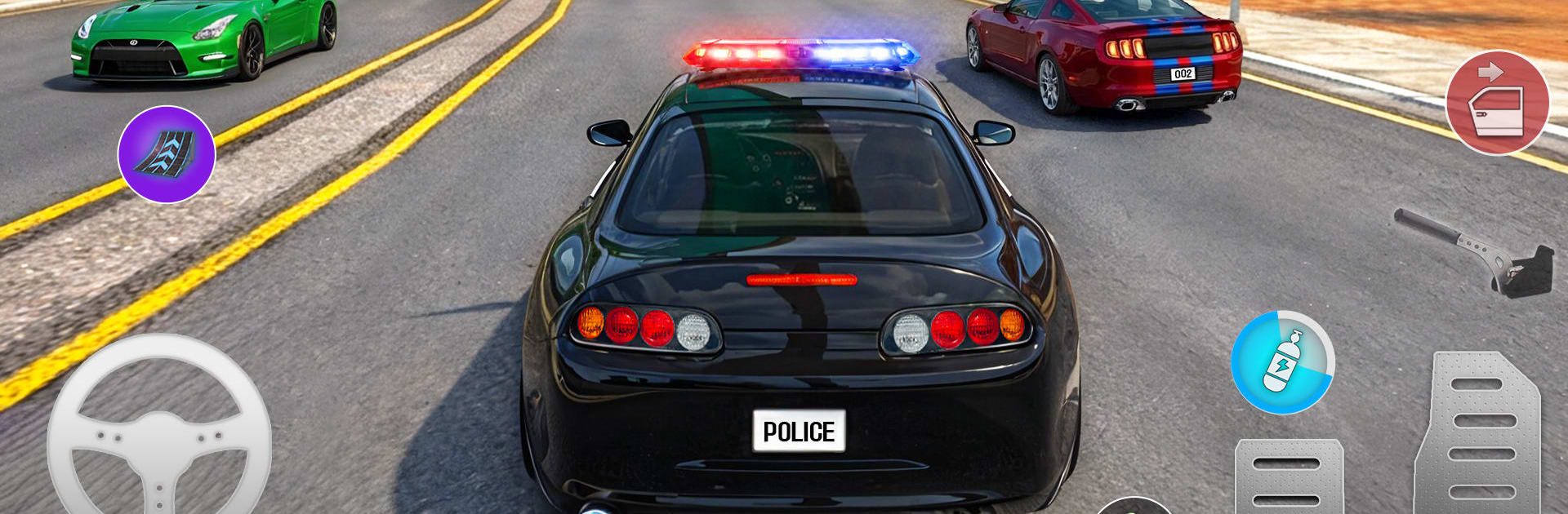
Sirens wailing, city lights flashing, and a full shift ahead—City Police Car Chase Games 3D throws you behind the wheel for a day (and night) in the life of a patrol driver. This Simulation focuses on authentic driving and split‑second decision-making across a busy, open city. One moment you’re cruising your beat, the next you’re locking onto a fleeing suspect or threading the needle through traffic to reach an emergency.

Game Features

  • Open-city patrols: Roll through wide highways, crowded markets, and tight side streets while responding to calls spread across a large urban map.
  • Real chase energy: Jump into high-speed pursuits, hit clean drifts, and outmaneuver suspects without turning the streets into a crash zone.
  • Responsive driving: Feel the weight of modern cruisers with sharp steering, steady braking, and smooth acceleration that makes every turn count.
  • Mission variety: Swap between routine patrol checks, incident responses, checkpoint races, and time-based challenges—keeps the shift fresh.
  • Parking precision: Tackle tight, no-scratch parking tasks that reward patience, control, and picture-perfect angles.
  • Endless shifts: Stay on duty for long-form patrols and rolling chases that keep escalating as the city throws new problems your way.
  • Rank up the badge: Complete objectives, sharpen your skills, and progress from rookie to seasoned inspector with tougher assignments to match.
  • Living traffic: Navigate realistic road bustle and everyday city movement that can help—or seriously complicate—your route.
  • Play your way with BlueStacks: Prefer a bigger screen and flexible controls on PC? It runs great there, too, without getting in the way of the action.

Get ready for a buttery smooth, high-performance gaming action only on BlueStacks.

Game Features

Enhancements

  • Macros
  • Multi Instance
  • Multi Instance Sync
  • Script
  • Enhancements
Macros

Macros

Automate the predictable in City Police Car Chase Games 3D and transform your gameplay with Macros. Get access to inventive Macros in the BlueStacks Macro Community
Multi Instance

Multi Instance

Play City Police Car Chase Games 3D on one window. And chat with your friend on the other. Press CTRL + Shift + 8 to open the Multi-Instance Manager. And start creating fresh instances or clone an existing one.
Multi Instance Sync

Multi Instance Sync

Play City Police Car Chase Games 3D with the power of Multi-Instance Sync. Replicate what you are doing on the main instance on all other instances. Level up faster, play more.
Script

Script

Script your way to gaming glory in City Police Car Chase Games 3D with BlueStacks Script. Write and run a set of commands to automate repeated tasks. Trigger the command by assigning it to any key.
Read More

How to Download and Play City Police Car Chase Games 3D on PC or Mac

  • Download and install BlueStacks on your PC or Mac

  • Complete Google sign-in to access the Play Store, or do it later

  • Look for City Police Car Chase Games 3D in the search bar at the top right corner

  • Click to install City Police Car Chase Games 3D from the search results

  • Complete Google sign-in (if you skipped step 2) to install City Police Car Chase Games 3D

  • Click the City Police Car Chase Games 3D icon on the home screen to start playing

video
Watch Video

Minimum System Requirements

With BlueStacks 5, you can get started on a PC that fulfills the following requirements.

  • Operating System

    Microsoft Windows 7 or above, macOS 11 (Big Sur) or above

  • Processor

    Intel, AMD or Apple Silicon Processor

  • RAM

    at least 4GB

  • HDD

    10GB Free Disk Space

Note:

* You must be an Administrator on your PC. Up to date graphics drivers from Microsoft or the chipset vendor.

City Police Car Chase Games 3D - FAQs

  • How to play City Police Car Chase Games 3D on Windows PC & Mac?

    Play City Police Car Chase Games 3D on your PC or Mac by following these simple steps.

    • Click on 'Play City Police Car Chase Games 3D on PC’ to download BlueStacks
    • Install it and log-in to Google Play Store
    • Launch and play the game.
  • Why is BlueStacks the fastest and safest platform to play games on PC?

    BlueStacks respects your privacy and is always safe and secure to use. It does not carry any malware, spyware, or any sort of additional software that could harm your PC.

    It is engineered to optimize speed and performance for a seamless gaming experience.

  • What are City Police Car Chase Games 3D PC requirements?

    Minimum requirement to run City Police Car Chase Games 3D on your PC

    • OS: Microsoft Windows 7 or above MacOS 11 (Big Sur) or above
    • Processor: Intel, AMD or Apple Silicon Processor
    • RAM: Your PC must have at least 4GB of RAM. (Note that having 4GB or more disk space is not a substitute for RAM)
    • HDD: 10GB Free Disk Space.
    • You must be an Administrator on your PC.