Dragon Craft: Hunter Legends

Dragon Craft: Hunter Legends

Simulation

| Alfatih Sports

Play on PC with BlueStacks or from our cloud

  • Overview
  • Game Features
  • How to Play

Page Modified On: April 24, 2026

Play Dragon Craft: Hunter Legends on PC or Mac

Explore a whole new adventure with Dragon Craft: Hunter Legends, a Simulation game created by Alfatih Sports. Experience great gameplay with BlueStacks, the most popular gaming platform to play Android games on your PC or Mac.

About the Game

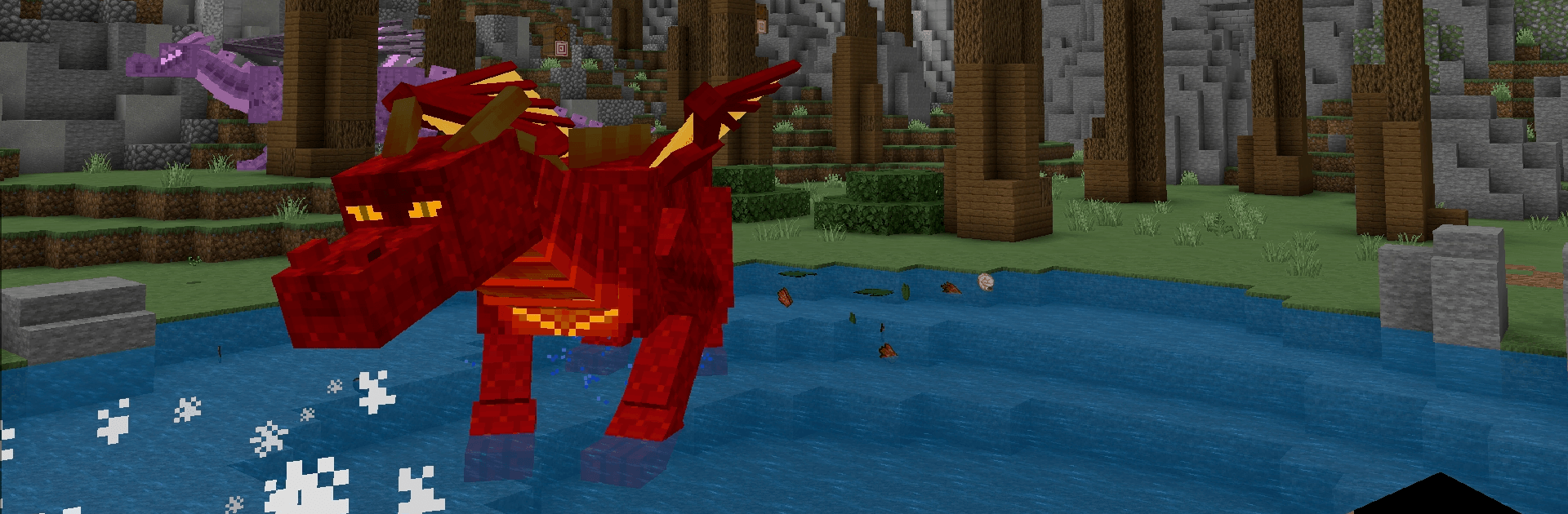
Dragon Craft: Hunter Legends is a Simulation sandbox from Alfatih Sports that throws you into a rugged, blocky wilderness where dragons aren’t just scenery—they’re the main event. Explore, gather, and build while gearing up to take on massive, fire-breathing beasts that guard the best loot. It’s part survival, part adventure, and totally about the thrill of the hunt. Prefer a bigger screen and keyboard? It plays great on BlueStacks too.

Game Features

  • Epic dragon hunts: Track crafty, high-flying predators and challenge them in tense, skill-based battles that reward smart prep and sharper aim.
  • Open-world exploration: Roam sprawling biomes filled with secrets, from quiet forests to scorching volcanic ridges and wind-beaten peaks.
  • Crafting that matters: Mine rare ores, shape components, and assemble tools and weapons that actually change how you fight and survive.
  • Build your haven: Throw up a quick shelter, expand into a sturdy fortress, or plan a sprawling stronghold—your base is your lifeline.
  • Gear progression: Upgrade blades, bows, armor, and passive skills to handle tougher creatures and harsher environments.
  • Caves and dungeons: Descend into twisting tunnels, molten chambers, and hidden vaults packed with resources—and the things guarding them.
  • Survival with bite: Manage health and supplies while battling roaming threats and sudden weather shifts that keep you on your toes.
  • Biome variety: Cross deserts, mountains, lava fields, and more, each with unique resources, enemies, and challenges.
  • Hunt-to-reward loop: Every successful takedown nets materials for better gear, unlocking new strategies for the next big target.

Get ready for a buttery smooth, high-performance gaming action only on BlueStacks.

Game Features

Enhancements

  • Macros
  • Multi Instance
  • Multi Instance Sync
  • Script
  • Enhancements
Macros

Macros

Automate the predictable in Dragon Craft: Hunter Legends and transform your gameplay with Macros. Get access to inventive Macros in the BlueStacks Macro Community
Multi Instance

Multi Instance

Play Dragon Craft: Hunter Legends on one window. And chat with your friend on the other. Press CTRL + Shift + 8 to open the Multi-Instance Manager. And start creating fresh instances or clone an existing one.
Multi Instance Sync

Multi Instance Sync

Play Dragon Craft: Hunter Legends with the power of Multi-Instance Sync. Replicate what you are doing on the main instance on all other instances. Level up faster, play more.
Script

Script

Script your way to gaming glory in Dragon Craft: Hunter Legends with BlueStacks Script. Write and run a set of commands to automate repeated tasks. Trigger the command by assigning it to any key.
Read More

How to Download and Play Dragon Craft: Hunter Legends on PC or Mac

  • Download and install BlueStacks on your PC or Mac

  • Complete Google sign-in to access the Play Store, or do it later

  • Look for Dragon Craft: Hunter Legends in the search bar at the top right corner

  • Click to install Dragon Craft: Hunter Legends from the search results

  • Complete Google sign-in (if you skipped step 2) to install Dragon Craft: Hunter Legends

  • Click the Dragon Craft: Hunter Legends icon on the home screen to start playing

video
Watch Video

Minimum System Requirements

With BlueStacks 5, you can get started on a PC that fulfills the following requirements.

  • Operating System

    Microsoft Windows 7 or above, macOS 11 (Big Sur) or above

  • Processor

    Intel, AMD or Apple Silicon Processor

  • RAM

    at least 4GB

  • HDD

    10GB Free Disk Space

Note:

* You must be an Administrator on your PC. Up to date graphics drivers from Microsoft or the chipset vendor.

Dragon Craft: Hunter Legends - FAQs

  • How to play Dragon Craft: Hunter Legends on Windows PC & Mac?

    Play Dragon Craft: Hunter Legends on your PC or Mac by following these simple steps.

    • Click on 'Play Dragon Craft: Hunter Legends on PC’ to download BlueStacks
    • Install it and log-in to Google Play Store
    • Launch and play the game.
  • Why is BlueStacks the fastest and safest platform to play games on PC?

    BlueStacks respects your privacy and is always safe and secure to use. It does not carry any malware, spyware, or any sort of additional software that could harm your PC.

    It is engineered to optimize speed and performance for a seamless gaming experience.

  • What are Dragon Craft: Hunter Legends PC requirements?

    Minimum requirement to run Dragon Craft: Hunter Legends on your PC

    • OS: Microsoft Windows 7 or above MacOS 11 (Big Sur) or above
    • Processor: Intel, AMD or Apple Silicon Processor
    • RAM: Your PC must have at least 4GB of RAM. (Note that having 4GB or more disk space is not a substitute for RAM)
    • HDD: 10GB Free Disk Space.
    • You must be an Administrator on your PC.