Dubai Van: Car Simulator Games

Dubai Van: Car Simulator Games

Simulation

| HubG Simulations

Play on PC with BlueStacks or from our cloud

  • Overview
  • Game Features
  • How to Play

Page Modified On: April 21, 2026

Play Dubai Van: Car Simulator Games on PC or Mac

Explore a whole new adventure with Dubai Van: Car Simulator Games, a Simulation game created by HubG Simulations. Experience great gameplay with BlueStacks, the most popular gaming platform to play Android games on your PC or Mac.

About the Game

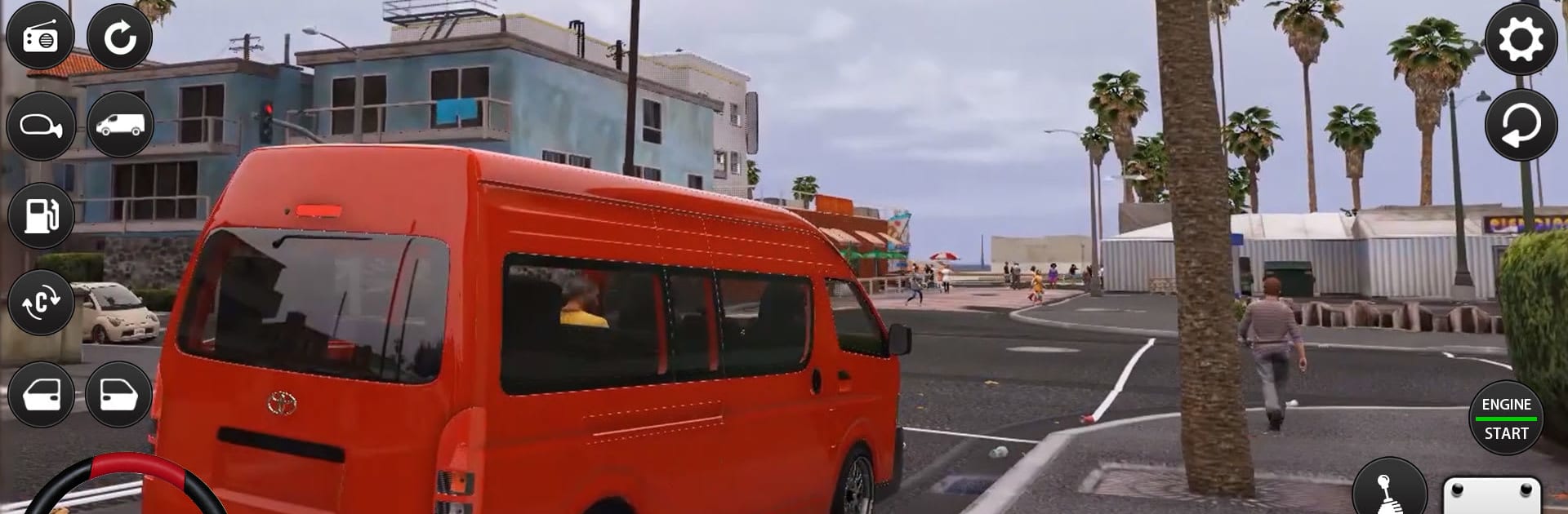
Ever wondered what it’s like to thread a delivery van through Dubai’s traffic while the clock keeps ticking? Dubai Van: Car Simulator Games puts you in the hot seat across lively boulevards, tight back streets, and highway loops lined with landmarks. Built by HubG Simulations, this Simulation title blends relaxed free-roam cruising with focused jobs that reward smart driving and smooth handling.

Game Features

  • Authentic Dubai Streets: Navigate bustling roads with traffic, pedestrians, roundabouts, and those sneaky speed bumps—perfect for practicing real city driving.
  • Distinct Vans, Distinct Feel: From compact delivery rides to heavy-duty haulers, each van handles differently with its own weight, braking, and steering personality.
  • Two Ways to Play: Pick Free Mode to roam without pressure or jump into Career for structured missions and level-based challenges that steadily ramp up.
  • Deliveries and Passenger Runs: Plot routes, load up, and keep cargo intact—or shuttle passengers and keep them happy. Good ratings mean better rewards and more unlocks.
  • Realistic Driving Physics: Feel the difference when you corner too hard or brake late. Manage momentum, watch your spacing, and respect the signals.
  • Online Multiplayer: Share the road with others, compare skills, and bring your best driving etiquette to busy city sessions.
  • Clean UI and Controls: A modern, straightforward interface keeps the focus on the road, with snappy menus and clear on-screen info.
  • 3D Sights and Sounds: Crisp visuals, detailed vehicles, and convincing audio create a city that feels alive at every intersection and alley.
  • Smooth on Mobile (and PC): Optimized size and performance keep it running nicely on phones—and if you want more screen and finer control, take the wheel on PC with BlueStacks.

Get ready for a buttery smooth, high-performance gaming action only on BlueStacks.

Game Features

Enhancements

  • Macros
  • Multi Instance
  • Multi Instance Sync
  • Script
  • Enhancements
Macros

Macros

Automate the predictable in Dubai Van: Car Simulator Games and transform your gameplay with Macros. Get access to inventive Macros in the BlueStacks Macro Community
Multi Instance

Multi Instance

Play Dubai Van: Car Simulator Games on one window. And chat with your friend on the other. Press CTRL + Shift + 8 to open the Multi-Instance Manager. And start creating fresh instances or clone an existing one.
Multi Instance Sync

Multi Instance Sync

Play Dubai Van: Car Simulator Games with the power of Multi-Instance Sync. Replicate what you are doing on the main instance on all other instances. Level up faster, play more.
Script

Script

Script your way to gaming glory in Dubai Van: Car Simulator Games with BlueStacks Script. Write and run a set of commands to automate repeated tasks. Trigger the command by assigning it to any key.
Read More

How to Download and Play Dubai Van: Car Simulator Games on PC or Mac

  • Download and install BlueStacks on your PC or Mac

  • Complete Google sign-in to access the Play Store, or do it later

  • Look for Dubai Van: Car Simulator Games in the search bar at the top right corner

  • Click to install Dubai Van: Car Simulator Games from the search results

  • Complete Google sign-in (if you skipped step 2) to install Dubai Van: Car Simulator Games

  • Click the Dubai Van: Car Simulator Games icon on the home screen to start playing

video
Watch Video

Minimum System Requirements

With BlueStacks 5, you can get started on a PC that fulfills the following requirements.

  • Operating System

    Microsoft Windows 7 or above, macOS 11 (Big Sur) or above

  • Processor

    Intel, AMD or Apple Silicon Processor

  • RAM

    at least 4GB

  • HDD

    10GB Free Disk Space

Note:

* You must be an Administrator on your PC. Up to date graphics drivers from Microsoft or the chipset vendor.

Dubai Van: Car Simulator Games - FAQs

  • How to play Dubai Van: Car Simulator Games on Windows PC & Mac?

    Play Dubai Van: Car Simulator Games on your PC or Mac by following these simple steps.

    • Click on 'Play Dubai Van: Car Simulator Games on PC’ to download BlueStacks
    • Install it and log-in to Google Play Store
    • Launch and play the game.
  • Why is BlueStacks the fastest and safest platform to play games on PC?

    BlueStacks respects your privacy and is always safe and secure to use. It does not carry any malware, spyware, or any sort of additional software that could harm your PC.

    It is engineered to optimize speed and performance for a seamless gaming experience.

  • What are Dubai Van: Car Simulator Games PC requirements?

    Minimum requirement to run Dubai Van: Car Simulator Games on your PC

    • OS: Microsoft Windows 7 or above MacOS 11 (Big Sur) or above
    • Processor: Intel, AMD or Apple Silicon Processor
    • RAM: Your PC must have at least 4GB of RAM. (Note that having 4GB or more disk space is not a substitute for RAM)
    • HDD: 10GB Free Disk Space.
    • You must be an Administrator on your PC.