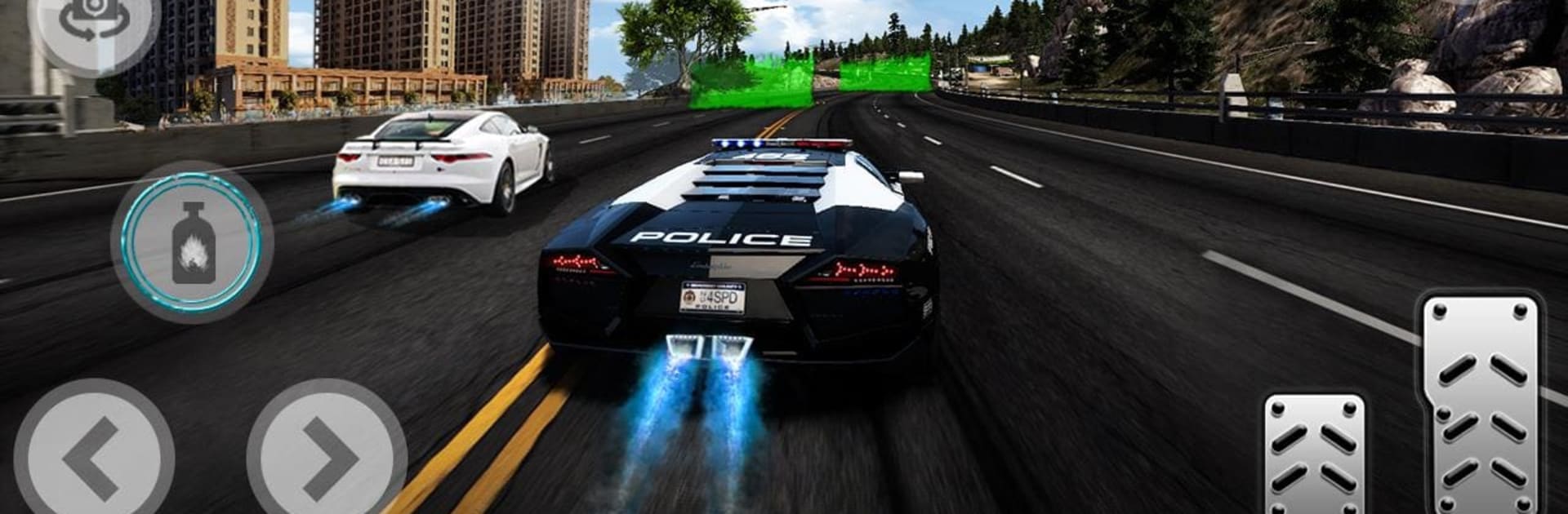
Police car Racing:Bank Robbery

Police car Racing:Bank Robbery

Simulation

| HubG Simulations

Play on PC with BlueStacks or from our cloud

  • Overview
  • Game Features
  • How to Play

Page Modified On: August 29, 2025

Play Police car Racing:Bank Robbery on PC or Mac

Police car Racing:Bank Robbery brings the Simulation genre to life, and throws up exciting challenges for gamers. Developed by HubG Simulations, this Android game is best experienced on BlueStacks, the World’s #1 app player for PC and Mac users.

About the Game

Police car Racing:Bank Robbery puts you in the driver’s seat of high-stakes pursuits across a living city. This Simulation from HubG Simulations is all about reading the streets, responding to calls, and shutting down slick getaway crews before they vanish. It plays great on mobile—and feels especially smooth on BlueStacks if you like a bigger screen and tighter controls.

Game Features

  • Open-city pursuits: Roll through busy downtown blocks, gritty docks, and long canyon highways, picking your own routes to cut off escaping suspects.
  • Mission-driven progression: Answer dispatch calls that range from reckless driving to full-on bank robbery getaways, earn badges, and rise through the ranks.
  • Cars that feel alive: Master handbrake drifts, time your braking, and use the siren to pressure fleeing drivers in tense, close-quarters chases.
  • Garage with variety: Build a fleet of 10 ride types—from nimble sports units to heavier interceptors—and tune the look with paints, rims, and liveries.
  • Boosts when it counts: Spend your hard-earned cash on nitrous for that last-second burst, plus quick repairs to keep your cruiser in the fight.
  • Smarter suspects, tougher choices: Crooks weave through traffic, fake turns, and double back; decide when to box them in or go for a clean, safe stop.
  • Multiple camera views: Swap between cockpit, chase, and cinematic angles that amp up drifts and high-speed near misses.
  • Special ops moments: Certain missions push you beyond street level—provide aerial support or coordinate from above to track a fleeing getaway car.
  • Crisp visuals and scale: Clear lighting, long sightlines, and busy traffic make every pursuit feel fast, messy, and real.

Start your journey now. Download the game on BlueStacks, invite your friends, and march on a new adventure.


Game Features

Enhancements

  • Macros
  • Multi Instance
  • Multi Instance Sync
  • Script
  • Enhancements
Macros

Macros

Automate the predictable in Police car Racing:Bank Robbery and transform your gameplay with Macros. Get access to inventive Macros in the BlueStacks Macro Community
Multi Instance

Multi Instance

Play Police car Racing:Bank Robbery on one window. And chat with your friend on the other. Press CTRL + Shift + 8 to open the Multi-Instance Manager. And start creating fresh instances or clone an existing one.
Multi Instance Sync

Multi Instance Sync

Play Police car Racing:Bank Robbery with the power of Multi-Instance Sync. Replicate what you are doing on the main instance on all other instances. Level up faster, play more.
Script

Script

Script your way to gaming glory in Police car Racing:Bank Robbery with BlueStacks Script. Write and run a set of commands to automate repeated tasks. Trigger the command by assigning it to any key.
Read More

How to Download and Play Police car Racing:Bank Robbery on PC or Mac

  • Download and install BlueStacks on your PC or Mac

  • Complete Google sign-in to access the Play Store, or do it later

  • Look for Police car Racing:Bank Robbery in the search bar at the top right corner

  • Click to install Police car Racing:Bank Robbery from the search results

  • Complete Google sign-in (if you skipped step 2) to install Police car Racing:Bank Robbery

  • Click the Police car Racing:Bank Robbery icon on the home screen to start playing

video
Watch Video

Minimum System Requirements

With BlueStacks 5, you can get started on a PC that fulfills the following requirements.

  • Operating System

    Microsoft Windows 7 or above, macOS 11 (Big Sur) or above

  • Processor

    Intel, AMD or Apple Silicon Processor

  • RAM

    at least 4GB

  • HDD

    10GB Free Disk Space

Note:

* You must be an Administrator on your PC. Up to date graphics drivers from Microsoft or the chipset vendor.

Police car Racing:Bank Robbery - FAQs

  • How to play Police car Racing:Bank Robbery on Windows PC & Mac?

    Play Police car Racing:Bank Robbery on your PC or Mac by following these simple steps.

    • Click on 'Play Police car Racing:Bank Robbery on PC’ to download BlueStacks
    • Install it and log-in to Google Play Store
    • Launch and play the game.
  • Why is BlueStacks the fastest and safest platform to play games on PC?

    BlueStacks respects your privacy and is always safe and secure to use. It does not carry any malware, spyware, or any sort of additional software that could harm your PC.

    It is engineered to optimize speed and performance for a seamless gaming experience.

  • What are Police car Racing:Bank Robbery PC requirements?

    Minimum requirement to run Police car Racing:Bank Robbery on your PC

    • OS: Microsoft Windows 7 or above MacOS 11 (Big Sur) or above
    • Processor: Intel, AMD or Apple Silicon Processor
    • RAM: Your PC must have at least 4GB of RAM. (Note that having 4GB or more disk space is not a substitute for RAM)
    • HDD: 10GB Free Disk Space.
    • You must be an Administrator on your PC.