
Golem Rise: Craft Arena

Golem Rise: Craft Arena

Simulation

| KOKIQU

Play on PC with BlueStacks or from our cloud

  • Overview
  • Game Features
  • How to Play

Page Modified On: April 13, 2026

Play Golem Rise: Craft Arena on PC or Mac

Bring your A-game to Golem Rise: Craft Arena, the Simulation game sensation from KOKIQU. Give your gameplay the much-needed boost with precise game controls, high FPS graphics, and top-tier features on your PC or Mac with BlueStacks.

About the Game

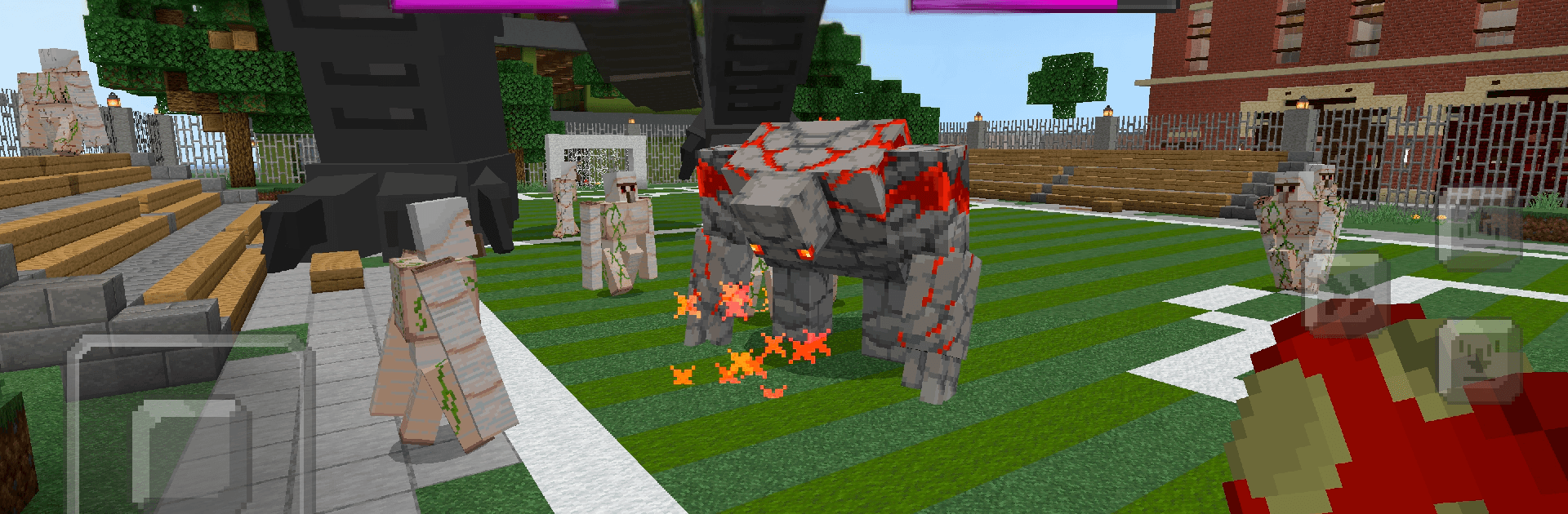
Want a builder that actually throws down in the arena? Golem Rise: Craft Arena from KOKIQU is a Simulation game that blends blocky crafting with punchy, wave-based battles. You’ll assemble golems, fine-tune their abilities, and send them into fast clashes that reward timing, smart upgrades, and a bit of nerve—great for quick sessions on mobile or on a bigger screen with BlueStacks.

Game Features

  • Build your golems: Combine parts to create chunky guardians with distinct strengths and trade-offs. Heavy hitter, speedy scrapper, or something in between—your call.
  • Summon and fight: Bring your custom creations into compact arenas and take on escalating waves of enemies. It’s simple to start, but the heat ramps up fast.
  • Upgrade and specialize: Earn resources to boost stats and unlock fresh abilities. Nudge a balanced build toward tanky defense or sharpen its damage for all-out offense.
  • Snappy, pick‑up‑and‑play controls: Quick inputs keep the action moving, so you can squeeze in a run anytime without wrestling with menus.
  • Strategy in the chaos: Positioning, cooldown timing, and when you unleash abilities matter. A solid plan beats button mashing once the tougher waves roll in.
  • Built for tinkerers and brawlers: Whether you love experimenting with builds or just want nonstop combat, there’s a satisfying loop to chase.
  • Plays nicely on BlueStacks: Prefer a larger display and tighter controls? It runs smoothly there, too, without changing the core, craft-and-battle feel.

Slay your opponents with your epic moves. Play it your way on BlueStacks and dominate the battlefield.


Game Features

Enhancements

  • Macros
  • Multi Instance
  • Multi Instance Sync
  • Script
  • Enhancements
Macros

Macros

Automate the predictable in Golem Rise: Craft Arena and transform your gameplay with Macros. Get access to inventive Macros in the BlueStacks Macro Community
Multi Instance

Multi Instance

Play Golem Rise: Craft Arena on one window. And chat with your friend on the other. Press CTRL + Shift + 8 to open the Multi-Instance Manager. And start creating fresh instances or clone an existing one.
Multi Instance Sync

Multi Instance Sync

Play Golem Rise: Craft Arena with the power of Multi-Instance Sync. Replicate what you are doing on the main instance on all other instances. Level up faster, play more.
Script

Script

Script your way to gaming glory in Golem Rise: Craft Arena with BlueStacks Script. Write and run a set of commands to automate repeated tasks. Trigger the command by assigning it to any key.
Read More

How to Download and Play Golem Rise: Craft Arena on PC or Mac

  • Download and install BlueStacks on your PC or Mac

  • Complete Google sign-in to access the Play Store, or do it later

  • Look for Golem Rise: Craft Arena in the search bar at the top right corner

  • Click to install Golem Rise: Craft Arena from the search results

  • Complete Google sign-in (if you skipped step 2) to install Golem Rise: Craft Arena

  • Click the Golem Rise: Craft Arena icon on the home screen to start playing

video
Watch Video

Minimum System Requirements

With BlueStacks 5, you can get started on a PC that fulfills the following requirements.

  • Operating System

    Microsoft Windows 7 or above, macOS 11 (Big Sur) or above

  • Processor

    Intel, AMD or Apple Silicon Processor

  • RAM

    at least 4GB

  • HDD

    10GB Free Disk Space

Note:

* You must be an Administrator on your PC. Up to date graphics drivers from Microsoft or the chipset vendor.

Golem Rise: Craft Arena - FAQs

  • How to play Golem Rise: Craft Arena on Windows PC & Mac?

    Play Golem Rise: Craft Arena on your PC or Mac by following these simple steps.

    • Click on 'Play Golem Rise: Craft Arena on PC’ to download BlueStacks
    • Install it and log-in to Google Play Store
    • Launch and play the game.
  • Why is BlueStacks the fastest and safest platform to play games on PC?

    BlueStacks respects your privacy and is always safe and secure to use. It does not carry any malware, spyware, or any sort of additional software that could harm your PC.

    It is engineered to optimize speed and performance for a seamless gaming experience.

  • What are Golem Rise: Craft Arena PC requirements?

    Minimum requirement to run Golem Rise: Craft Arena on your PC

    • OS: Microsoft Windows 7 or above MacOS 11 (Big Sur) or above
    • Processor: Intel, AMD or Apple Silicon Processor
    • RAM: Your PC must have at least 4GB of RAM. (Note that having 4GB or more disk space is not a substitute for RAM)
    • HDD: 10GB Free Disk Space.
    • You must be an Administrator on your PC.







