Суровая Россия (CRMP)

Суровая Россия (CRMP)

Simulation

| Medjidovich

Play on PC with BlueStacks or from our cloud

  • Overview
  • Game Features
  • How to Play

Page Modified On: January 09, 2026

Play Суровая Россия (CRMP) on PC or Mac

Суровая Россия (CRMP) brings the Simulation genre to life, and throws up exciting challenges for gamers. Developed by Medjidovich, this Android game is best experienced on BlueStacks, the World’s #1 app player for PC and Mac users.

About the Game

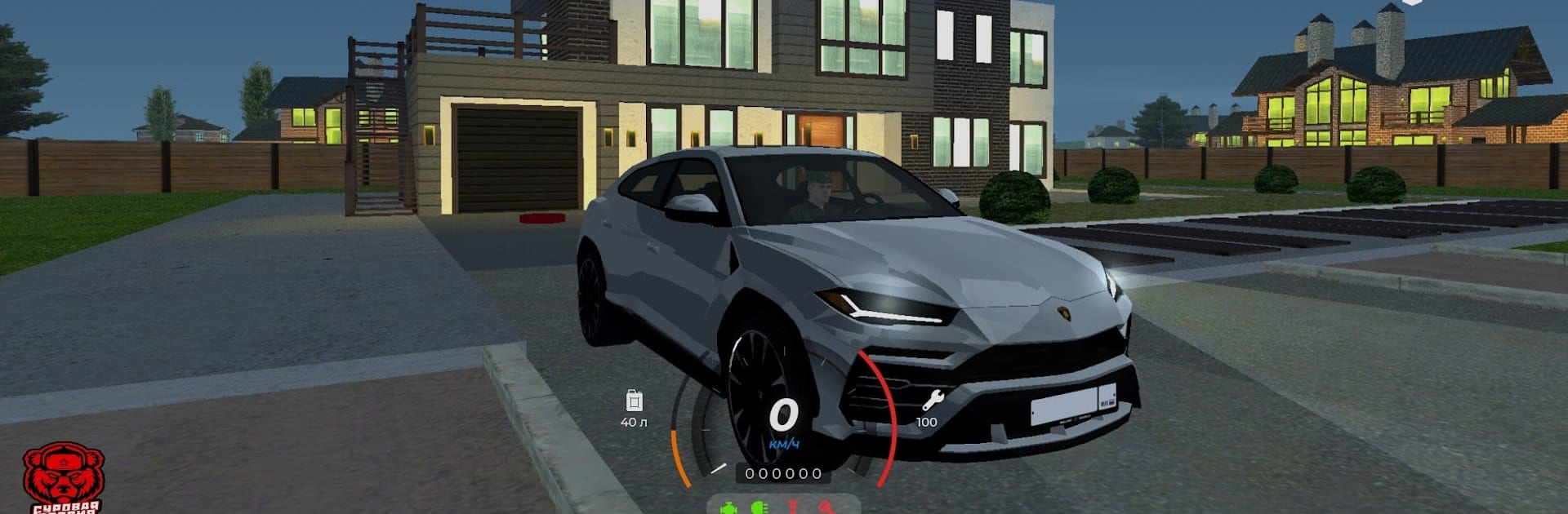
Суровая Россия (CRMP) is a Simulation world built around everyday life in modern Russia—cars, cities, and lots of people to meet. It’s online, lively, and surprisingly chill: hop into a car, roll through familiar streets, and see what the crowd’s up to. Made by Medjidovich, it brings together cruising, social play, and plenty of tinkering under the hood.

Game Features

  • Real Russian cities
    Explore recognizable spots from places like Moscow and Nizhny Novgorod. Cruise wide avenues, cut through tight courtyards, and get that “I’ve been here” vibe while you roam.

  • Always-on multiplayer
    Jump into busy servers with thousands of players. Chat, make friends, form a crew, or just people-watch as the city moves around you.

  • 180+ vehicles to collect
    Build a garage that actually feels personal: domestic classics, speedy sports cars, tough jeeps, and practical pickups—all with their own character.

  • Tuning your way
    Go subtle or go wild. Swap rims, throw on neon, add nitrous, tweak engine settings (ECU-style tunes), and even drop a subwoofer for style points.

  • Easy start bonus
    New here? There’s a welcome bonus waiting. Type /pr in chat to claim it and get rolling faster.

  • Smooth on PC with BlueStacks
    Want a bigger screen and comfy controls? You can play it on your PC using BlueStacks without changing how the game feels.

Slay your opponents with your epic moves. Play it your way on BlueStacks and dominate the battlefield.


Game Features

Enhancements

  • Macros
  • Multi Instance
  • Multi Instance Sync
  • Script
  • Enhancements
Macros

Macros

Automate the predictable in Суровая Россия (CRMP) and transform your gameplay with Macros. Get access to inventive Macros in the BlueStacks Macro Community
Multi Instance

Multi Instance

Play Суровая Россия (CRMP) on one window. And chat with your friend on the other. Press CTRL + Shift + 8 to open the Multi-Instance Manager. And start creating fresh instances or clone an existing one.
Multi Instance Sync

Multi Instance Sync

Play Суровая Россия (CRMP) with the power of Multi-Instance Sync. Replicate what you are doing on the main instance on all other instances. Level up faster, play more.
Script

Script

Script your way to gaming glory in Суровая Россия (CRMP) with BlueStacks Script. Write and run a set of commands to automate repeated tasks. Trigger the command by assigning it to any key.
Read More

How to Download and Play Суровая Россия (CRMP) on PC or Mac

  • Download and install BlueStacks on your PC or Mac

  • Complete Google sign-in to access the Play Store, or do it later

  • Look for Суровая Россия (CRMP) in the search bar at the top right corner

  • Click to install Суровая Россия (CRMP) from the search results

  • Complete Google sign-in (if you skipped step 2) to install Суровая Россия (CRMP)

  • Click the Суровая Россия (CRMP) icon on the home screen to start playing

video
Watch Video

Minimum System Requirements

With BlueStacks 5, you can get started on a PC that fulfills the following requirements.

  • Operating System

    Microsoft Windows 7 or above, macOS 11 (Big Sur) or above

  • Processor

    Intel, AMD or Apple Silicon Processor

  • RAM

    at least 4GB

  • HDD

    10GB Free Disk Space

Note:

* You must be an Administrator on your PC. Up to date graphics drivers from Microsoft or the chipset vendor.

Суровая Россия (CRMP) - FAQs

  • How to play Суровая Россия (CRMP) on Windows PC & Mac?

    Play Суровая Россия (CRMP) on your PC or Mac by following these simple steps.

    • Click on 'Play Суровая Россия (CRMP) on PC’ to download BlueStacks
    • Install it and log-in to Google Play Store
    • Launch and play the game.
  • Why is BlueStacks the fastest and safest platform to play games on PC?

    BlueStacks respects your privacy and is always safe and secure to use. It does not carry any malware, spyware, or any sort of additional software that could harm your PC.

    It is engineered to optimize speed and performance for a seamless gaming experience.

  • What are Суровая Россия (CRMP) PC requirements?

    Minimum requirement to run Суровая Россия (CRMP) on your PC

    • OS: Microsoft Windows 7 or above MacOS 11 (Big Sur) or above
    • Processor: Intel, AMD or Apple Silicon Processor
    • RAM: Your PC must have at least 4GB of RAM. (Note that having 4GB or more disk space is not a substitute for RAM)
    • HDD: 10GB Free Disk Space.
    • You must be an Administrator on your PC.