Hit Sandbox
Hit Sandbox

Hit Sandbox

Simulation

| KAOLA games

Play on PC with BlueStacks or from our cloud

  • Overview
  • Game Features
  • How to Play

Page Modified On: June 29, 2026

Play Hit Sandbox on PC or Mac

Explore a whole new adventure with Hit Sandbox, a Simulation game created by KAOLA games. Experience great gameplay with BlueStacks, the most popular gaming platform to play Android games on your PC or Mac.

About the Game

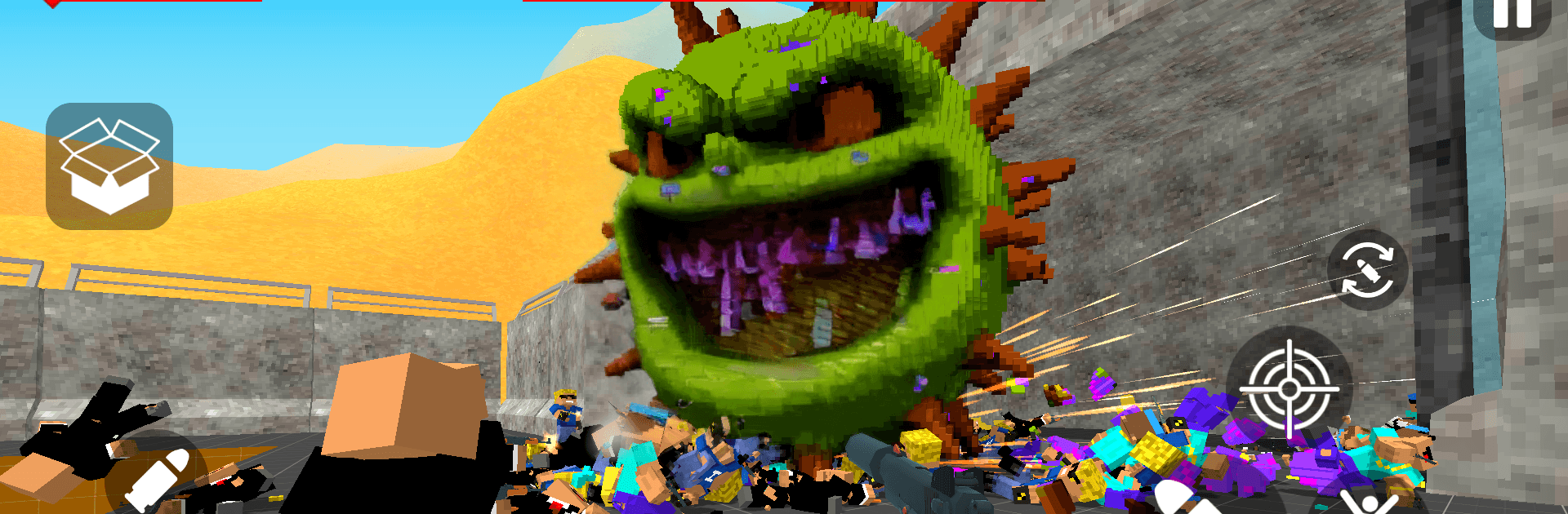
Hit Sandbox is a physics-heavy Simulation where your inner builder and your chaotic side finally get along. It’s a breakable, blocky world made for experiments, traps, and over-the-top stunts—then watching it all crumble in glorious slow motion. It runs offline, so whether you’ve got five minutes or an entire evening, you can set up a plan and blow it to bits.

Game Features

  • Fully Destructible Voxels: Every wall, floor, and prop is made of tiny blocks you can chip, blast, or collapse. Expect shockwaves, flying debris, and that “did I just do that?” grin.
  • Offline Chaos: No connection required. Tinker on the go, test wild ideas, and spark chain reactions anytime.
  • Powerful Map Editor: Drop structures, brace beams, wire explosives, and paint your own arenas. It’s quick to build—faster to break.
  • Tactical Gunplay: Go quiet with silenced shots or loud with rockets. Set ambushes, funnel enemies, and time detonations for maximum impact.
  • Ragdoll Physics: Wobbly bodies somersault through windows, tumble down stairs, and react to force in satisfyingly silly ways.
  • Giant Fruit Bosses: Face towering oddballs like a watermelon brute with a sticky tongue or an orange warlord lobbing rockets. Outsmart them with traps and clever terrain use.
  • Crafting & Customization: Mix materials for tougher walls, rig remote-detonated mines, cook up experimental bombs, and tune weapon parts—then tag them with crisp pixel decals.
  • Chain-Reaction Toys: Build Rube Goldberg-style contraptions—ramps, domino beams, tripwires—that all end in one glorious boom.
  • Secrets Everywhere: Hidden rooms, quirky props, and odd puzzles reward the curious with special gadgets and weird surprises.
  • PC-Friendly on BlueStacks: Prefer keyboard-and-mouse control while you engineer mayhem? It plays comfortably there without getting in the way of the destruction.

BlueStacks gives you more room to focus on the game and less time adjusting around mobile limitations.


Game Features

Enhancements

  • Macros
  • Multi Instance
  • Multi Instance Sync
  • Script
  • Enhancements
Macros

Macros

Automate the predictable in Hit Sandbox and transform your gameplay with Macros. Get access to inventive Macros in the BlueStacks Macro Community
Multi Instance

Multi Instance

Play Hit Sandbox on one window. And chat with your friend on the other. Press CTRL + Shift + 8 to open the Multi-Instance Manager. And start creating fresh instances or clone an existing one.
Multi Instance Sync

Multi Instance Sync

Play Hit Sandbox with the power of Multi-Instance Sync. Replicate what you are doing on the main instance on all other instances. Level up faster, play more.
Script

Script

Script your way to gaming glory in Hit Sandbox with BlueStacks Script. Write and run a set of commands to automate repeated tasks. Trigger the command by assigning it to any key.
Read More

How to Download and Play Hit Sandbox on PC or Mac

  • Download and install BlueStacks on your PC or Mac

  • Complete Google sign-in to access the Play Store, or do it later

  • Look for Hit Sandbox in the search bar at the top right corner

  • Click to install Hit Sandbox from the search results

  • Complete Google sign-in (if you skipped step 2) to install Hit Sandbox

  • Click the Hit Sandbox icon on the home screen to start playing

video
Watch Video

Minimum System Requirements

With BlueStacks 5, you can get started on a PC that fulfills the following requirements.

  • Operating System

    Microsoft Windows 7 or above, macOS 11 (Big Sur) or above

  • Processor

    Intel, AMD or Apple Silicon Processor

  • RAM

    at least 4GB

  • HDD

    10GB Free Disk Space

Note:

* You must be an Administrator on your PC. Up to date graphics drivers from Microsoft or the chipset vendor.

Hit Sandbox - FAQs

  • How to play Hit Sandbox on Windows PC & Mac?

    Play Hit Sandbox on your PC or Mac by following these simple steps.

    • Click on 'Play Hit Sandbox on PC’ to download BlueStacks
    • Install it and log-in to Google Play Store
    • Launch and play the game.
  • Why is BlueStacks the fastest and safest platform to play games on PC?

    BlueStacks respects your privacy and is always safe and secure to use. It does not carry any malware, spyware, or any sort of additional software that could harm your PC.

    It is engineered to optimize speed and performance for a seamless gaming experience.

  • What are Hit Sandbox PC requirements?

    Minimum requirement to run Hit Sandbox on your PC

    • OS: Microsoft Windows 7 or above MacOS 11 (Big Sur) or above
    • Processor: Intel, AMD or Apple Silicon Processor
    • RAM: Your PC must have at least 4GB of RAM. (Note that having 4GB or more disk space is not a substitute for RAM)
    • HDD: 10GB Free Disk Space.
    • You must be an Administrator on your PC.