Mimo Land: Chibi World

Mimo Land: Chibi World

Simulation

| Grus Studio

Play on PC with BlueStacks or from our cloud

  • Overview
  • Game Features
  • How to Play

Page Modified On: January 02, 2026

Play Mimo Land: Chibi World on PC or Mac

Step into the World of Mimo Land: Chibi World, a thrilling Simulation game from the house of Grus Studio. Play this Android game on BlueStacks App Player and experience immersive gaming on PC or Mac.

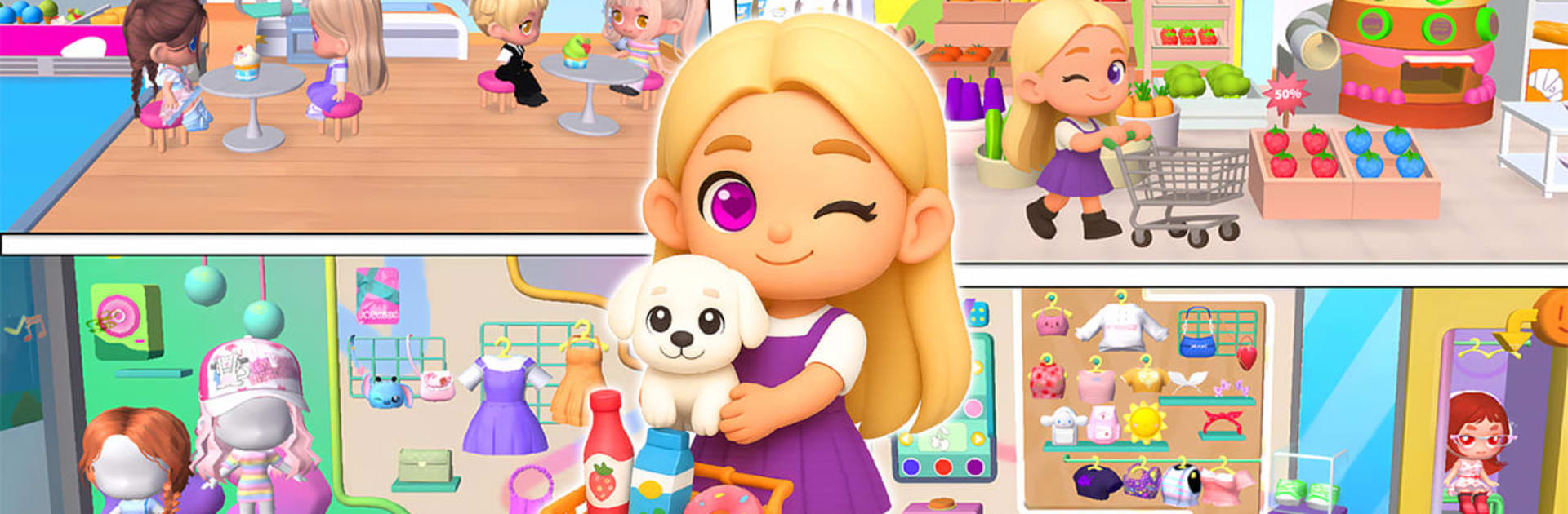
Mimo Land: Chibi World plays like a cheerful little dollhouse that grew into a whole town. A player makes a chibi avatar, then roams between spots in the city to dress up, decorate rooms, get a salon glow up, shop for groceries, and mess with small mini games. It is not about stress or grind. It is more like picking a place, poking at the cute stuff, and seeing what happens. On PC with BlueStacks it feels nice and tidy, since outfits and furniture are easier to browse on a big screen, and dragging items with a mouse lands things right where they should go.

The fashion side is the big hook. There are racks of dresses, shoes, and accessories, and it is fun to mix casual looks with flashier pieces. Home building is the other half. Rooms can be filled with colorful furniture, and lots of objects react with simple animations when tapped. The spa and salon let the avatar get facials, wash hair, and try new cuts, which sounds small but it rounds out the whole pretend-play feel. Outside, the park has a carousel, a tiny train ride, a basketball hoop, and camping spots, plus quick mini games for short breaks. The supermarket leads into cooking, so players can shop and then make dishes like a little Mimo chef. It all runs at a calm pace, more sandbox than story, great for anyone who likes cute dress up, cozy decorating, and light role play. If someone wants combat or deep progression, this is not that. If they want a bright, toy-like city to tinker with, it hits that spot.

Start your journey now. Download the game on BlueStacks, invite your friends, and march on a new adventure.


Game Features

Enhancements

  • Macros
  • Multi Instance
  • Multi Instance Sync
  • Script
  • Enhancements
Macros

Macros

Automate the predictable in Mimo Land: Chibi World and transform your gameplay with Macros. Get access to inventive Macros in the BlueStacks Macro Community
Multi Instance

Multi Instance

Play Mimo Land: Chibi World on one window. And chat with your friend on the other. Press CTRL + Shift + 8 to open the Multi-Instance Manager. And start creating fresh instances or clone an existing one.
Multi Instance Sync

Multi Instance Sync

Play Mimo Land: Chibi World with the power of Multi-Instance Sync. Replicate what you are doing on the main instance on all other instances. Level up faster, play more.
Script

Script

Script your way to gaming glory in Mimo Land: Chibi World with BlueStacks Script. Write and run a set of commands to automate repeated tasks. Trigger the command by assigning it to any key.
Read More

How to Download and Play Mimo Land: Chibi World on PC or Mac

  • Download and install BlueStacks on your PC or Mac

  • Complete Google sign-in to access the Play Store, or do it later

  • Look for Mimo Land: Chibi World in the search bar at the top right corner

  • Click to install Mimo Land: Chibi World from the search results

  • Complete Google sign-in (if you skipped step 2) to install Mimo Land: Chibi World

  • Click the Mimo Land: Chibi World icon on the home screen to start playing

video
Watch Video

Minimum System Requirements

With BlueStacks 5, you can get started on a PC that fulfills the following requirements.

  • Operating System

    Microsoft Windows 7 or above, macOS 11 (Big Sur) or above

  • Processor

    Intel, AMD or Apple Silicon Processor

  • RAM

    at least 4GB

  • HDD

    10GB Free Disk Space

Note:

* You must be an Administrator on your PC. Up to date graphics drivers from Microsoft or the chipset vendor.

Mimo Land: Chibi World - FAQs

  • How to play Mimo Land: Chibi World on Windows PC & Mac?

    Play Mimo Land: Chibi World on your PC or Mac by following these simple steps.

    • Click on 'Play Mimo Land: Chibi World on PC’ to download BlueStacks
    • Install it and log-in to Google Play Store
    • Launch and play the game.
  • Why is BlueStacks the fastest and safest platform to play games on PC?

    BlueStacks respects your privacy and is always safe and secure to use. It does not carry any malware, spyware, or any sort of additional software that could harm your PC.

    It is engineered to optimize speed and performance for a seamless gaming experience.

  • What are Mimo Land: Chibi World PC requirements?

    Minimum requirement to run Mimo Land: Chibi World on your PC

    • OS: Microsoft Windows 7 or above MacOS 11 (Big Sur) or above
    • Processor: Intel, AMD or Apple Silicon Processor
    • RAM: Your PC must have at least 4GB of RAM. (Note that having 4GB or more disk space is not a substitute for RAM)
    • HDD: 10GB Free Disk Space.
    • You must be an Administrator on your PC.