My Supermarket: Real Tycoon 3D

My Supermarket: Real Tycoon 3D

Simulation

| Deviloper Limited

Play on PC with BlueStacks or from our cloud

  • Overview
  • Game Features
  • How to Play

Page Modified On: June 17, 2026

Play My Supermarket: Real Tycoon 3D on PC or Mac

Explore a whole new adventure with My Supermarket: Real Tycoon 3D, a Simulation game created by Deviloper Limited. Experience great gameplay with BlueStacks, the most popular gaming platform to play Android games on your PC or Mac.

About the Game

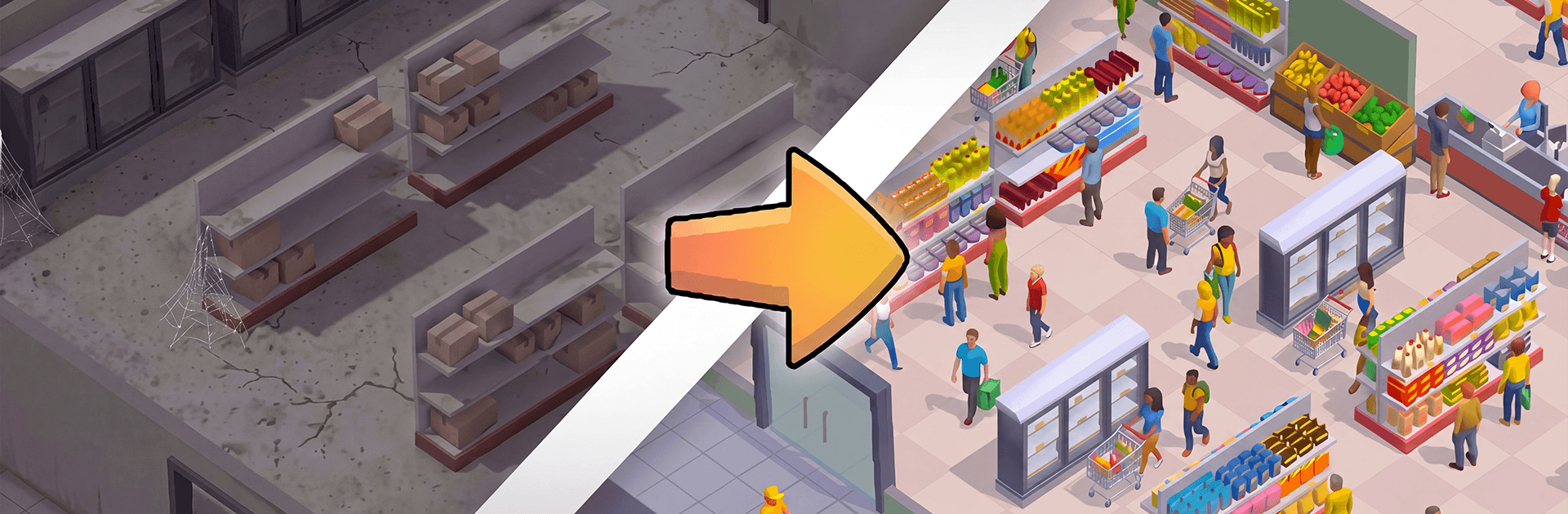
Ever wondered what it’s like to run the place instead of just grabbing a cart and going? My Supermarket: Real Tycoon 3D puts you in charge of a small neighborhood shop and asks you to turn it into a full-blown retail success. It’s a hands-on Simulation where you design the floor plan, set prices, manage staff, and juggle deliveries—then watch customers flood in when everything clicks. Prefer a bigger view of your aisles? Playing on BlueStacks makes it easy to manage the chaos from your desktop.

Game Features

  • Smart Stocking: Order goods, track shipments, and keep shelves looking crisp. Go heavy on everyday essentials or carve out a niche with upscale items—it’s your call.
  • Price Power: You control the tags. Compete on bargains or lean into premium pricing, then adjust as demand and trends shift.
  • Layout That Works: Move shelves, coolers, and displays to guide traffic and cut down on checkout jams. A better flow equals happier shoppers.
  • Grow the Store: Start with one register and build out into a bustling market. Unlock new areas like a bakery, a butcher counter, and even a pharmacy to round out your offerings.
  • Hire and Manage: Bring on cashiers and stockers, set priorities, and keep morale high so lines move fast and aisles stay tidy.
  • Watch the Market: Keep an eye on what sells, what stalls, and how rivals position themselves. Nudge prices and inventory to stay a step ahead.
  • Chill and Thrilling: Enjoy the oddly satisfying rhythm of restocking and organizing—then shift gears when rush hour hits and every second matters.

Ready to top the leaderboard? We bet you do. Let precise controls and sharp visuals optimized on BlueStacks lead you to victory.


Game Features

Enhancements

  • Macros
  • Multi Instance
  • Multi Instance Sync
  • Script
  • Enhancements
Macros

Macros

Automate the predictable in My Supermarket: Real Tycoon 3D and transform your gameplay with Macros. Get access to inventive Macros in the BlueStacks Macro Community
Multi Instance

Multi Instance

Play My Supermarket: Real Tycoon 3D on one window. And chat with your friend on the other. Press CTRL + Shift + 8 to open the Multi-Instance Manager. And start creating fresh instances or clone an existing one.
Multi Instance Sync

Multi Instance Sync

Play My Supermarket: Real Tycoon 3D with the power of Multi-Instance Sync. Replicate what you are doing on the main instance on all other instances. Level up faster, play more.
Script

Script

Script your way to gaming glory in My Supermarket: Real Tycoon 3D with BlueStacks Script. Write and run a set of commands to automate repeated tasks. Trigger the command by assigning it to any key.
Read More

How to Download and Play My Supermarket: Real Tycoon 3D on PC or Mac

  • Download and install BlueStacks on your PC or Mac

  • Complete Google sign-in to access the Play Store, or do it later

  • Look for My Supermarket: Real Tycoon 3D in the search bar at the top right corner

  • Click to install My Supermarket: Real Tycoon 3D from the search results

  • Complete Google sign-in (if you skipped step 2) to install My Supermarket: Real Tycoon 3D

  • Click the My Supermarket: Real Tycoon 3D icon on the home screen to start playing

video
Watch Video

Minimum System Requirements

With BlueStacks 5, you can get started on a PC that fulfills the following requirements.

  • Operating System

    Microsoft Windows 7 or above, macOS 11 (Big Sur) or above

  • Processor

    Intel, AMD or Apple Silicon Processor

  • RAM

    at least 4GB

  • HDD

    10GB Free Disk Space

Note:

* You must be an Administrator on your PC. Up to date graphics drivers from Microsoft or the chipset vendor.

My Supermarket: Real Tycoon 3D - FAQs

  • How to play My Supermarket: Real Tycoon 3D on Windows PC & Mac?

    Play My Supermarket: Real Tycoon 3D on your PC or Mac by following these simple steps.

    • Click on 'Play My Supermarket: Real Tycoon 3D on PC’ to download BlueStacks
    • Install it and log-in to Google Play Store
    • Launch and play the game.
  • Why is BlueStacks the fastest and safest platform to play games on PC?

    BlueStacks respects your privacy and is always safe and secure to use. It does not carry any malware, spyware, or any sort of additional software that could harm your PC.

    It is engineered to optimize speed and performance for a seamless gaming experience.

  • What are My Supermarket: Real Tycoon 3D PC requirements?

    Minimum requirement to run My Supermarket: Real Tycoon 3D on your PC

    • OS: Microsoft Windows 7 or above MacOS 11 (Big Sur) or above
    • Processor: Intel, AMD or Apple Silicon Processor
    • RAM: Your PC must have at least 4GB of RAM. (Note that having 4GB or more disk space is not a substitute for RAM)
    • HDD: 10GB Free Disk Space.
    • You must be an Administrator on your PC.