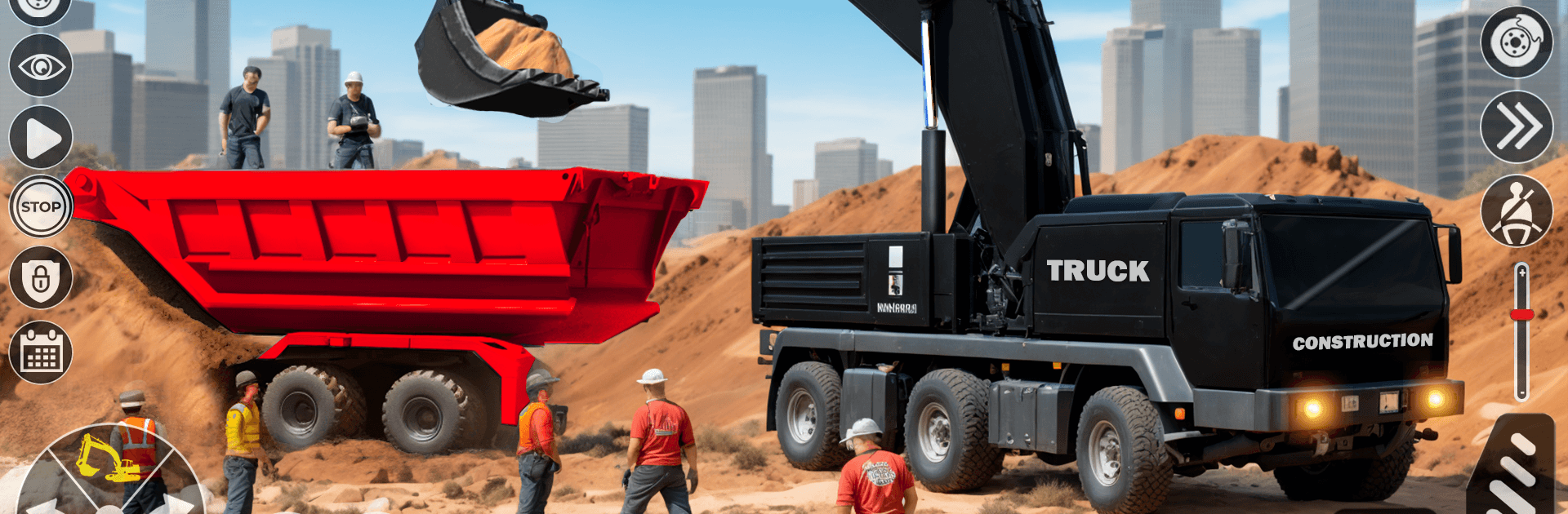
Offroad Construction Game 3D

Offroad Construction Game 3D

Simulation

| SCRAP-سكراب‎

Play on PC with BlueStacks or from our cloud

  • Overview
  • Game Features
  • How to Play

Page Modified On: September 18, 2026

Play Offroad Construction Game 3D on PC or Mac

Step into the World of Offroad Construction Game 3D, a thrilling Simulation game from the house of SCRAP-سكراب‎. Play this Android game on BlueStacks App Player and experience immersive gaming on PC or Mac.

About the Game

Offroad Construction Game 3D drops you into the driver’s seat of serious heavy machines on rough, untamed terrain. This Simulation is all about building big—roads, bridges, and work sites—while mastering realistic vehicle handling and smart job planning. It feels especially nice on BlueStacks with smooth, responsive controls.

Game Features

  • Big Fleet, Bigger Jobs: Operate excavators, bulldozers, forklifts, cranes, and heavy haulers to handle everything from digging foundations to placing beams.
  • Offroad Terrain That Fights Back: Tackle mud, steep slopes, and rocky paths where careful throttle control and steady wheels make all the difference.
  • Bridge and Road Building: Pour, compact, lift, and set components piece by piece as you assemble bridges and carve new routes across challenging maps.
  • From Lots to Landmarks: Move materials between sites and raise houses, high-rises, and full work zones like a seasoned site manager.
  • Physics You Can Feel: Weighty cargo, swinging hooks, and shifting dirt reward precise crane swings and gentle pedal work.
  • Mission-Based Progress: Timed contracts, optional objectives, and escalating difficulty keep the next payout—and the next unlock—always within reach.
  • Earn, Unlock, Upgrade: Collect rewards to open new machines, tools, and attachments, then improve performance where it counts.
  • Cockpit and External Views: Swap viewpoints to line up forks, watch your tail swing, or scan the entire site before the next lift.
  • Crisp Audio and Visuals: Clean HD graphics, detailed animations, and chunky engine sounds bring every dig, dump, and haul to life.
  • Simple Controls, Real Results: Accessible driving and crane inputs are easy to pick up, yet demand finesse when trails get narrow and loads get heavy.

Ready to top the leaderboard? We bet you do. Let precise controls and sharp visuals optimized on BlueStacks lead you to victory.


Game Features

Enhancements

  • Macros
  • Multi Instance
  • Multi Instance Sync
  • Script
  • Enhancements
Macros

Macros

Automate the predictable in Offroad Construction Game 3D and transform your gameplay with Macros. Get access to inventive Macros in the BlueStacks Macro Community
Multi Instance

Multi Instance

Play Offroad Construction Game 3D on one window. And chat with your friend on the other. Press CTRL + Shift + 8 to open the Multi-Instance Manager. And start creating fresh instances or clone an existing one.
Multi Instance Sync

Multi Instance Sync

Play Offroad Construction Game 3D with the power of Multi-Instance Sync. Replicate what you are doing on the main instance on all other instances. Level up faster, play more.
Script

Script

Script your way to gaming glory in Offroad Construction Game 3D with BlueStacks Script. Write and run a set of commands to automate repeated tasks. Trigger the command by assigning it to any key.
Read More

How to Download and Play Offroad Construction Game 3D on PC or Mac

  • Download and install BlueStacks on your PC or Mac

  • Complete Google sign-in to access the Play Store, or do it later

  • Look for Offroad Construction Game 3D in the search bar at the top right corner

  • Click to install Offroad Construction Game 3D from the search results

  • Complete Google sign-in (if you skipped step 2) to install Offroad Construction Game 3D

  • Click the Offroad Construction Game 3D icon on the home screen to start playing

video
Watch Video

Minimum System Requirements

With BlueStacks 5, you can get started on a PC that fulfills the following requirements.

  • Operating System

    Microsoft Windows 7 or above, macOS 11 (Big Sur) or above

  • Processor

    Intel, AMD or Apple Silicon Processor

  • RAM

    at least 4GB

  • HDD

    10GB Free Disk Space

Note:

* You must be an Administrator on your PC. Up to date graphics drivers from Microsoft or the chipset vendor.

Offroad Construction Game 3D - FAQs

  • How to play Offroad Construction Game 3D on Windows PC & Mac?

    Play Offroad Construction Game 3D on your PC or Mac by following these simple steps.

    • Click on 'Play Offroad Construction Game 3D on PC’ to download BlueStacks
    • Install it and log-in to Google Play Store
    • Launch and play the game.
  • Why is BlueStacks the fastest and safest platform to play games on PC?

    BlueStacks respects your privacy and is always safe and secure to use. It does not carry any malware, spyware, or any sort of additional software that could harm your PC.

    It is engineered to optimize speed and performance for a seamless gaming experience.

  • What are Offroad Construction Game 3D PC requirements?

    Minimum requirement to run Offroad Construction Game 3D on your PC

    • OS: Microsoft Windows 7 or above MacOS 11 (Big Sur) or above
    • Processor: Intel, AMD or Apple Silicon Processor
    • RAM: Your PC must have at least 4GB of RAM. (Note that having 4GB or more disk space is not a substitute for RAM)
    • HDD: 10GB Free Disk Space.
    • You must be an Administrator on your PC.