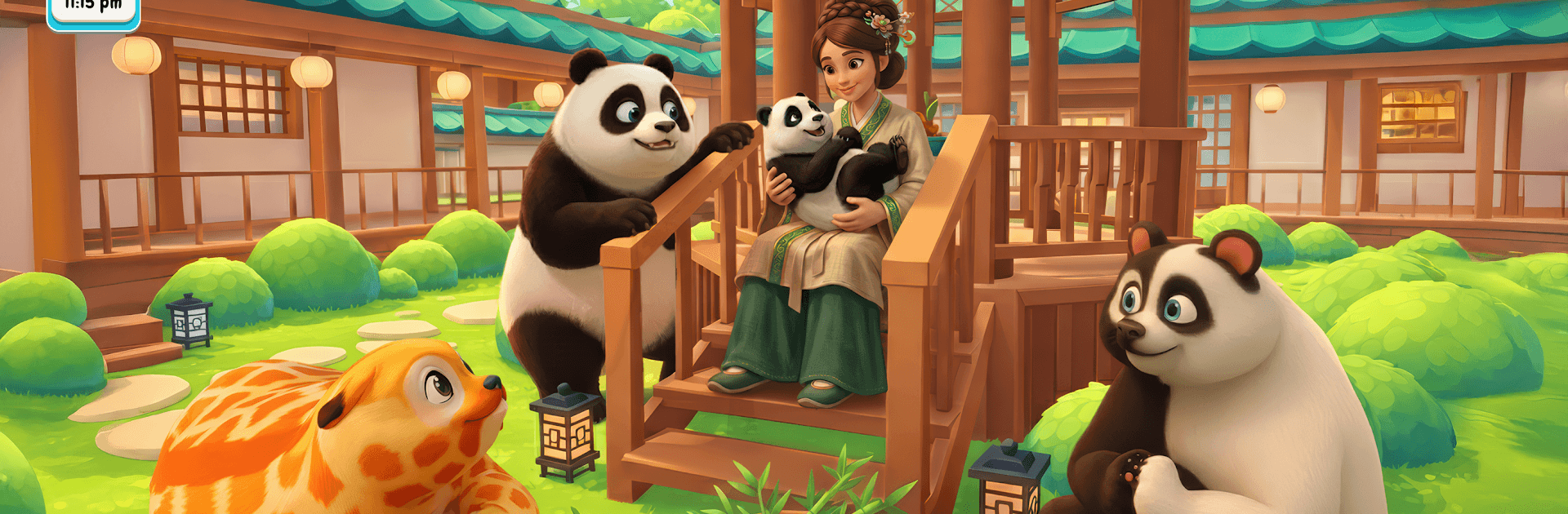
Panda Simulator: My Pets

Panda Simulator: My Pets

Simulation

| Take Top Entertainment

Play on PC with BlueStacks or from our cloud

  • Overview
  • Game Features
  • How to Play

Page Modified On: August 14, 2026

Play Panda Simulator: My Pets on PC or Mac

Panda Simulator: My Pets by Take Top Entertainment has plenty to keep you busy. BlueStacks lets you play it on PC or Mac with more screen space, better control, and fewer mobile limits.

About the Game

Panda Simulator: My Pets is a cozy Simulation about raising a snug little clan of pandas and keeping them happy, healthy, and well-fed. You’ll adopt squishy cubs, watch them grow, and handle all the everyday care—from snack time to bath time—at your own pace. It’s relaxing, a bit playful, and surprisingly satisfying when every chubby belly is full and every mood bar is glowing.

Game Features

  • Adopt and collect: Start with one curious cub and expand your family with pandas that have different markings, moods, and funny quirks. Each new arrival feels like a small win.
  • Feed and treat time: Hand out crunchy bamboo and tasty snacks, then watch those little mouths go to work. Happy tummies mean bouncier pandas and brighter mood icons.
  • Grooming that shines: Brush away dust, run bubbly baths, and finish with a towel fluff. Add a bow or a leafy accent for extra charm—and yes, that glossy coat is worth it.
  • Growth you can see: Nurture newborns into playful toddlers. Track health, mood, and energy, unlock milestones, and enjoy lively animations as they hit each stage.
  • A living forest home: Your den sits in a calm bamboo grove with cozy nests and soft breezes. It’s a peaceful backdrop for naps, snacks, and goofy panda shenanigans.
  • Light challenges, chill pacing: Try maxing happiness for every cub, mix treat combos, or tweak grooming routines to see what works best. It’s low pressure, high feel-good.
  • Play anytime: No Wi‑Fi? No problem. Quick cuddle sessions and care checks work offline for easy pick‑up‑and‑play moments.
  • Fewer interruptions: Enjoy your routine without constant pop‑ups breaking the flow, so the focus stays on your furry crew.
  • Nice on BlueStacks: Also plays great on BlueStacks if you prefer a comfy, click-friendly setup.

Start playing Panda Simulator: My Pets on BlueStacks and get a smoother, more comfortable PC or Mac setup.


Game Features

Enhancements

  • Macros
  • Multi Instance
  • Multi Instance Sync
  • Script
  • Enhancements
Macros

Macros

Automate the predictable in Panda Simulator: My Pets and transform your gameplay with Macros. Get access to inventive Macros in the BlueStacks Macro Community
Multi Instance

Multi Instance

Play Panda Simulator: My Pets on one window. And chat with your friend on the other. Press CTRL + Shift + 8 to open the Multi-Instance Manager. And start creating fresh instances or clone an existing one.
Multi Instance Sync

Multi Instance Sync

Play Panda Simulator: My Pets with the power of Multi-Instance Sync. Replicate what you are doing on the main instance on all other instances. Level up faster, play more.
Script

Script

Script your way to gaming glory in Panda Simulator: My Pets with BlueStacks Script. Write and run a set of commands to automate repeated tasks. Trigger the command by assigning it to any key.
Read More

How to Download and Play Panda Simulator: My Pets on PC or Mac

  • Download and install BlueStacks on your PC or Mac

  • Complete Google sign-in to access the Play Store, or do it later

  • Look for Panda Simulator: My Pets in the search bar at the top right corner

  • Click to install Panda Simulator: My Pets from the search results

  • Complete Google sign-in (if you skipped step 2) to install Panda Simulator: My Pets

  • Click the Panda Simulator: My Pets icon on the home screen to start playing

video
Watch Video

Minimum System Requirements

With BlueStacks 5, you can get started on a PC that fulfills the following requirements.

  • Operating System

    Microsoft Windows 7 or above, macOS 11 (Big Sur) or above

  • Processor

    Intel, AMD or Apple Silicon Processor

  • RAM

    at least 4GB

  • HDD

    10GB Free Disk Space

Note:

* You must be an Administrator on your PC. Up to date graphics drivers from Microsoft or the chipset vendor.

Panda Simulator: My Pets - FAQs

  • How to play Panda Simulator: My Pets on Windows PC & Mac?

    Play Panda Simulator: My Pets on your PC or Mac by following these simple steps.

    • Click on 'Play Panda Simulator: My Pets on PC’ to download BlueStacks
    • Install it and log-in to Google Play Store
    • Launch and play the game.
  • Why is BlueStacks the fastest and safest platform to play games on PC?

    BlueStacks respects your privacy and is always safe and secure to use. It does not carry any malware, spyware, or any sort of additional software that could harm your PC.

    It is engineered to optimize speed and performance for a seamless gaming experience.

  • What are Panda Simulator: My Pets PC requirements?

    Minimum requirement to run Panda Simulator: My Pets on your PC

    • OS: Microsoft Windows 7 or above MacOS 11 (Big Sur) or above
    • Processor: Intel, AMD or Apple Silicon Processor
    • RAM: Your PC must have at least 4GB of RAM. (Note that having 4GB or more disk space is not a substitute for RAM)
    • HDD: 10GB Free Disk Space.
    • You must be an Administrator on your PC.