Pango safari builder for kids

Pango safari builder for kids

Simulation

| Studio Pango - Kids Fun preschool learning games

Play on PC with BlueStacks or from our cloud

  • Overview
  • Game Features
  • How to Play

Page Modified On: June 09, 2026

Play Pango safari builder for kids on PC or Mac

Step into the World of Pango safari builder for kids, a thrilling Simulation game from the house of Studio Pango – Kids Fun preschool learning games. Play this Android game on BlueStacks App Player and experience immersive gaming on PC or Mac.

About the Game

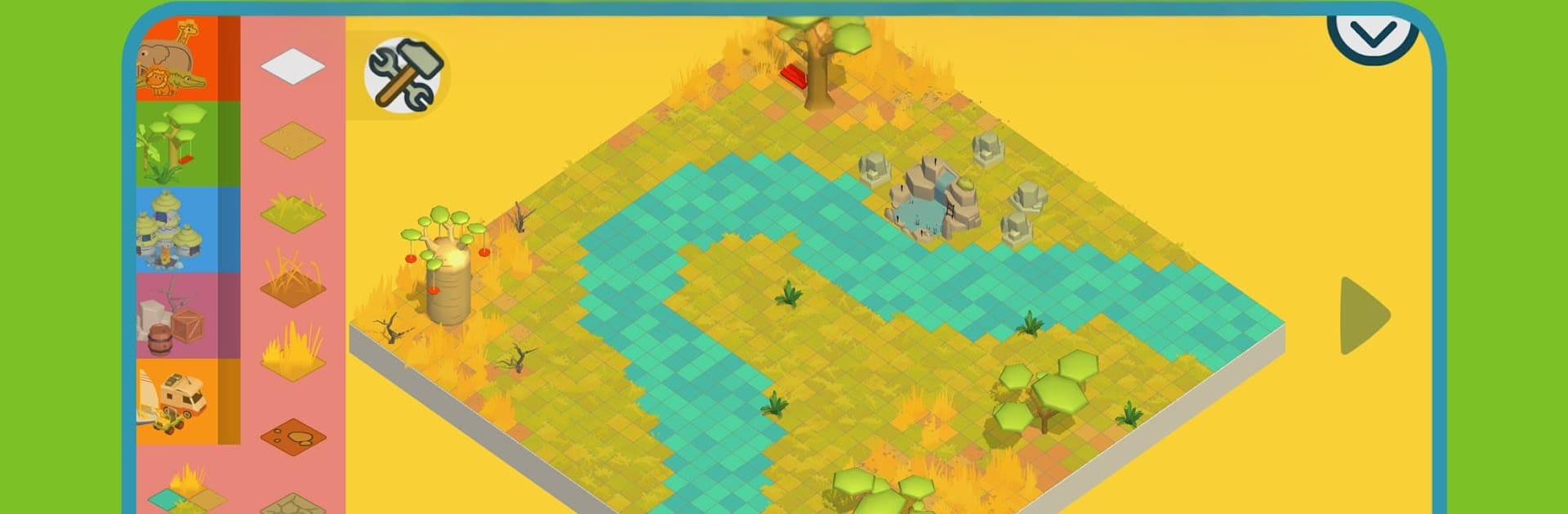
Pango safari builder for kids is a playful Simulation sandbox that lets little creators shape their own wild savannah, then go explore it. Sketch out the land, drop in trees and paths, and watch friendly animals make themselves at home. When you’re ready, hop into a 4×4 with Pango and friends to snap photos, splash under waterfalls, and uncover silly surprises tucked around the map.

Game Features

  • Build-your-own savannah: Draw watering holes, add towering baobabs, set up lodges, and trace paths—your layout instantly turns into a living habitat.
  • Friendly wildlife: Place zebras, elephants, giraffes, lions, and more anywhere you like; they wander, graze, and react to the world you’ve designed.
  • Safari time: Ride along with Pango and pals to observe, photograph, and explore; slide over rocks, find a bouncing “secret,” and gather by the campfire when night rolls in.
  • Open-ended play: No missions or timers. Kids experiment, tweak, and rebuild at their own pace, discovering how nature pieces fit together.
  • Made for small hands: Big, clean icons and smooth controls keep things simple for ages 3+, with a calm, kid-first interface.
  • Smart learning wrapped in fun: Encourages creativity, observation, early logic, and fine motor skills through hands-on building and exploring.
  • Secrets everywhere: Lively scenery and hidden interactions reward curiosity and make every corner worth poking.
  • Safe and kid-friendly: No ads, no in-app purchases, no external links, and built-in parental controls for worry-free play.
  • Helpful starting worlds: Several ready-made savannahs give younger builders a head start before making their own.
  • Play your way: Great on a phone or tablet, and comfy on a bigger screen with BlueStacks if you want to share the adventure together.

Start playing Pango safari builder for kids on BlueStacks and get a smoother, more comfortable PC or Mac setup.


Game Features

Enhancements

  • Macros
  • Multi Instance
  • Multi Instance Sync
  • Script
  • Enhancements
Macros

Macros

Automate the predictable in Pango safari builder for kids and transform your gameplay with Macros. Get access to inventive Macros in the BlueStacks Macro Community
Multi Instance

Multi Instance

Play Pango safari builder for kids on one window. And chat with your friend on the other. Press CTRL + Shift + 8 to open the Multi-Instance Manager. And start creating fresh instances or clone an existing one.
Multi Instance Sync

Multi Instance Sync

Play Pango safari builder for kids with the power of Multi-Instance Sync. Replicate what you are doing on the main instance on all other instances. Level up faster, play more.
Script

Script

Script your way to gaming glory in Pango safari builder for kids with BlueStacks Script. Write and run a set of commands to automate repeated tasks. Trigger the command by assigning it to any key.
Read More

How to Download and Play Pango safari builder for kids on PC or Mac

  • Download and install BlueStacks on your PC or Mac

  • Complete Google sign-in to access the Play Store, or do it later

  • Look for Pango safari builder for kids in the search bar at the top right corner

  • Click to install Pango safari builder for kids from the search results

  • Complete Google sign-in (if you skipped step 2) to install Pango safari builder for kids

  • Click the Pango safari builder for kids icon on the home screen to start playing

video
Watch Video

Minimum System Requirements

With BlueStacks 5, you can get started on a PC that fulfills the following requirements.

  • Operating System

    Microsoft Windows 7 or above, macOS 11 (Big Sur) or above

  • Processor

    Intel, AMD or Apple Silicon Processor

  • RAM

    at least 4GB

  • HDD

    10GB Free Disk Space

Note:

* You must be an Administrator on your PC. Up to date graphics drivers from Microsoft or the chipset vendor.

Pango safari builder for kids - FAQs

  • How to play Pango safari builder for kids on Windows PC & Mac?

    Play Pango safari builder for kids on your PC or Mac by following these simple steps.

    • Click on 'Play Pango safari builder for kids on PC’ to download BlueStacks
    • Install it and log-in to Google Play Store
    • Launch and play the game.
  • Why is BlueStacks the fastest and safest platform to play games on PC?

    BlueStacks respects your privacy and is always safe and secure to use. It does not carry any malware, spyware, or any sort of additional software that could harm your PC.

    It is engineered to optimize speed and performance for a seamless gaming experience.

  • What are Pango safari builder for kids PC requirements?

    Minimum requirement to run Pango safari builder for kids on your PC

    • OS: Microsoft Windows 7 or above MacOS 11 (Big Sur) or above
    • Processor: Intel, AMD or Apple Silicon Processor
    • RAM: Your PC must have at least 4GB of RAM. (Note that having 4GB or more disk space is not a substitute for RAM)
    • HDD: 10GB Free Disk Space.
    • You must be an Administrator on your PC.