Plane Games: Pilot Flight 3D

Plane Games: Pilot Flight 3D

Simulation

| HyperOn Studios

Play on PC with BlueStacks or from our cloud

  • Overview
  • Game Features
  • How to Play

Page Modified On: August 17, 2026

Play Plane Games: Pilot Flight 3D on PC or Mac

Bring your A-game to Plane Games: Pilot Flight 3D, the Simulation game sensation from HyperOn Studios. Give your gameplay the much-needed boost with precise game controls, high FPS graphics, and top-tier features on your PC or Mac with BlueStacks.

About the Game

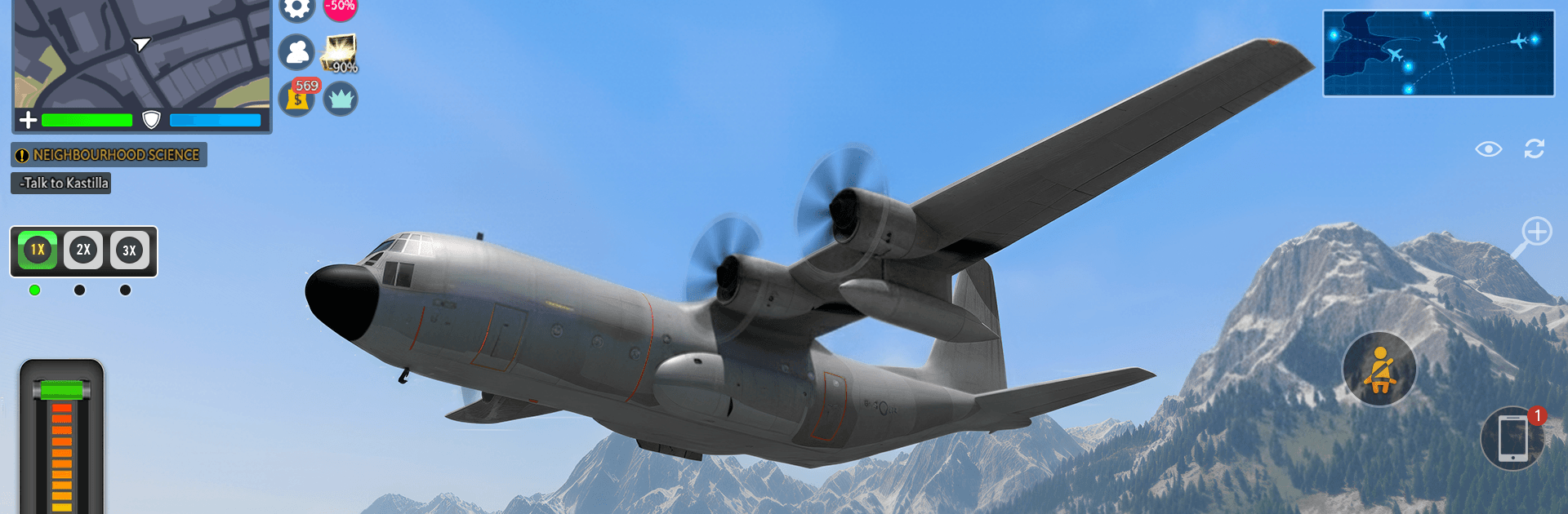
Plane Games: Pilot Flight 3D is a Simulation that hands you the captain’s seat and lets you actually fly, not just point and go. Expect real procedures, varied missions, and aircraft that feel distinct as you move from taxi to touchdown across cities, mountain ridges, and wide rivers. It also runs smoothly on BlueStacks if you prefer a bigger view and tighter controls.

Game Features

  • Diverse aircraft: Hop between passenger liners, heavy cargo haulers, and fast jets—each with its own handling quirks and cockpit layout that rewards smooth control.
  • Mission variety: Shuttle travelers, race the clock through checkpoint routes, move freight on tight schedules, and step into rescue duties when things get urgent.
  • Realistic operations: Follow taxiway lines, line up for proper takeoffs, manage approaches, and finish with neat parking at the stand—no skipping the important bits.
  • Cockpit immersion: Watch instruments come alive, hear engines spool up, and switch between interior and exterior camera views to monitor every angle.
  • Skill-based flying: Keep speed under control, balance throttle and pitch, and set up clean landings while avoiding hard touchdowns or costly mistakes.
  • Earn and upgrade: Complete flights to collect coins, improve aircraft performance, and unlock new pilot options to suit your style.
  • Detailed locations: Navigate busy 3D airports and explore routes over dense cities, winding rivers, and rugged terrain that challenge your flight plan.
  • Offline friendly: Fly whenever you like without needing a connection—perfect for quick practice sessions or long-haul runs.

Ready to top the leaderboard? We bet you do. Let precise controls and sharp visuals optimized on BlueStacks lead you to victory.


Game Features

Enhancements

  • Macros
  • Multi Instance
  • Multi Instance Sync
  • Script
  • Enhancements
Macros

Macros

Automate the predictable in Plane Games: Pilot Flight 3D and transform your gameplay with Macros. Get access to inventive Macros in the BlueStacks Macro Community
Multi Instance

Multi Instance

Play Plane Games: Pilot Flight 3D on one window. And chat with your friend on the other. Press CTRL + Shift + 8 to open the Multi-Instance Manager. And start creating fresh instances or clone an existing one.
Multi Instance Sync

Multi Instance Sync

Play Plane Games: Pilot Flight 3D with the power of Multi-Instance Sync. Replicate what you are doing on the main instance on all other instances. Level up faster, play more.
Script

Script

Script your way to gaming glory in Plane Games: Pilot Flight 3D with BlueStacks Script. Write and run a set of commands to automate repeated tasks. Trigger the command by assigning it to any key.
Read More

How to Download and Play Plane Games: Pilot Flight 3D on PC or Mac

  • Download and install BlueStacks on your PC or Mac

  • Complete Google sign-in to access the Play Store, or do it later

  • Look for Plane Games: Pilot Flight 3D in the search bar at the top right corner

  • Click to install Plane Games: Pilot Flight 3D from the search results

  • Complete Google sign-in (if you skipped step 2) to install Plane Games: Pilot Flight 3D

  • Click the Plane Games: Pilot Flight 3D icon on the home screen to start playing

video
Watch Video

Minimum System Requirements

With BlueStacks 5, you can get started on a PC that fulfills the following requirements.

  • Operating System

    Microsoft Windows 7 or above, macOS 11 (Big Sur) or above

  • Processor

    Intel, AMD or Apple Silicon Processor

  • RAM

    at least 4GB

  • HDD

    10GB Free Disk Space

Note:

* You must be an Administrator on your PC. Up to date graphics drivers from Microsoft or the chipset vendor.

Plane Games: Pilot Flight 3D - FAQs

  • How to play Plane Games: Pilot Flight 3D on Windows PC & Mac?

    Play Plane Games: Pilot Flight 3D on your PC or Mac by following these simple steps.

    • Click on 'Play Plane Games: Pilot Flight 3D on PC’ to download BlueStacks
    • Install it and log-in to Google Play Store
    • Launch and play the game.
  • Why is BlueStacks the fastest and safest platform to play games on PC?

    BlueStacks respects your privacy and is always safe and secure to use. It does not carry any malware, spyware, or any sort of additional software that could harm your PC.

    It is engineered to optimize speed and performance for a seamless gaming experience.

  • What are Plane Games: Pilot Flight 3D PC requirements?

    Minimum requirement to run Plane Games: Pilot Flight 3D on your PC

    • OS: Microsoft Windows 7 or above MacOS 11 (Big Sur) or above
    • Processor: Intel, AMD or Apple Silicon Processor
    • RAM: Your PC must have at least 4GB of RAM. (Note that having 4GB or more disk space is not a substitute for RAM)
    • HDD: 10GB Free Disk Space.
    • You must be an Administrator on your PC.