Ragdoll Monster Sandbox

Ragdoll Monster Sandbox

Simulation

| Sprigame

Play on PC with BlueStacks or from our cloud

  • Overview
  • Game Features
  • How to Play

Page Modified On: June 29, 2026

Play Ragdoll Monster Sandbox on PC or Mac

Bring your A-game to Ragdoll Monster Sandbox, the Simulation game sensation from Sprigame. Give your gameplay the much-needed boost with precise game controls, high FPS graphics, and top-tier features on your PC or Mac with BlueStacks.

About the Game

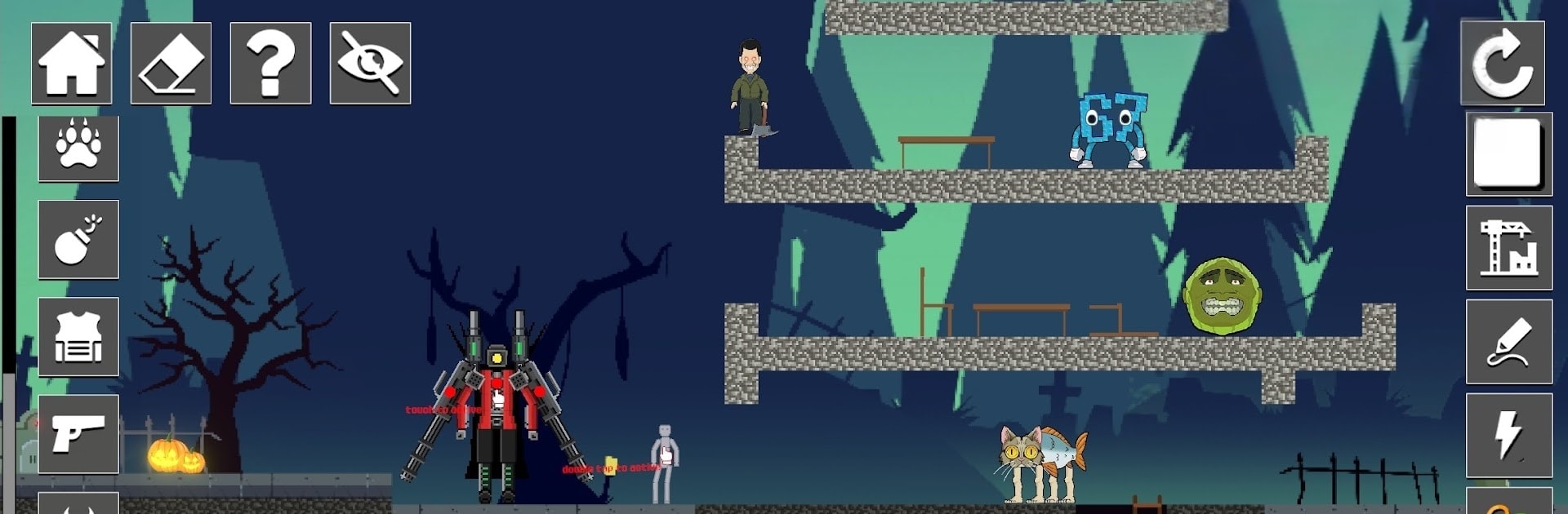
Ragdoll Monster Sandbox is a physics-heavy Simulation where you get to tinker, break stuff, and see what wild chain reactions you can cook up. It’s all about creating your own goofy experiments with monsters, gadgets, and a playground of reactive elements. Prefer a bigger canvas and mouse precision? It’s comfy to build and test on BlueStacks, too.

Game Features

  • Play Your Way: No missions, timers, or pressure—set your own goals, from stress-testing contraptions to staging the silliest monster pileups imaginable.
  • Ragdoll Physics That Misbehave: Watch creatures wobble, ragdoll, and crumple in unpredictable ways when they collide, get launched, or meet an explosion.
  • Big Toolbox of Toys: Grab melee gear, firearms, tools, and plenty of explosives to stitch together traps, machines, or total chaos.
  • Reactive Elements: Mix fire, electricity, gravity tweaks, and more to trigger surprising chain reactions and see how long your setup lasts.
  • Monster Variety: Spawn different monster types and sizes, then notice how their shapes change the way they stumble, stack, and smash into things.
  • Simple, Tactile Controls: Drag, drop, rotate, and line things up with ease, so your builds feel deliberate—even when the results aren’t.
  • Build Bold Structures: Throw up forts, ramps, and test tracks, then push them to the limit with high-speed crashes, stress tests, and over-the-top stunts.

Ready to top the leaderboard? We bet you do. Let precise controls and sharp visuals optimized on BlueStacks lead you to victory.


Game Features

Enhancements

  • Macros
  • Multi Instance
  • Multi Instance Sync
  • Script
  • Enhancements
Macros

Macros

Automate the predictable in Ragdoll Monster Sandbox and transform your gameplay with Macros. Get access to inventive Macros in the BlueStacks Macro Community
Multi Instance

Multi Instance

Play Ragdoll Monster Sandbox on one window. And chat with your friend on the other. Press CTRL + Shift + 8 to open the Multi-Instance Manager. And start creating fresh instances or clone an existing one.
Multi Instance Sync

Multi Instance Sync

Play Ragdoll Monster Sandbox with the power of Multi-Instance Sync. Replicate what you are doing on the main instance on all other instances. Level up faster, play more.
Script

Script

Script your way to gaming glory in Ragdoll Monster Sandbox with BlueStacks Script. Write and run a set of commands to automate repeated tasks. Trigger the command by assigning it to any key.
Read More

How to Download and Play Ragdoll Monster Sandbox on PC or Mac

  • Download and install BlueStacks on your PC or Mac

  • Complete Google sign-in to access the Play Store, or do it later

  • Look for Ragdoll Monster Sandbox in the search bar at the top right corner

  • Click to install Ragdoll Monster Sandbox from the search results

  • Complete Google sign-in (if you skipped step 2) to install Ragdoll Monster Sandbox

  • Click the Ragdoll Monster Sandbox icon on the home screen to start playing

video
Watch Video

Minimum System Requirements

With BlueStacks 5, you can get started on a PC that fulfills the following requirements.

  • Operating System

    Microsoft Windows 7 or above, macOS 11 (Big Sur) or above

  • Processor

    Intel, AMD or Apple Silicon Processor

  • RAM

    at least 4GB

  • HDD

    10GB Free Disk Space

Note:

* You must be an Administrator on your PC. Up to date graphics drivers from Microsoft or the chipset vendor.

Ragdoll Monster Sandbox - FAQs

  • How to play Ragdoll Monster Sandbox on Windows PC & Mac?

    Play Ragdoll Monster Sandbox on your PC or Mac by following these simple steps.

    • Click on 'Play Ragdoll Monster Sandbox on PC’ to download BlueStacks
    • Install it and log-in to Google Play Store
    • Launch and play the game.
  • Why is BlueStacks the fastest and safest platform to play games on PC?

    BlueStacks respects your privacy and is always safe and secure to use. It does not carry any malware, spyware, or any sort of additional software that could harm your PC.

    It is engineered to optimize speed and performance for a seamless gaming experience.

  • What are Ragdoll Monster Sandbox PC requirements?

    Minimum requirement to run Ragdoll Monster Sandbox on your PC

    • OS: Microsoft Windows 7 or above MacOS 11 (Big Sur) or above
    • Processor: Intel, AMD or Apple Silicon Processor
    • RAM: Your PC must have at least 4GB of RAM. (Note that having 4GB or more disk space is not a substitute for RAM)
    • HDD: 10GB Free Disk Space.
    • You must be an Administrator on your PC.