Runaway Boy 3: Monster Escape

Runaway Boy 3: Monster Escape

Action

| Sprigame

Play on PC with BlueStacks or from our cloud

  • Overview
  • Game Features
  • How to Play

Page Modified On: January 02, 2026

Play Runaway Boy 3: Monster Escape on PC or Mac

Step into the World of Runaway Boy 3: Monster Escape, a thrilling Action game from the house of Sprigame. Play this Android game on BlueStacks App Player and experience immersive gaming on PC or Mac.

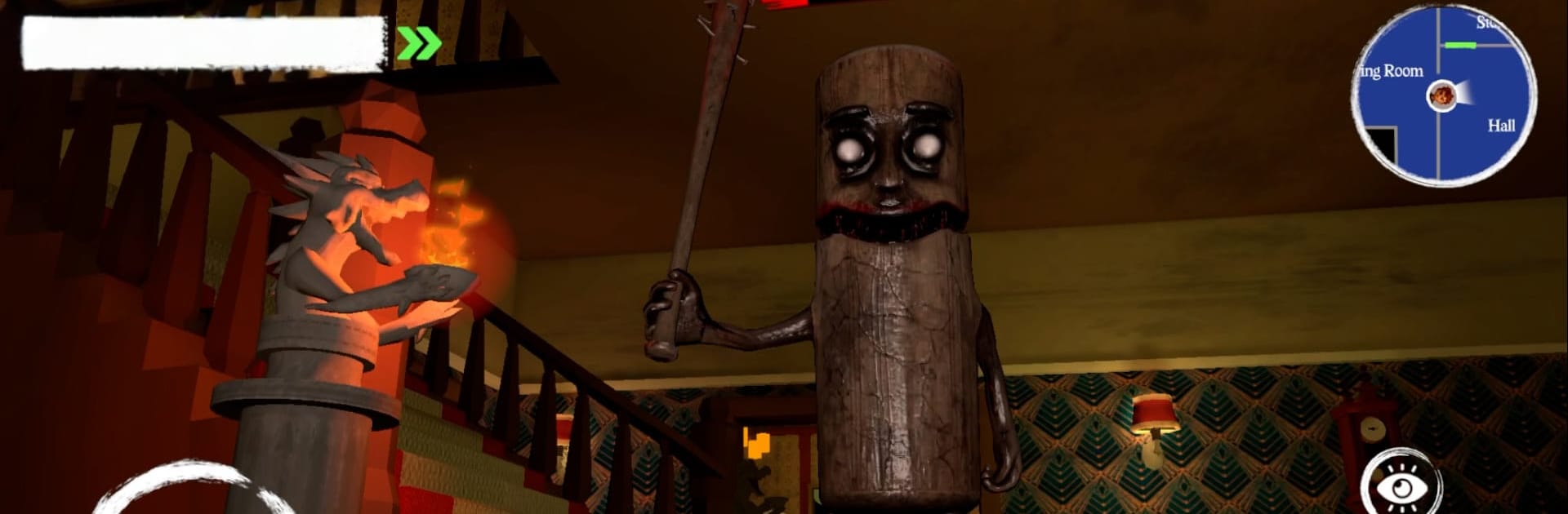
Runaway Boy 3: Monster Escape plays like a tense little escape-room thriller with stealth rules. A kid is stuck in a creaky three-floor house, and each floor has its own monster with a different quirk. The loop is simple to understand and nervy to execute. Players scout around for keys, codes, and odd clues, piece together small logic puzzles, and plan routes while listening for footsteps or breathing that means trouble is nearby. Stealth is the heart of it. Hide in corners or closets, distract when needed, then sprint when a door finally clicks open. One bad move and the hunter on that floor wakes up, so every decision carries a bit of sweat.

What stands out is how clean the goals feel. Puzzles make sense, nothing super obscure, but the pressure of being chased makes even a basic symbol match feel risky. The monsters behave differently, so by the second and third floors, players learn to read patterns, watch sightlines, and manage noise. Sound design does a lot of heavy lifting with creaks, whispers, and quick stings, and the visuals are moody without going for cheap gore. On PC with BlueStacks, the bigger screen and key mapping help a lot, since quick turns, peeking, and hitting hide or run on a keyboard feels more reliable than swipes. Simple to start, lots of small decisions to master, and short runs that make it easy to say one more try, then another.

Start your journey now. Download the game on BlueStacks, invite your friends, and march on a new adventure.


Game Features

Enhancements

  • Macros
  • Multi Instance
  • Multi Instance Sync
  • Eco Mode
  • Enhancements
Macros

Macros

Skip the boring parts of a game. Play Runaway Boy 3: Monster Escape with Macros and get the edge. Simply record a sequence of commands and execute them at any moment.
Multi Instance

Multi Instance

Why limit to one game on your phone when you can play many on your PC? Open multiple instances of Runaway Boy 3: Monster Escape at once with Multi-Instance. Leverage the power of different accounts by doing more.
Multi Instance Sync

Multi Instance Sync

Get the best out of Runaway Boy 3: Monster Escape with Multi-Instance Sync. Play the game from different accounts and build your own empire. Use Multi-instance sync to repeat the action in the main BlueStacks instance on all other instances.
Eco Mode

Eco Mode

Find the rarest heroes by making multiple summons in Runaway Boy 3: Monster Escape. And while you are at it, reduce your PC’s resource consumption with the Eco Mode. Farm efficiently. Get the best results.
Read More

How to Download and Play Runaway Boy 3: Monster Escape on PC or Mac

  • Download and install BlueStacks on your PC or Mac

  • Complete Google sign-in to access the Play Store, or do it later

  • Look for Runaway Boy 3: Monster Escape in the search bar at the top right corner

  • Click to install Runaway Boy 3: Monster Escape from the search results

  • Complete Google sign-in (if you skipped step 2) to install Runaway Boy 3: Monster Escape

  • Click the Runaway Boy 3: Monster Escape icon on the home screen to start playing

video
Watch Video

Minimum System Requirements

With BlueStacks 5, you can get started on a PC that fulfills the following requirements.

  • Operating System

    Microsoft Windows 7 or above, macOS 11 (Big Sur) or above

  • Processor

    Intel, AMD or Apple Silicon Processor

  • RAM

    at least 4GB

  • HDD

    10GB Free Disk Space

Note:

* You must be an Administrator on your PC. Up to date graphics drivers from Microsoft or the chipset vendor.

Runaway Boy 3: Monster Escape - FAQs

  • How to play Runaway Boy 3: Monster Escape on Windows PC & Mac?

    Play Runaway Boy 3: Monster Escape on your PC or Mac by following these simple steps.

    • Click on 'Play Runaway Boy 3: Monster Escape on PC’ to download BlueStacks
    • Install it and log-in to Google Play Store
    • Launch and play the game.
  • Why is BlueStacks the fastest and safest platform to play games on PC?

    BlueStacks respects your privacy and is always safe and secure to use. It does not carry any malware, spyware, or any sort of additional software that could harm your PC.

    It is engineered to optimize speed and performance for a seamless gaming experience.

  • What are Runaway Boy 3: Monster Escape PC requirements?

    Minimum requirement to run Runaway Boy 3: Monster Escape on your PC

    • OS: Microsoft Windows 7 or above MacOS 11 (Big Sur) or above
    • Processor: Intel, AMD or Apple Silicon Processor
    • RAM: Your PC must have at least 4GB of RAM. (Note that having 4GB or more disk space is not a substitute for RAM)
    • HDD: 10GB Free Disk Space.
    • You must be an Administrator on your PC.