
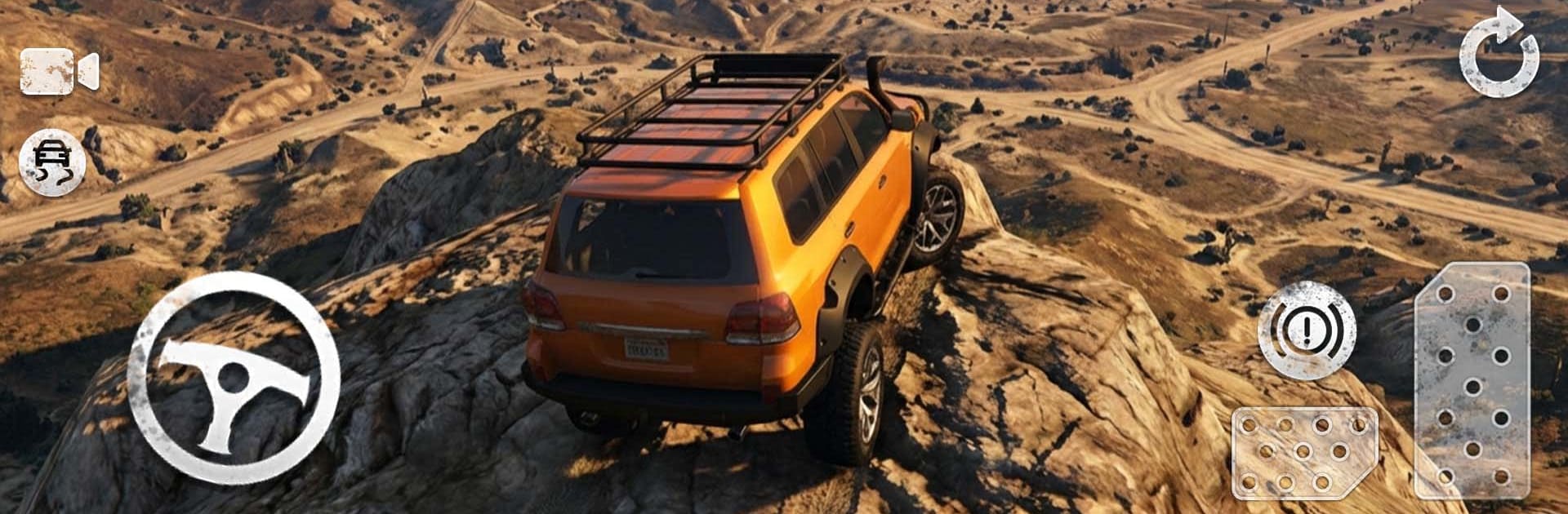
Real 4x4 SUV Offroad

Real 4x4 SUV Offroad

Simulation

| Mino Juki

Play on PC with BlueStacks or from our cloud

  • Overview
  • Game Features
  • How to Play

Page Modified On: May 11, 2026

Play Real 4x4 SUV Offroad on PC or Mac

Real 4×4 SUV Offroad brings the Simulation genre to life, and throws up exciting challenges for gamers. Developed by Mino Juki, this Android game is best experienced on BlueStacks, the World’s #1 app player for PC and Mac users.

About the Game

Real 4×4 SUV Offroad puts you behind the wheel of hefty 4×4 machines and lets you wrestle them through wild terrain—rocky climbs, muddy ruts, sandy stretches, and tight forest paths. It’s a hands-on Simulation from Mino Juki where the suspension groans, tires hunt for grip, and every slip feels earned. Prefer careful crawl sessions or flat-out sprints? You can do both, and swap styles whenever the trail changes. It also feels right at home on a bigger screen with BlueStacks.

Game Features

  • Authentic handling: Weighty suspension, torque you can feel, and believable tire grip make every obstacle a small puzzle. Dial traction and stability assists on or off to suit your style.
  • Clear driving info: A clean HUD shows speed, RPM, and current gear so you always know what the truck’s doing.
  • Huge areas to roam: Head into mountain passes, forest trails, desert flats, and sloppy backroads across roomy open maps.
  • Real damage and crashes: Scrapes, crunches, and bent panels sell every mistake—and make success that much sweeter.
  • Multiple control schemes: Pick what feels natural—on-screen wheel, tilt steering, or simple tap buttons.
  • Your favorite view: Swap between cockpit, chase cam, and more to nail tricky lines or enjoy the scenery.
  • Pick a mode, pick a mood: Free drive for exploration, traffic runs for variety, or checkpoint challenges when you want goals and timers.
  • Built for tinkering: Turn assists on for a relaxed ride or switch them off for raw, no-aids control.

Ready to top the leaderboard? We bet you do. Let precise controls and sharp visuals optimized on BlueStacks lead you to victory.


Game Features

Enhancements

  • Macros
  • Multi Instance
  • Multi Instance Sync
  • Script
  • Enhancements
Macros

Macros

Automate the predictable in Real 4x4 SUV Offroad and transform your gameplay with Macros. Get access to inventive Macros in the BlueStacks Macro Community
Multi Instance

Multi Instance

Play Real 4x4 SUV Offroad on one window. And chat with your friend on the other. Press CTRL + Shift + 8 to open the Multi-Instance Manager. And start creating fresh instances or clone an existing one.
Multi Instance Sync

Multi Instance Sync

Play Real 4x4 SUV Offroad with the power of Multi-Instance Sync. Replicate what you are doing on the main instance on all other instances. Level up faster, play more.
Script

Script

Script your way to gaming glory in Real 4x4 SUV Offroad with BlueStacks Script. Write and run a set of commands to automate repeated tasks. Trigger the command by assigning it to any key.
Read More

How to Download and Play Real 4x4 SUV Offroad on PC or Mac

  • Download and install BlueStacks on your PC or Mac

  • Complete Google sign-in to access the Play Store, or do it later

  • Look for Real 4x4 SUV Offroad in the search bar at the top right corner

  • Click to install Real 4x4 SUV Offroad from the search results

  • Complete Google sign-in (if you skipped step 2) to install Real 4x4 SUV Offroad

  • Click the Real 4x4 SUV Offroad icon on the home screen to start playing

video
Watch Video

Minimum System Requirements

With BlueStacks 5, you can get started on a PC that fulfills the following requirements.

  • Operating System

    Microsoft Windows 7 or above, macOS 11 (Big Sur) or above

  • Processor

    Intel, AMD or Apple Silicon Processor

  • RAM

    at least 4GB

  • HDD

    10GB Free Disk Space

Note:

* You must be an Administrator on your PC. Up to date graphics drivers from Microsoft or the chipset vendor.

Real 4x4 SUV Offroad - FAQs

  • How to play Real 4x4 SUV Offroad on Windows PC & Mac?

    Play Real 4x4 SUV Offroad on your PC or Mac by following these simple steps.

    • Click on 'Play Real 4x4 SUV Offroad on PC’ to download BlueStacks
    • Install it and log-in to Google Play Store
    • Launch and play the game.
  • Why is BlueStacks the fastest and safest platform to play games on PC?

    BlueStacks respects your privacy and is always safe and secure to use. It does not carry any malware, spyware, or any sort of additional software that could harm your PC.

    It is engineered to optimize speed and performance for a seamless gaming experience.

  • What are Real 4x4 SUV Offroad PC requirements?

    Minimum requirement to run Real 4x4 SUV Offroad on your PC

    • OS: Microsoft Windows 7 or above MacOS 11 (Big Sur) or above
    • Processor: Intel, AMD or Apple Silicon Processor
    • RAM: Your PC must have at least 4GB of RAM. (Note that having 4GB or more disk space is not a substitute for RAM)
    • HDD: 10GB Free Disk Space.
    • You must be an Administrator on your PC.







